#HPI Check #API – HPI Data via Xml / JSON

HPI or “Hire Purchase Inspection” (aka VDI) is data that indicate if there is outstanding car finance on a vehicle. This is particularly important for people purchasing second hand cars – to know that the seller does not have a credit obligation to a car finance company, to which the car itself is collateral.
This data is under guarantee, and backed with a 40,000 GBP insurance policy, and it’s now available via an SOAP / XML based Restful API which also returns data in JSON format if required.
A sandbox environment is available for developers who do not wish to run billable queries, It’s a simple setup + pay as you go model, so that you can get up and running in no time.
Interested? head on over to RegCheck.org.uk – and read more.
Call an #ASMX #WebService API using #NodeJS

Here’s a quick example showing how to use NodeJS to call an ASMX .NET webservice: – you need to replace the username with one from your account on RegCheck.org.uk
And you need to npm install xml2js
var http = require(‘http’);
var parseString = require(‘xml2js’).parseString; // npm install xml2jsfunction getHttp(host,path,callback) {
return http.get({
host: host,
path: path
}, function(response) {
// Continuously update stream with data
var body = ”;
response.on(‘data’, function(d) {
body += d;
});
response.on(‘end’, function() {
callback(body);
});
});
}
getHttp(“www.regcheck.org.uk”,”/api/reg.asmx/Check?RegistrationNumber=ukz2955&username=XXXXXXX”,function(data){
parseString(data,function(err,result){
var innerJson = result.Vehicle.vehicleJson;
var oInnerJson = JSON.parse(innerJson);
console.log(oInnerJson.Description);
});
});
Verify car ownership API in #Belgium

Belgium support
Car registration plates in Belgium use the /CheckBelgium endpoint and return the following information:
- Date of Registration
Due to the very limited information returned by the Belgian government, there is no charge to use the Belgian API.
Sample JSON:
{“RegistrationYear”:2016,”RegistrationDate”:”08-06-2016″}
You will need an account on http://www.regcheck.org.uk/ to access this API, but it is free of charge to use.
AvatarAPI.com – Get a name and profile pic from a #Gmail address
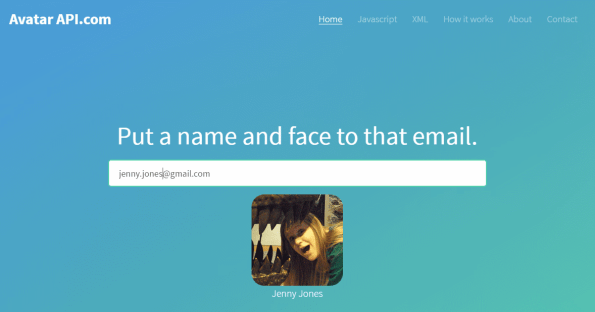
Do you find that your users never upload decent profile images?, and you end up with pages with lots of default silhouette icons in place of profile pics?, or perhaps you have a database with plenty of email addresses, but no name to put to them – so you end up sending out emails with “Dear Sir or Madam” instead of “Dear Mr James Smith” , this service at AvatarAPI.com allows you to use a simple API to solve those problems.
It’s easy to implement in either PHP, C#, or any other language that can make a HTTP request and parse XML.
HTTP useage
You can call this via any client capable of making a HTTP request, in it’s simplist form, you make a GET request as follows
(where xxxx is your username and password)
And you will receive XML as follows
| <profile xmlns:xsd=”http://www.w3.org/2001/XMLSchema” xmlns:xsi=”http://www.w3.org/2001/XMLSchema-instance” xmlns=”http://avatarapi.com/”>
<Name>Peter Smith</Name> <Image> </Image> <Valid>true</Valid> </profile> |
PHP implementation
You can call the webservice via PHP using code such as the following:
Replacing the xxxxx with your username and password.
| <?php
$client = new SoapClient(“http://www.avatarapi.com/avatar.asmx?wsdl”); $params = array ( “email” => “john.reid@gmail.com”, “username” => “xxxxx”, “password” => “xxxxxx” ); $response = $client->__soapCall(‘GetProfile’, array($params)); print_r($response); ?> |
C# implementation
To use C# to call this API, you must first add a web service reference to your project by right clicking Add > Service Reference, and entering the url http://www.avatarapi.com/avatar.asmx
You can call the namespace “Avatar”, for the purposes of this example, then just add this code into a console app;
Replacing the xxxxx with your username and password.
| var avatar = new avatarSoapClient();
var profile = avatar.GetProfile(“john.reid@gmail.com”, “xxxx”, “xxxx”); Console.WriteLine(profile.Name); Console.ReadLine(); |
#Car registration #API for #Croatia

If your buisness sells cars or car parts in Croatia, then you can streamline the purchase process by allowing users enter a car number plate rather than selecting make / model / year etc.
With http://www.provjeraregistracije.com/ you can submit a Croatian car number plate via the API, and in return, get the make, model, VIN number and current insurer
Car registration plates in Croatia use the /CheckCroatia endpoint and return the following information:
- Make / Model
- VIN number
- Insurer
- Insurer website
- Insurance number
Sample Json:
{“Description”:”ŠKODA FAVORIT, 136 L”,”CarMake”:{“CurrentTextValue”:”ŠKODA”},”CarModel”:{“CurrentTextValue”:” FAVORIT, 136 L”},”MakeDescription”:{“CurrentTextValue”:”ŠKODA”},”ModelDescription”:{“CurrentTextValue”:” FAVORIT, 136 L”},”VechileIdentificationNumber”:”TMBADA200M0268617″,”InsuranceCompany”:”CROATIA OSIGURANJE D.D.”,”InsuranceCompanyUrl”:”http://www.crosig.hr”,”InsuranceCompanyNumber”:”011610053583″}
Paypal #IPN in C#- the basics.

After you get a payment from paypal, you can simply redirect the user back to your website in order to record the purchase in your database, but this has serious problems, one is that customers can often close their browser after payment so you don’t record the payment, or a cheeky customer might try bypassing paypal and go straight to your order processing “thank you” page, and might get your service for free.
Paypal IPN gets around both of these problems, one is that it doesn’t matter if the user closes the browser, it will get called anyway. Secondly, it can’t be called manually, since the IPN payload gets verified against Paypal, so that it can’t be faked.
What is Paypal IPN?
It’s simply the parameter notify_url is set to a url on your server, and you include this parameter in the /webscr url in the “buy now” button. This url gets called by Paypal’s servers. You add &cmd=_notify-validate to the post data, and post it back to paypal for validation. If paypal returns “VERIFIED” then you can provide whatever service you need to the customer. – There are some other security checks you can do here too, to make sure the user is paying in the expected currency, and the expected amount.
And here’s the code (Adapted from Paypal’s VB.NET version):
var param = Request.BinaryRead(HttpContext.Current.Request.ContentLength);
var strRequest = Encoding.ASCII.GetString(param);
strRequest = strRequest + “&cmd=_notify-validate”;
var strLive = “https://www.paypal.com/cgi-bin/webscr”;
var req = (HttpWebRequest)WebRequest.Create(strLive);//Set values for the request back
req.Method = “POST”;
req.ContentType = “application/x-www-form-urlencoded”;
req.ContentLength = strRequest.Length;var streamOut = new StreamWriter(req.GetRequestStream(), Encoding.ASCII);
streamOut.Write(strRequest);
streamOut.Close();
var streamIn = new StreamReader(req.GetResponse().GetResponseStream());
var strResponse = streamIn.ReadToEnd();
streamIn.Close();
switch (strResponse)
{
case “VERIFIED”:
var ipn = Request.Form.AllKeys.ToDictionary(k => k, k => Request[k]);//check the payment_status is Completed
//check that txn_id has not been previously processed
//check that receiver_email is your Primary PayPal email
//check that payment_amount/payment_currency are correct
//process payment
break;
case “INVALID”:
//log for manual investigation
break;
default:
//Response wasn’t VERIFIED or INVALID, log for manual investigation
break;
}
#Vulnerability in CaptchaSecurityImages.php

CaptchaSecurityImages.php is a common captcha generation script, that really should never be used. It was written back in 2006 by Simon Jarvis, but it’s got some serious security flaws.
The main one being, it’s configurable remotely, so instead of a hard captcha like this

You can simply pass in parameters saying you’d like it to be massive, and let’s make the text bright red, so that it’s easy to filter from the background – and, let’s have 2 characters rather than 6, then we can put that through any OCR webservice, and it’ll read it no problem.
width=500&height=220&characters=2&font_color=FF0000
Well done Mr. Jarvis… Use google recaptcha instead.
Using @livechat #api to get car details for website visitors

Livechat is a great system for chatting live to your website visitors. But sometimes time can be wasted ascertaining pertinent details from the customer that could be looked up automatically as the chat starts.
In this example, a car parts company wanted to know exactly what type of car the person as soon as the chat started.- Using our API at http://www.regcheck.org.uk
So, the first thing to do is to set up a pre-chat survey (under settings), adding a Question saying “What is your registration number”

Once this is enabled, the chat window should appear as shown above. In this example, it’s important that the question is the third in the list, but you can modify the webhook code below to change that.
Next set up a webhook, under settings > integrations. Here it’s important to ensure that visitor and pre_chat_survey are clicked, and chat starts event is selected. The target url should point to your website, and a PHP file called livechathook.php

Now, here’s some code, for the file livechathook.php
<?php
ini_set(‘display_errors’,true);
error_reporting(-1);$client = new soapclient(‘http://www.regcheck.org.uk/api/reg.asmx?WSDL ‘, array(‘trace’ => 1));
// Set this username to your RegCheck username
$username = ‘your-username’; // Replace this!// read the webhook sent by LiveChat
$data = file_get_contents(‘php://input’);file_put_contents(‘raw.txt’, $data);
try {
$json = json_decode($data);
$survey = $json->pre_chat_survey;
$question2 =$survey[2];
$answer2 =$question2->answer;
file_put_contents(‘reg.txt’, print_r($answer2, true));// create an array of parameters
$param = array(
‘RegistrationNumber’ => $answer2,
‘username’ => $username);$result = $client->Check($param);
$car = ‘Not found’;
file_put_contents(‘soapresponse.txt’, print_r($client->__getLastResponse(),true));
if (is_soap_fault($result)) {
file_put_contents(‘regerror.txt’,print_r($result,true));
} else {
file_put_contents(‘regdetails.txt’,print_r($result,true));
$regJson = $result->CheckResult->vehicleJson;
$djson = json_decode($regJson);
$car = $djson->Description;
}$fields = array();
$fields[] = (object)array(
‘name’ => ‘Car’,
‘value’ => $car
);$curlFields = http_build_query(array(
‘license_id’ => $json->license_id,
‘token’ => $json->token,
‘id’ => ‘my-integration’,
‘fields’ => $fields
));$ch = curl_init();
curl_setopt($ch, CURLOPT_URL, ‘https://api.livechatinc.com/visitors/ ‘ . $json->visitor->id . ‘/details’);
curl_setopt($ch, CURLOPT_POST, 1);
curl_setopt($ch, CURLOPT_POSTFIELDS, $curlFields);
curl_setopt($ch, CURLOPT_HTTPHEADER, array(‘X-API-Version: 2’));
curl_setopt($ch, CURLOPT_SSL_VERIFYPEER, false);
curl_setopt($ch, CURLOPT_RETURNTRANSFER, true);
$result = curl_exec($ch);$CurlError = curl_error($ch);
file_put_contents(‘curlerror.txt’, print_r($CurlError, true));curl_close($ch);
file_put_contents(‘curl.txt’, print_r($result, true));
}
catch(Exception $e) {
file_put_contents(‘error.txt’, $e->getMessage());
}?>
The end result of this, is when you are chatting with a user, you now know the exact make and model of the car they are driving.

It should be noted, that the above example assumes the user is from the UK, and you will have to change the $client->Check call to $client->CheckUSA or $client->CheckAustralia for other countries (* And you need to collect state information for USA and Australia too).
So, you might be interested to know how this works?
The webhook from LiveChatInc sends the following Json;
{
“event_type”:“chat_started”,
“event_unique_id”:“f35b043d61184384762ccf47fb761e5e”,
“token”:“00d0a8995cb9eefa3bb2e6b91a812996“,
“license_id”:“7738991“,
“visitor”:{
“id”:“S1467215931.f4e3dfcee9“,
“name”:“John Mairs”,
“email”:“John@mairs.com”,
“country”:“United Kingdom”,
“city”:“”,
“language”:“en”,
“page_current”:“http://livechat.webtropy.com/”,
“timezone”:“”
},
“chat”:{
“id”:“O9CL40K8AT”,
“started_timestamp”:1467284861,
“url”:“http://livechat.webtropy.com/”,
“messages”:[
{
“user_type”:“agent”,
“author_name”:“Fiach Reid”,
“agent_id”:“xxxxx@gmail.com”,
“text”:“Hello. How may I help you?”,
“timestamp”:1467284861
}
],
“attachments”:[],
“events”:[],
“agents”:[
{
“name”:“Fiach Reid”,
“login”:“fiach.reid@gmail.com”
}
],
“tags”:[],
“groups”:[
0
]
},
“pre_chat_survey”:[
{
“id”:“146721615150601218”,
“type”:“name”,
“label”:“Name:”,
“answer”:“John Mairs”
},
{
“id”:“146721615150606648”,
“type”:“email”,
“label”:“E-mail:”,
“answer”:“John@mairs.com”
},
{
“id”:“146721615150604606”,
“type”:“question”,
“label”:“What is your registration number”,
“answer”:“UKZ2955“
}
]
}
The parts of interest are the response to the question – the registration number, the token, license and visitor id are required to feed information back to LiveChatInc.
In the code above, you can see that the car registration number is stored in $answer2, and this is then sent to the regcheck webservice, to determine the car details. If this succeeds, then the car description is stored in $car – The $fields object is then created with the car details stored in an associative array, this is then sent back to the LiveChatInc API to be associated with the current visitor.
The code above contains quite a bit of logging, which can be used for debugging purposes, but should be removed before going live.
Raw.Txt – The Json sent to the Webhook
reg.txt – The Visitors registration number
soapresponse.txt – XML returned from the webservice
regerror.txt – Any error returned from the webservice
regdetails.txt – The data returned from the webservice
curlerror.txt – Any error in calling the API
curl.txt – The result of calling the API
error.txt – Any PHP errors.
#Czech Car Registration #API now available

Czech this out!, Sorry, pardon the pun. We’ve just added support from the CKP (Czech Insurers Bureau) support for automated car registration lookups that allows users submit Czech car registration details into our API, and receive data about the Car back in XML and JSON format. The website is at http://www.spzapi.com
Czech Republic support
Car registration plates in the Czech Republic use the /CheckCzechRepublic endpoint and return the following information:
- Make
- Vehicle type
- Insurer
- Date last insured
Sample Json:
{“Description”:”HARLEY DAVIDSON”,”CarMake”:{“CurrentTextValue”:”HARLEY DAVIDSON”},”MakeDescription”:{“CurrentTextValue”:”HARLEY DAVIDSON”},”VehicleClass”:”MOTORCYCLE”,”Insurer”:”DIRECT POJIŠŤOVNA, A.S.”,”InsuranceDate”:”15.10.2013″}
We will shortly be adding support for stolen car detection, to assist in purchasing decisions.
#SriLanka Car Registration API

Sri lanka, has over 6 million registered vehicles, in a population of 20 million, according to http://www.motortraffic.gov.lk/web/images/stories/document/pop2015.pdf
We’ve now opened up an API that offers a lookup that can obtain vehicle data from a Sri-Lankan registered vehicle at http://lk.carregistrationapi.com/
Sri Lanka support
Car registration plates in Sri Lanka use the /CheckSriLanka endpoint and return the following information:
- Make and Model
- Registration year
- Engine code
- Owner (i.e. outstanding car loans)
Sample Json:
{“Description”:”SUZUKI ALTO LXI 800″,”CarMake”:{“CurrentTextValue”:”SUZUKI”},”CarModel”:{“CurrentTextValue”:”ALTO LXI 800″},”MakeDescription”:{“CurrentTextValue”:”SUZUKI”},”ModelDescription”:{“CurrentTextValue”:”ALTO LXI 800″},”EngineSize”:{“CurrentTextValue”:”F8DN5403186″},”RegistrationYear”:”2015″,”Owner”:”n/a”,”VehicleClass”:”MOTOR CAR”,”Conditions”:”n/a”}


