#LinkedIn #OAUTH Login using #PhantomJS

Say you wanted to authenticate yourself against a website that used LinkedIn OAuth for authentication, tricky ?, well, not too bad if you are using PhantomJS.
I’ve elided a bit of information below (in bold), since I’m not going to put my LinkedIn password up on this blog 🙂
var page = require(‘webpage’).create();
page.open(‘https://www.linkedin.com/uas/oauth2/authorization?redirect_uri=http://othersite.com&client_id=THEIR CLIENT ID&scope=r_emailaddress%20r_basicprofile&response_type=code&state=THEIR STATE‘, function (status) {
console.log(“opened linkedin page”);
page.evaluate(function() {
var usernameField = “session_key-oauth2SAuthorizeForm”;
var elUsername = document.getElementById(usernameField);
elUsername.value = ‘XXXXX@gmail.com‘
var passwordField = “session_password-oauth2SAuthorizeForm”;
var elPassword = document.getElementById(passwordField);
elPassword.value=”XXXXXX“;
var elForm = document.querySelector(“form”);
elForm.submit();
});
page.onLoadFinished = function(){
console.log(“Logged in”);
page.render(“linkedin-2.png”);
step2();
};
});
Mixed mode #HTTP #Authentication

If you want to have a service that can be contacted either with Basic Authentication, or without authentication, then you may not want your server to return a 401 challenge response, but want to look for the Authentication header anyway.
Here’s how I’ve done it with asp.net
var strAuthHeader = HttpContext.Current.Request.Headers[HttpRequestHeader.Authorization.ToString()];
if (!string.IsNullOrEmpty(strAuthHeader))
{
strAuthHeader = strAuthHeader.Substring(6);
byte[] bAuthHeader = Convert.FromBase64String(strAuthHeader);
strAuthHeader = Encoding.UTF8.GetString(bAuthHeader);
var strAuthUsername = strAuthHeader.Split(new char[] {‘:’})[0];
var strAuthPassword = strAuthHeader.Split(new char[] {‘:’})[1];
}
So, for example, you can call our RegCheck webservice, passing the credentials via basic authentication.
string userName = “user”;
string password = “password”;
WebClient client = new WebClient();
string credentials = Convert.ToBase64String(Encoding.ASCII.GetBytes(userName + “:” + password));
client.Headers[HttpRequestHeader.Authorization] = string.Format(“Basic {0}”, credentials);
var strUrl = “http://www.regcheck.org.uk/api/reg.asmx/Check?RegistrationNumber=ukz2952&username=”;
var strHtml = client.DownloadString(strUrl);
Response.Write(strHtml);
#Upload FTP using #Javascript only

Sometimes you want to let your users upload images or other files to your server, but you’re not a wizard at PHP, so you’d like to do it just using Javascript, and with no server side coding at all. Just two lines of code … yes please!
So, here’s what we’ve come up with at http://ftp.apixml.net
- 1. Include the script:
< script src="http://ftp.apixml.net/ftp.js">
</script>
- 2. Include an upload button:
<input type=file
onchange="Ftp.upload('access_token', this.files)"/>
Now, you have to go to the website ftp.apixml.net to enter your username and password, and you’ll get an secure access token back. The reason for this, is that you’d never want to put your FTP username and password into the Javascript directly, it would be too insecure. Instead, you enter it into the website, and get a code back. using this code, the javascript will know where to put your file, but hackers can’t determine your password.
Now, if you’re interested on how this works, it uses two technologies that are new to HTML5, the FileReader Object, which allows client side javascript to read the file that the user has just uploaded, and CORS, which allows the file to be sent to a server other than the one that served the page. It uses the C# FTP library at http://www.ftpclient.co.uk
The code for the FTP library is as follows – which you are free to modify, but please leave the copyright notice at the head.
// Script from http://FTPJS.XYZ
// Copyright 2016 FTPJS.XYZ, DO NOT REMOVE THIS COPYRIGHT NOTICE
var Ftp = {
    createCORSRequest: function (method, url) {
        var xhr = new XMLHttpRequest();
        if ("withCredentials" in xhr) {
            // Check if the XMLHttpRequest object has a "withCredentials" property.
            // "withCredentials" only exists on XMLHTTPRequest2 objects.
            xhr.open(method, url, true);
        } else if (typeof XDomainRequest != "undefined") {
            // Otherwise, check if XDomainRequest.
            // XDomainRequest only exists in IE, and is IE's way of making CORS requests.
            xhr = new XDomainRequest();
            xhr.open(method, url);
        } else {
            // Otherwise, CORS is not supported by the browser.
            xhr = null;
        }
        return xhr;
    },
      upload: function(token, files) {
        var file = files[0];
        var reader = new FileReader();
        reader.readAsDataURL(file);
        reader.addEventListener("load",
            function() {
                var base64 = this.result;
                var xhr = Ftp.createCORSRequest('POST', "http://www.ftpjs.xyz/upload.aspx");
                if (!xhr) {
                    throw new Error('CORS not supported');
                }
				xhr.onreadystatechange = function() {
					if (xhr.readyState == 4 && xhr.status == 200) {
						Ftp.callback(file);
					}
				};
                xhr.setRequestHeader("Content-type", "application/x-www-form-urlencoded");
                xhr.send("token=" + token + "&data=" + encodeURIComponent(base64) + "&file=" + file.name);
            },
            false);
    },
	callback: function(){}
    }
};
The request was aborted: Could not create SSL/TLS secure channel.
Got this error message today;
+ e {System.Net.WebException:
The request was aborted: Could not create SSL/TLS secure channel.
at System.Net.HttpWebRequest.GetResponse()
The solution to this, in .NET 4.5 is
ServicePointManager.SecurityProtocol = SecurityProtocolType.Tls12;
// Requires .NET 4.5
If you don’t have .NET 4.5 then use
ServicePointManager.SecurityProtocol = (SecurityProtocolType)3072;
#Slovakia Car Registration lookup API

Today, we added support for Slovakia in our network of European car registration APIs at
http://www.ečv.com/
Car registration plates in Slovakia use the /CheckSlovakia endpoint and return the following information
- Make and Model
- Engine Size
- Registration year
- Power in Kw
- Colour (in Slovak)
- VIN number
Sample Json:
{“Description”:”SKODA FABIA”,”CarMake”:{“CurrentTextValue”:”SKODA”},”CarModel”:{“CurrentTextValue”:”FABIA”},”MakeDescription”:{“CurrentTextValue”:”SKODA”},”ModelDescription”:{“CurrentTextValue”:”FABIA”},”EngineSize”:{“CurrentTextValue”:”1598″},”RegistrationYear”:2009,”Power”:”77″,”Colour”:”CERVENA”,”VechileIdentificationNumber”:”TMBGD25J893173003″}
#Affiliate program available for RegCheck API

If you know of a company that may need an API lookup service for Car number plates, then we now offer an affiliate program where we can pay back 10% of payments made by the referred party to you.
It is open to all account holders, on www.regcheck.org.uk – and is done simply by sharing a link, that is available on your dashboard. You can email this link to your contacts, or simply just share it on your website or social media.
If you have connections in the motor trade, or other companies that might be interested in using our service, then you can get paid whenever a company you refer makes a payment into their account. We pay 10% of revenue from referred sales to the affiliate. With a minimum payout of GBP £10 / USD $15.
With this link, we can track the referral, and we will contact you as soon as the first payment is made in order to arrange payment.
#Free SSL #Certificates for #IIS 8.5 in seconds

Lets encrypt is a great service, it offers free SSL certificates, that are properly signed to a root-CA called IdenTrust , a banking consortium of over 60 banks. It’s not the self signed rubbish, but on first glance the system looks daunting, but with the right tools, then it works a charm.
That’s when I discovered “Certify” at http://certify.webprofusion.com/ , If you have IIS 8.5, – you need SNI for multi-certs per IP. You just install it on your server, Enter in an email address. And then just select the domain you want to secure. It even configures IIS for you, all in seconds.
I’ve set this up now on https://httpsimage.com– a secure SSL free image hosting service.
French #CNIT codes now returned in #VIN lookup API
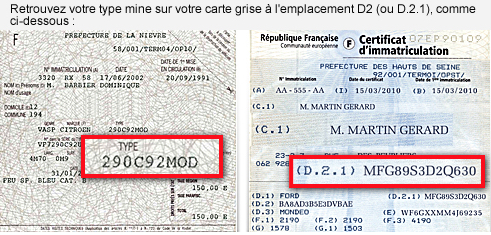
Keeping your API relevant to your customers is something that makes can sometimes take your service in a directions that you never knew existed. This morning, I didn’t know what a CNIT number was, this afternoon, it looks like we’ve now got the only commercially available CNIT API available outside of the French government,
A CNIT number or “Code national d’identification du type“, has been used since 1998 and consists of 12 characters that can succinctly define the essential characteristics of a vehicle. For example: the fourth character defines the fuel type and transmission (0-9), the fifth defines the engine power (0-9), and the seventh code defines the body style (0-7). The CNIT is more general than the type Mines, but does not allow to know the level of equipment of a vehicle. Recently, the CNIT can contain 15 characters.
Our VIN lookup service now includes a JSON segment that contains the CNIT and TVV values of a car, in the following format
<Vehicle xmlns:xsi=”http://www.w3.org/2001/XMLSchema-instance“ xmlns:xsd=”http://www.w3.org/2001/XMLSchema“ xmlns=”http://regcheck.org.uk“></Vehicle>
Our French API is accesible via this website: http://www.immatriculationapi.com/
Irish Company search #API example in C#
 Like the UK’s companies house, you can access basic information about Irish companies using an API that is free to use (mostly), and quite easy to implement.
I say mostly, because unlike the UK version, they charge €2.50 for document downloads.
Here’s the code example (without my credentials) in c#
var strUrl = “https://services.cro.ie/cws/companies?company_num=389820&htmlEnc=1”;
string userName = “** An email address **”;
string password = “**A GUID**”;
WebClient client = new WebClient();
string credentials = Convert.ToBase64String(Encoding.ASCII.GetBytes(userName + “:” + password));
client.Headers[HttpRequestHeader.Authorization] = string.Format(“Basic {0}”, credentials);
client.Headers[HttpRequestHeader.Accept] = “application/json”;
string strJson = “”;
try
{
strJson = client.DownloadString(strUrl);
}
catch (WebException exception)
{if (exception.Response != null)
{
var responseStream = exception.Response.GetResponseStream();if (responseStream != null)
{
using (var reader = new StreamReader(responseStream))
{
strJson = reader.ReadToEnd();
}
}
}
}Console.Write(strJson);
UK Motorbike plate lookup #API added
 Our RegCheck API was limited initally to Cars and Vans, but now we’ve added Motorbikes, via a seperate endpoint. – It won’t fall through to return a motorbike unexpectedly, if you’re expecting a car.
If the registration number of the vehicle you are checking is a MotorBike, rather than a car or van, then you should call the “CheckMotorBikeUK” endpoint instead. This returns some basic information about the motorbike, and you can use this data to call the UKMOT endpoint, for further information, if required. The basic data are:
- Make and Model
- Year of Registration
- Engine Size
- Variant
- Colour
Sample JSON:
{“Description”:”KAWASAKI KLE 500 B1P”,”RegistrationYear”:”2005″,”CarMake”:{“CurrentTextValue”:”KAWASAKI”},”CarModel”:{“CurrentTextValue”:”KLE 500 B1P”},”MakeDescription”:{“CurrentTextValue”:”KAWASAKI”},”ModelDescription”:{“CurrentTextValue”:”KLE 500 B1P”}, “EngineSize”:{“CurrentTextValue”:”498cc”},”Variant”:”n/a”,”Colour”:”BLACK”}

