#APNS using HTTP/2 in C# using #AWS Lambda
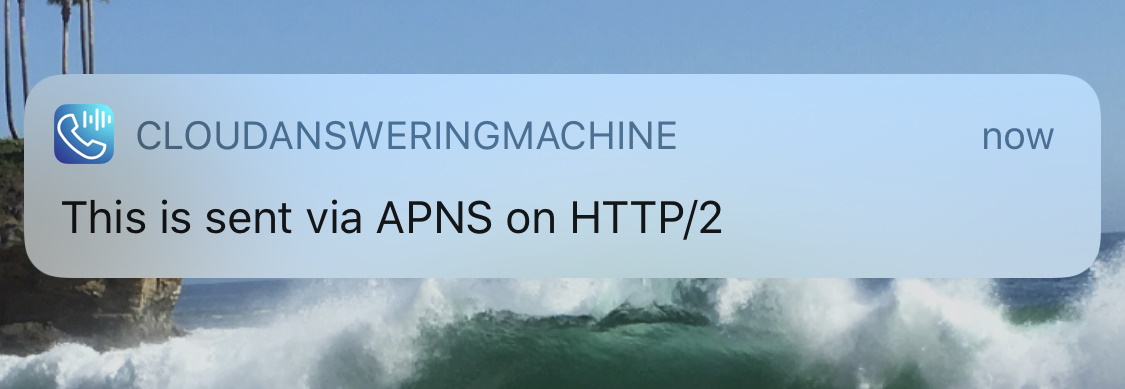
By March 31st 2021, all users using the Apple Push Notification Service (APNS) must update to Apple’s new API, which is based on HTTP/2. If you don’t update, then it’s likely that your push notifications won’t get through.
If you are using C#, then you can use the dotAPNS NUGet package, which, from the client perspective is a tiny change, however, it does require .NET Core to run, which if your project is in .NET standard, then this could cause problems.
So, in this case, I decided to create a stand-alone .NET Core app using AWS Lambda and AWS API Gateway, which would be a middleware API between my main app and the APNS API.
My App -> AWS LAMBDA -> APNS
So, I created an AWS Lambda App in Visual Studio, and made sure I could publish to AWS Lambda. Which also gives you an API Gateway URL, in the format;
<ID>.execute-api.<Region>.amazonaws.com/Prod
I also needed to update the serverless.template file as follows
         "Events": {
           "RootGet": {
             "Type": "Api",
             "Properties": {
               "Path": "/",
               "Method": "GET"
             }
           },
           "RootPost": {
             "Type": "Api",
             "Properties": {
               "Path": "/",
               "Method": "POST"
             }
           }
And changed the Handler to
ApnsHttp2Serverless::ApnsHttp2Serverless.Functions::HttpRequest
(Where ApnsHttp2Serverless was the name of my project)
Now, my code to send the push notification is as follows;
private ApnsResponse Send(
             byte[] certificate,
             string certPassword,
             string message,
             string destination)
 {
     var x509 = new X509Certificate2(certificate, certPassword);
     var applePushNotificationService = ApnsClient.CreateUsingCert(x509);
     var push = new ApplePush(ApplePushType.Alert)
     .AddAlert(message)
     .AddToken(destination);
     return applePushNotificationService.Send(push).Result;
 }
Which is called from the lambda as follows;
public APIGatewayProxyResponse HttpRequest(APIGatewayProxyRequest request, ILambdaContext context)
 {
     context.Logger.LogLine(request.Body);
     var jRequest = JObject.Parse(request.Body);
     var certificate = jRequest["certificate"].ToObject();
     var certPassword = jRequest["certPassword"].ToObject();
     var message = jRequest["message"].ToObject();
     var destination = jRequest["destination"].ToObject();
     var sendResult = Send(certificate, certPassword, message, destination);
     var response = new APIGatewayProxyResponse
     {
     StatusCode = (int)HttpStatusCode.OK,
     Body = JsonConvert.SerializeObject(sendResult,Formatting.Indented),
     Headers = new Dictionary { { "Content-Type", "application/json" } }
     };
     return response;
 }
So, I pushed this code to AWS Lambda, and wrote the client as follows:
public static string Push(string destination, string message, string certFile, string certPassword)
 {
     var certificate = File.ReadAllBytes(certFile);
     var oPayload = new
     {
         destination,
         message,
         certificate,
         certPassword
     };
     var strPayload = JsonConvert.SerializeObject(oPayload, Formatting.Indented);
     var wc = new WebClient();
     var response = wc.UploadString("https://....execute-api.eu-west-1.amazonaws.com/Prod", strPayload);
     return response;
 }
So, Assuming you have the destination ID, and your certs set up correctly, this just works!
For anyone who is interested, here is the GitHub Repo of the AWS Lambda function:
https://github.com/infiniteloopltd/ApnsHttp2
And for those who happen to use PHP as the trigger to send push notifications, here is the client code in PHP:
<?php
$data        = file_get_contents('cert.p12');
$cert64      = base64_encode($data);
$destination = "-apns-token-";
$password    = "-cert-password-";
$url         = "https://xxxxxx.execute-api.eu-west-1.amazonaws.com/Prod";
$ch          = curl_init($url);
$oPayload    = array(
    'destination' => $destination,
    'message' => 'hello there!',
    'certificate' => $cert64,
    'certPassword' => $password
);
$payload     = json_encode($oPayload);
curl_setopt($ch, CURLOPT_POSTFIELDS, $payload);
curl_setopt($ch, CURLOPT_RETURNTRANSFER, true);
$content = curl_exec($ch);
if ($content === false) {
    echo 'Curl error: ' . curl_error($ch);
}
curl_close($ch);
echo $content;
?>
Overriding the Date in a WebClient Request in C#

The WebClient object in C# greatly simplifies the actions of making HTTP GET and POST requests, however, when you need to edit an “Under the hood” property, then you find that WebClient has hidden this functionality from you.
In this example, I want to override the Date property of the HTTP request, effectively sending a request to the server, but saying it was sent at a different time. This is not a property you often want to mess with, but you can do it as follows;
private class SpecializedWebClient : WebClient
{
    public DateTime Date { get; set; }
    protected override WebRequest GetWebRequest(Uri address)
    {
	var request = base.GetWebRequest(address) as HttpWebRequest;
	if (request != null) request.Date = Date;
	return request;
    }
}
I hope someone finds this useful!
Convert French Siret/Siren to VAT (TVA) in C#

This is probably well known to french people, but you can convert a french company ID (Siret or Siren) to a french VAT number with some simple code, as follows in c#
The relevant function is as follows;
public static string VatFromSiret(string siret)
{
if (siret.Length > 9) siret = siret.Substring(0, 9); // siren
var numSiret = Convert.ToInt32(siret);
var validation = (12 + 3 * (numSiret % 97)) % 97;
return "FR" + validation + siret;
}
Here is the Github repo, for anyone who’s interested;
Encryption at rest #MySQL, before and after


If you don’t encrypt data at rest in MySQL, then potentially secure information can be easily extracted from the underlying “ibd” files. This scenario may occur, if someone had access to the filesystem of your server, but not necessarily access to MySQL itself.
Here, I’ve simply created a new database, called “superSecure”, with one table called “Passwords”, which has one column called “Password”, and one row containing the text “YELLOW_SUBMARINE”, by running a simple “cat” commad on the ibd file, you can clearly see the text “YELLOW_SUBMARINE” in the text.
However, with these commands, we can encrypt the underlying data;
INSTALL PLUGIN keyring_file SONAME 'keyring_file.so';
SET GLOBAL keyring_file_data = '/var/lib/mysql-keyring/keyring';
ALTER TABLE PASSWORDS ENCRYPTION='Y';
Once these commands are complete; and we try to view the ibd file again,

There is no plain text that can be viewed in the file.
Evidently, this is not foolproof, but it’s one simple way to help secure your data.
Microsoft Translation #API using #Azure #CognitiveServices

When it comes to translation APIs, then Google translate is perhaps the first that comes to mind, but there is also Microsoft Azure translation API, under their cognitive Services umbrella.
Here is some simple code to implement the API, – I’ve omitted my API keys, and assuming you are using the WesternEurope (Ireland) endpoint.
ServicePointManager.SecurityProtocol = SecurityProtocolType.Ssl3 |
                                       SecurityProtocolType.Tls |
                                       SecurityProtocolType.Tls11 |
                                       SecurityProtocolType.Tls12;

const string strUrl = "https://api.cognitive.microsofttranslator.com/translate?api-version=3.0&to=es&from=en";
var wc = new WebClient();
wc.Headers["Ocp-Apim-Subscription-Key"] = key;
wc.Headers["Ocp-Apim-Subscription-Region"] = "westeurope";
wc.Encoding = Encoding.UTF8;
var jPost = new [] { new { Text = "Hello, what is your name?"}};
var strPost = JsonConvert.SerializeObject(jPost, Formatting.Indented);
wc.Headers[HttpRequestHeader.ContentType] = "application/json";
var json = "";
try
{
    json = wc.UploadString(strUrl, "POST", strPost);

}
catch (WebException exception)
{
    string strResult = "";
    if (exception.Response != null)
    {
        var responseStream = exception.Response.GetResponseStream();
        if (responseStream != null)
        {
            using (var reader = new StreamReader(responseStream))
            {
                strResult = reader.ReadToEnd();
            }
        }
    }
    throw new Exception(strResult);
}

var jResponse = JArray.Parse(json);
var translation = jResponse.First["translations"].First["text"].ToString();
It also requires the Newtonsoft.JSON Nuget package.
Hope this is useful to someone.
Using #AWS #SQS in C# – Decouple database inserts

Amazon SQS or Simple Queue Service is AWS’s answer to Microsoft’s MSMQ, for those who remember it. It’s a great way to decouple an application from database inserts.
So, for example, if your application logs activity to a database, and you want to seperate conerns, so that in the event of a database outage, you don’t loose your data.
Because typically, you can do only one of two things, in the case of a database outage in this case, you can ignore the data, and loose it. or you can keep it in memory, and hope that the application pool doesn’t recycle or server doesn’t reboot. Or you can store it in local persistant storage – but this is going to start becoming complicated to manage.
SQS offers a way that you can send your data to a queue, and some other process can read it back out, and store it in a database. If that process fails to write the data, it just leaves it in the queue, until such time as the database is back online.
So, without further ado, here is the code;
First install the Nuget package for AWS SQS:
Install-Package AWSSDK.SQS
Then create the SQS client as follows (I’ve omitted my IAM user and password)
public static AmazonSQSClient CreateClient()
{
var sqsConfig = new AmazonSQSConfig
{
RegionEndpoint = RegionEndpoint.EUWest1
};
const string iamUser = "xxxxx";
const string iamPass = "xxxxx";
var awsCredentials = new BasicAWSCredentials(iamUser, iamPass) ;
return new AmazonSQSClient(awsCredentials, sqsConfig);
}
Then, here I am writing some code to write a new message to the queue
const string strSqsUrl = "https://sqs.eu-west-1.amazonaws.com/005445879168/helloWorld";

var client = CreateClient();

var sendMessageRequest = new SendMessageRequest
{
 QueueUrl = strSqsUrl,
mMessageBody = "Hello World"
};

Console.WriteLine("Sending 'hello world' to queue");
var msg = client.SendMessageAsync(sendMessageRequest).Result;

Console.WriteLine("Sent with messageId:" + msg.MessageId);
Then, in the same function, I’ll read it back (here it would be a seperate process)
var latestMessages = client.ReceiveMessageAsync(new ReceiveMessageRequest(strSqsUrl)).Result;

onsole.WriteLine("Reading messages back from queue:");
foreach (var message in latestMessages.Messages)
{
 Console.WriteLine(message.Body);
}
Now, if you’re happy that everything has worked well, you can delete the message from the queue.
 Console.WriteLine("Deleting from queue");
client.DeleteMessageAsync(new DeleteMessageRequest(strSqsUrl, msg.MessageId));
And, that’s the basics of how to use SQS. .
You shouldn’t use SQS for long-term storage (>4 days), and you shouldn’t put large (>256K) messages in the queue. Although these defaults are configurable (max 14 days), But it works very well for what it’s designed for.
300% performance increase on #MySQL inserts in C#

This may be obvious to anybody who frequently uses MySQL in C#, but for someone who’s come from the SQL Server world, you may quickly realise that the connection pool management is not done as well in MySQL as it is in SQL Server. I guess it is something lacking in the MySQL connector.
Anyway, long story short – if your code for inserts in mysql is as follows (pseudocode:)
Foreach(item in collection)
{
Open Connection
Run SQL
Close Connection
}
Then you can have a huge (300%) performance increase by doing the following:
Open Connection
Foreach (item in collection)
{
Run SQL
}
Close Connection
It’s pretty obvious, but you don’t have to do this sort of refactoring with the SQL Server driver, since the connection pool is managed under-the-hood.
Designing a .NET application with removable features

Normally, if you remove a class file from an application, it will just break, but let’s imagine, you want to allow that, so that, a sysops engineer can delete sensitive code from your application that may not be required in a given circumstance.
So, to design an application that will allow you to just delete a file without breaking the application, takes alot of forethought, and here’s one possible way of doing it.
TL;DR; here’s the github repo: https://github.com/infiniteloopltd/PluginDemo
So, First off, I’ll describe this proof of concept application. It has two features, Addition and Subtraction, which are named Addition.cs and Subtraction.cs in the Features folder. Either of these files can be deleted, and it won’t break the application, but evidently the ability to perform that operation will be removed.
So, First, I define an Interface, which features must adhere to; as follows;
namespace PluginDemo
{
    public interface IFeature
    {
        string Description { get; }

        int Execute(int a, int b);
    }
}
So, each feature has a Description, and it can perform some numerical operation on two numbers. Here is how Addition.cs implements this interface;
namespace PluginDemo
{
    class Addition : IFeature
    {
        public string Description
        {
            get
            {
                return "Addition";
            }
        }

        public int Execute(int a, int b)
        {
            return a + b;
        }
    }
}
Now, the magic is in the reflection, where we generate a dynamic list at runtime of all classes in the assembly that implement IFeature. (except IFeature itself), which is defined in a class named FeatureManager
using System;
using System.Collections.Generic;
using System.Reflection;

namespace PluginDemo
{
    public static class FeatureManager
    {
        private static readonly List<IFeature> _features = new List<IFeature>();

        static FeatureManager()
        {
            var dll = Assembly.GetExecutingAssembly();
            foreach (var type in dll.GetTypes())
            {
                if (typeof(IFeature).IsAssignableFrom(type) && !type.IsInterface)
                {
                    _features.Add(Activator.CreateInstance(type) as IFeature);
                }
            }
        }

        public static List<IFeature> Features
        {
            get
            {
                return _features;
            }
        }
    }
}
Now, we can list all available features by calling;
foreach (var feature in FeatureManager.Features)
{
   Console.WriteLine(feature.Description);
}
And, we can use this feature list to check for the availability of a feature, and call it, if it is available.
var addition = FeatureManager.Features.FirstOrDefault(f => f.Description == "Addition");
if (addition != null)
{
  Console.WriteLine("1 + 2 = " + addition.Execute(1,2) );
}
Here, as you can see in the above code. If the file, Addition.cs is deleted, then the addition object is null, but no exception is thrown.
Print a #PDF from C# using #Spire.NET

There are many ways to print a PDF in C#, but I wanted one that was unobtrusive, and didn’t depend on any particular software being installed on the client machine. – So I’m using Spire.NET
TL DR; Here is the github repo: https://github.com/infiniteloopltd/PrintPDF
I am also using a image printer driver called Joy Image Printer (http://www.joyprinter.com/) – which enables me to test this, witout wasting paper. The output image has watermarking, so it’s not for production, just testing. It’s also unobtrusive, and doesn’t pop up any windows.
So, the first step is that I wanted to list all the printers installed on the client machine, and allow the user select one by number. Then it loads a static PDF into Spire, and calls the print method. The Free version of Spire (https://www.e-iceblue.com/Introduce/pdf-for-net-introduce.html) is limited to 10 pages, but that was fine for my purposes.
var iSelection = 1;
Console.WriteLine(“Which printer do you wish to use:”);
foreach (string printer in PrinterSettings.InstalledPrinters)
{
Console.WriteLine(iSelection + “:” + printer);
iSelection++;
}
iSelection = Convert.ToInt16(Console.ReadLine());
var printerName = PrinterSettings.InstalledPrinters[–iSelection];
// Install-Package Spire.PDF -Version 6.7.6
// http://www.joyprinter.com/index.html — handy for development
var document = new PdfDocument();
document.LoadFromFile(“hello-world.pdf”);
document.PrintSettings.PrinterName = printerName;
document.Print();
document.Dispose();
Apply for a #LetsEncrypt #SSL cert for an #NGINX server

Self-signed certs suck. They aren’t secure, and throw nasty security error messages when people access your website.
Let’s encrypt offers real, verifiable SSL certs, that give you that nice padlock in the URL, and most imporantly, they are perfectly secure. So, if you have NGINX running on Linux, here is how you get a SSL cert, and apply it to your server.
So, step 1; is to install the getssl tool, which you can do as follows;
curl --silent https://raw.githubusercontent.com/srvrco/getssl/master/getssl > getssl ; chmod 700 getssl
Step 2, is create a config file for the domain
./getssl -c domain.com
Edit the config file using the pico editor (or other)
pico .getssl/domain.com/getssl.cfg
Make the following changes:
Uncomment CA="https://acme-v02.api.letsencrypt.org"
Edit the ACL line to say:
ACL=('/home/wwwroot/.well-known/acme-challenge')
By uncommenting the line CA=”https://acme-v02.api.letsencrypt.org” it means that you are using the live API, not the sandbox (Fake LE Intermediate and Root X1) CA.
The ACL must point to the location on disk where the root of your website is.
Then create the acme-challenge folder as follows
cd /home/wwwroot
mkdir .well-known
cd .well-known/
mkdir acme-challenge
Then apply for the cert as follows;
sudo ./getssl -d domain.com
Assuming that step ran completely, copy the retrieved cert and key to the nginx folder;
cd .getssl
cd domain.com/

sudo cp *.crt /etc/nginx/
sudo cp *.key /etc/nginx/

sudo nginx -s reload
The NGINX config should resemble the following:
server {

    listen 443;

    ssl_certificate           /etc/nginx/domain.crt;
    ssl_certificate_key       /etc/nginx/domain.key;

    ssl on;
    ssl_session_cache  builtin:1000  shared:SSL:10m;
    ssl_protocols  TLSv1 TLSv1.1 TLSv1.2;
    ssl_ciphers HIGH:!aNULL:!eNULL:!EXPORT:!CAMELLIA:!DES:!MD5:!PSK:!RC4;
    ssl_prefer_server_ciphers on;

    access_log            /var/log/nginx/domain.access.log;
    location / {
       ...
    }
}

