Using #Postgres from .NET Core

This little “Hello World” of Postgres is a simple application in .NET that accesses the CRT.SH certifiate database to list all known Certificate Authorities.
The CRT.SH database is open to all clients thanks to Sectigo.
TL;DR; Here is the Github repo https://github.com/infiniteloopltd/HelloWorldPostgres2
using System;
using Npgsql; // Install-Package Npgsql -Version 4.1.3.1

namespace HelloPostgres
{
    class Program
    {
        static void Main(string[] args)
        {
            const string connString = "Host=crt.sh;Username=guest;Password=certwatch;Database=certwatch";
            var conn = new NpgsqlConnection(connString);
            conn.Open();
            // List all certificate authorities
            var cmd = new NpgsqlCommand("select name from ca", conn);
            var reader = cmd.ExecuteReader();
            while (reader.Read())
            {
                Console.WriteLine(reader["name"]);
            }
            conn.Close();
            Console.ReadLine();
        }
    }
}
Record events to #DataDog with .NET Core / C#

Datadog is a powerful logging tool, great for keeping an eye on servers that may not always have a pretty admin tool.
Here is a code example in C# on how to record an event to DataDog via it’s API. Here I have used my own API Key, (feel free to mess about, I don’t intend to use this account seriously), but evidently, you should get your own API key.
TL;DR – Getting ot the point, here is the Github repo if you don’t want to read – https://github.com/infiniteloopltd/DataDogCSharpCore
Here is the code I used;
 const string key = "f15d23159b008e325e2cf65a04502c05";
var url = "https://api.datadoghq.eu/api/v1/events?api_key=" + key; // EU api endpoint
var oReq = new
{
	text= "This is the event body",
	title = "This is the event title"
};
var strReq = JsonConvert.SerializeObject(oReq);
var wc = new WebClient();


try
{
	var response = wc.UploadString(url, strReq);
	Console.WriteLine(response);
}
catch (WebException wex)
{
	var err = new StreamReader(wex.Response.GetResponseStream()).ReadToEnd();
	Console.WriteLine(err);
}Assign a static IP to an #AWS #lambda function
To assign a static ip to Lambda function for outbound requests we need to deploy the lambda function in private subnet of a VPC which will be attach with a NAT gateway. As NAT Gateway is associated with an Elastic IP address so all the traffic from lambda function will be routed via this EIP.
Creating VPC: VPC is a virtual private cloud which consists of below components.
- CIDR block – Range of IP address which you VPC can have. It is defined like 10.0.0.0/16.
For more information on cidr please refer this link : https://www.ionos.com/digitalguide/server/know-how/cidr-classless-inter-domain-routing/
- Subnets – A subnet, or subnetwork, is a segmented piece of a larger network. More specifically, subnets are a logical partition of an IP network into multiple, smaller network segments.
In this solution we have divided our VPC to one public subnet and one private subnet. Based on our requirement we can create multiple public and private subnets in our VPC.
- Route Tables: Each subnet is associated with a route table which defines the inbound and outbound traffic in that subnet.
- Internet Gateway: Public VPCs are the one which are accessible from Internet and to have connectivity from Internet each public subnet attached with an Internet Gateway.
- NAT Gateway: Private Gateways are the one which are not accessible from Internet. We keep our secure servers like Databases, application servers in our private subnet which do not need to directly expose to Internet. But these servers need to send outbound request to Internet for some scenarios like downloading the latest os or security patches. To allow Private subnet to send outbound traffic we need to attach a NAT gateway to Private subnet. This NAT Gateway need to be created in public subnet.

Steps to create VPC:
To calculate CIDR for VPC and subnets you can use this site : https://mxtoolbox.com/subnetcalculator.aspx

This will create a VPC with CIDR range 20.0.0.0/16 and one public subnet with cidr 20.0.1.0/24.


Once your VPC created with a public subnet you will see 2 route tables will be created automatically. One is default and one is attached to your public subnet. You can see which subnet is associated to your route table in details.


Now give your route table proper name so that you can easily identify them.
If you click on your public route table and see Routes then you will see route from 0.0.0.0/0 to internet gateway. This internet Gateway was automatically created while creating the VPC.
If anytime this internet gateway is not created the you can create it from console and attach it to the route table with same configuration as below.


Now as your VPC is created and a public subnet is created, we will create a private subnet.
Goto Subnets- > Create subnet- >enter details.


Now your two subnets are available as below:

Now to we need to create a NAT Gateway and attach it to our private subnet. We must have an Elastic IP created in our account to create a NAT Gateway.
Important Note: NAT Gateway should always be created in a public subnet so that It can have access to Internet.


Once your NAT gateway is created, you need to attach it to your private subnet by adding a route in your private route table.


Click on Edit routes and add a route from 0.0.0.0/0 to your NAT Gateway and save.


Once your route is created now associate your private subnet to this route table.
Goto Subnet Associations – > edit subnet associations-> select your subnet.


Now your VPC is ready with one public subnet and one private subnet.
Create a Lambda execution role for your VPC:
Now you need to create an IAM for your VPC to execute your lambda.
Goto IAM Roles-> create new role- >
For Select type of trusted entity, confirm that AWS service is selected.
For Choose a use case, choose Lambda.


Choose Next: Permissions.
Under Attach permissions policies, search for AWSLambdaVPCAccessExecutionRole. Select the policy with that name. If you lambda need any other permissions then select them and add to your role.

Move your lambda to VPC private subnet:
Change Lambda execution role to newley created role.

Click Edit

Now go to the VPC section of Lambda and edit to point to your VPC and private subnet.


All done and now your lambda will send outbound from EIP of your NAT Gateway.
Run an ASP.NET website on #AWS without a server

Here is a a few simple steps to run a ASP.NET (Razor / C#) based website on AWS without provisioning an EC2 instance – So you only pay for the few seconds when your website is being requested, and some S3 storage.
TL;DR; Here is the github repo https://github.com/infiniteloopltd/AWSServerlessHelloWorld
First, you have to download the AWS Toolkit for Visual Studio and then open up VS 2019, and select New Project > AWS Serverless application (.NET Core)
Right click on the Project, select publish. Press the user icon, and enter in your AWS Access key and Secret from IAM.
Then, enter in a cloud formation name (just type anything), and create a new S3 bucket (again, any name). Press publish, and wait 5 minutes.
At the end you’ll be given a url like this;
Start and Stop an #AWS #EC2 instance using the C# SDK

Automation of EC2 instances is really important if you want to optimize costs. Perhaps you have a server that does not need to be online 100% of the time, perhaps just during peak hours, or perhaps, when running a scheduled task.
You can use C# to query the state of an instance, and start and stop it. You will need to generate your own Access keys in AWS IAM, and the instance ID and region will change based on your setup,
Add the Nuget Package AWSSDK.EC2
Here is the code to log in to AWS
const string accessKey = "....";
const string secretKey = ".....";
AWSCredentials credentials = new BasicAWSCredentials(accessKey, secretKey);
var config = new AmazonEC2Config
{
RegionEndpoint = Amazon.RegionEndpoint.GetBySystemName("eu-west-2")
};
var client = new AmazonEC2Client(credentials, config);
var response = client.DescribeInstanceStatus(new DescribeInstanceStatusRequest { IncludeAllInstances = true});
var state = response.InstanceStatuses.First(i => i.InstanceId == "i-0fb....").InstanceState.Name.ToString();
Console.WriteLine("Instance is " + state);
then to start the instance it’s :
client.StartInstances(new StartInstancesRequest(new List<string> { "i-0fb9f4....." }));
And to stop the instance it’s:
client.StopInstances(new StopInstancesRequest(new List<string> {"i-0fb9....."}));
Easy done!
Car Registration #API for #Israel

Israel is a country with 2.9 Million vehicles, and a population of 8.8 million, giving a total car ownership percentage of 33%.
We have just launched an API in Israel, that allows uses to search for a vehicle by license plate (Registration Number), and will return technical details about that vehicle.
This API can be used to determine, the make, model, VIN, and other technical specifications of a vehicle registered in Israel from it’s registration number (license plate). The API applies to cars, motorbikes, and heavy vehicles.
The website is available in Hebrew here ; http://www.rechevapi.co.il/ but, equally, the API can be accessed via any of our other websites, such as here; https://carregistrationapi.com/api/reg.asmx – using the same account, and credits.
Here is an excerpt from our documentation:
Israel support
Offline data available
Car registration plates in Israel use the /CheckIsrael endpoint and return the following information:
- Make / Model
- Age
- VIN number
- Fuel
- Engine size
- Representative image
Sample Registration Number:
1011928
Sample Json:
{
“Description”: “Porsche CAYENNE”,
“Variant”: “PLATINUM”,
“RegistrationYear”: 2017,
“CarMake”: {
“CurrentTextValue”: “Porsche”
},
“CarModel”: {
“CurrentTextValue”: “CAYENNE”
},
“MakeDescription”: {
“CurrentTextValue”: “Porsche”
},
“ModelDescription”: {
“CurrentTextValue”: “CAYENNE”
},
“VehicleIdentificationNumber”: “WP1ZZZ92ZHLA32339”,
“Fuel”: “Diesel”,
“EngineSize”: “2967”,
“Co2”: “179”,
“HorsePower”: “262”,
“IsAutomatic”: “1”,
“Doors”: “5”,
“Seats”: “5”,
“Weight”: “2870”,
“EngineCode”: “CVVA”,
“VehicleUse”: “P”,
“TestDate”: “02/01/2020 00:00:00”,
“LicenseDate”: “11/01/2021 00:00:00”,
“MakeHebrew”: “פורשה גרמניה”,
“VehicleType”: “Car”,
“ImageUrl”: “http://rechevapi.co.il/image.aspx/@UG9yc2NoZSBDQVlFTk5F”
}
C# 300% #performance increase Dictionaries vs #Linq

Simple statment, if you are holding large (1M+) objects in memory, use a Dictionary, don’t use Linq on a Generic List. I saw a 300% improvement using this approach.
So, here is, in pseudocode what I’m talking about.
// SLOW!
List<SomeObject> myList = new List<SomeObject>()
.. Add 1M items to myList
var myObject = myList.FirstOrDefault(o => o.property==id);
Whereas, if you can do this:
// FAST!
Dictionary<int,SomeObject> dList = new Dictionary<int,SomeObject>();
.. Add 1M items to dList
var myObject = dList[id];
It is 300% faster.
My benchmarking code created a 1M item list, and a 1M item dictionary, and ran 100 lookups on each. The Linq approach took 7.6 Seconds, the dictionary took 2 seconds.
Of course, you lose the flexibility of writing filters on other properties, or more complex lookups other than equality.
Extracting data from a running process #Windows / #WindowsSecurity

In this particular instance, I had a long running EXE, that crashed, but didn’t terminate. I couldn’t restart it, but I see that it was still in- memory, so I wanted to see if I could rescue the data from it, or at least some of the data, there was about a 1GB memory footprint.
So, I opened task manager, and Right Click > Create memory dump, and it created a 1GB file. I opened this file in GLOGG, a large file viewer.
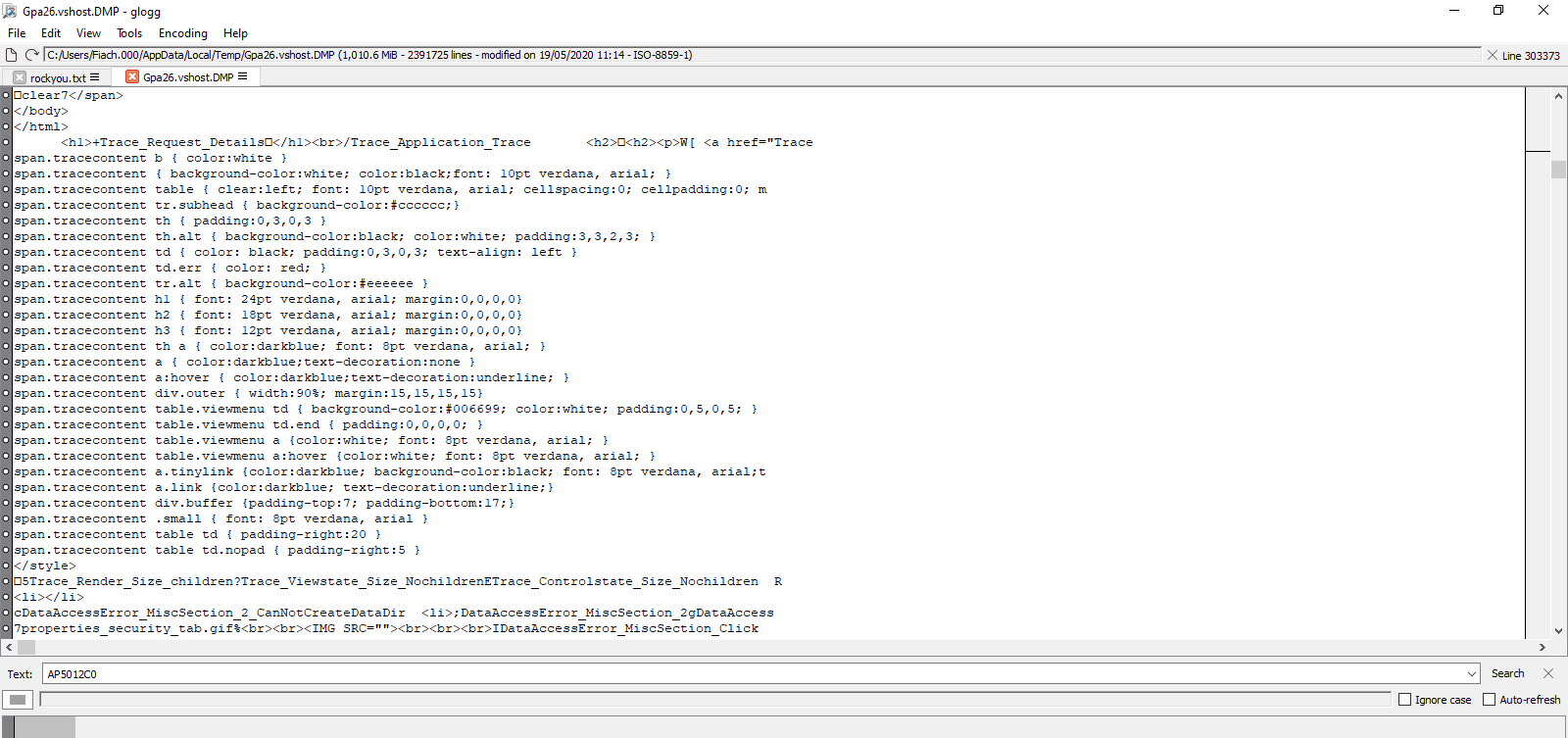
And… lo and behold, amonst alot of binary data, there was plain text, that could be easily extracted. Like in this screenshot, where you can see HTML in plain text.
This also may serve as an alarm bell for any software that might hold passwords or sensitive information in memory. Make sure that passwords are not held in static variables, since this approach could be used to extract them.
#OpenSource web crawler in C# based on #HTMLAgilityPack

TL; DR;
Here’s the Repo; https://github.com/infiniteloopltd/WebCrawler/
A Web Spider based using HTMLAgilityPack. This library will follow links within webpages in order to find more webpages, it works asynchronously, and will fire events every time a new page is encountered.
A few caveats, is that it’s single-threaded, so, it’s going to be rather slow. It holds it’s queue in memory, so it’s going to be a memory hog on really large websites. It also doesn’t obey Robots.txt.
Please feel free to fork this library, and improve upon it!
Sample Usage
  Spider.OnQueueUpdate = q =>
  {
      Console.WriteLine("Crawler Queue updated : " + q);
      if (q == 0)
      {
          // when this reaches 0, then the crawl is complete
          Console.WriteLine("Crawl Complete");
      }
  };
  Spider.OnVisitedPage = (webpage,content) =>
  {
      Console.WriteLine("Crawler visited : " + webpage.Url);
  };
  Spider.OnCrawlError = (webpage, ex) =>
  {
      Console.WriteLine("Crawler hit error at : " + webpage.Url);
  };
  Spider.StartPage = new Uri("https://www.cloudansweringmachine.com/");
  Spider.Scope = "https://www.cloudansweringmachine.com/"; // Don't leave this domain.
  Spider.Start();
  Console.WriteLine("Crawl stated, press enter to stop.");
  Console.ReadLine();
Decode an SSL Cert from a byte array in C#

This is more of a useful code snippet than any great revelation, however, if you ever needed to convert a byte array of a X509 cert into a X509 certificate object, then here’s how you do it using BouncyCastle
var certificateBase64 = File.ReadAllText(“cert.txt”);
var certData = Convert.FromBase64String(certificateBase64);
var parser = new X509CertificateParser();
var cert = parser.ReadCertificate(certData);
Really easy!; Here’s the project on GitHub – https://github.com/infiniteloopltd/CertificateDecoder

