List of available APIs by Google (Discovery API)
var service = new DiscoveryService(new BaseClientService.Initializer
{
ApplicationName = “Discovery Sample”,
ApiKey = “xxxxxxxxxxxxxxxxxx”,
});// Run the request.
Console.WriteLine(“Executing a list request…”);
var result = await service.Apis.List().ExecuteAsync();// Display the results.
if (result.Items != null)
{
foreach (DirectoryList.ItemsData api in result.Items)
{
Console.WriteLine(api.Id + ” – ” + api.Title);
}
}
Discovery API Sample
====================
Executing a list request…
abusiveexperiencereport:v1 – Google Abusive Experience Report API
acceleratedmobilepageurl:v1 – Accelerated Mobile Pages (AMP) URL API
adexchangebuyer:v1.2 – Ad Exchange Buyer API
adexchangebuyer:v1.3 – Ad Exchange Buyer API
adexchangebuyer:v1.4 – Ad Exchange Buyer API
adexchangebuyer2:v2beta1 – Ad Exchange Buyer API II
adexchangeseller:v1 – Ad Exchange Seller API
adexchangeseller:v1.1 – Ad Exchange Seller API
adexchangeseller:v2.0 – Ad Exchange Seller API
adexperiencereport:v1 – Google Ad Experience Report API
admin:datatransfer_v1 – Admin Data Transfer API
admin:directory_v1 – Admin Directory API
admin:reports_v1 – Admin Reports API
adsense:v1.4 – AdSense Management API
adsensehost:v4.1 – AdSense Host API
analytics:v2.4 – Google Analytics API
analytics:v3 – Google Analytics API
analyticsreporting:v4 – Google Analytics Reporting API
androiddeviceprovisioning:v1 – Android Device Provisioning Partner API
androidenterprise:v1 – Google Play EMM API
androidmanagement:v1 – Android Management API
androidpublisher:v1 – Google Play Developer API
androidpublisher:v1.1 – Google Play Developer API
androidpublisher:v2 – Google Play Developer API
appengine:v1alpha – Google App Engine Admin API
appengine:v1beta – Google App Engine Admin API
appengine:v1 – Google App Engine Admin API
appengine:v1beta4 – Google App Engine Admin API
appengine:v1beta5 – Google App Engine Admin API
appsactivity:v1 – G Suite Activity API
appstate:v1 – Google App State API
bigquery:v2 – BigQuery API
bigquerydatatransfer:v1 – BigQuery Data Transfer API
blogger:v2 – Blogger API
blogger:v3 – Blogger API
books:v1 – Books API
calendar:v3 – Calendar API
civicinfo:v2 – Google Civic Information API
classroom:v1 – Google Classroom API
cloudbilling:v1 – Google Cloud Billing API
cloudbuild:v1 – Cloud Container Builder API
clouddebugger:v2 – Stackdriver Debugger API
clouderrorreporting:v1beta1 – Stackdriver Error Reporting API
cloudfunctions:v2alpha1 – Google Cloud Functions API
cloudfunctions:v1 – Google Cloud Functions API
cloudfunctions:v1beta2 – Google Cloud Functions API
cloudiot:v1 – Google Cloud IoT API
cloudiot:v1beta1 – Google Cloud IoT API
cloudkms:v1 – Google Cloud Key Management Service (KMS) API
cloudresourcemanager:v1 – Google Cloud Resource Manager API
cloudresourcemanager:v1beta1 – Google Cloud Resource Manager API
cloudresourcemanager:v2beta1 – Google Cloud Resource Manager API
cloudshell:v1alpha1 – Cloud Shell API
cloudshell:v1 – Cloud Shell API
cloudtasks:v2beta2 – Cloud Tasks API
cloudtrace:v1 – Stackdriver Trace API
cloudtrace:v2 – Stackdriver Trace API
clouduseraccounts:alpha – Cloud User Accounts API
clouduseraccounts:beta – Cloud User Accounts API
clouduseraccounts:vm_alpha – Cloud User Accounts API
clouduseraccounts:vm_beta – Cloud User Accounts API
compute:alpha – Compute Engine API
compute:beta – Compute Engine API
compute:v1 – Compute Engine API
container:v1 – Google Kubernetes Engine API
container:v1beta1 – Google Kubernetes Engine API
content:v2sandbox – Content API for Shopping
content:v2 – Content API for Shopping
customsearch:v1 – CustomSearch API
dataflow:v1b3 – Google Dataflow API
dataproc:v1 – Google Cloud Dataproc API
dataproc:v1beta2 – Google Cloud Dataproc API
datastore:v1 – Google Cloud Datastore API
datastore:v1beta1 – Google Cloud Datastore API
datastore:v1beta3 – Google Cloud Datastore API
deploymentmanager:alpha – Google Cloud Deployment Manager Alpha API
deploymentmanager:v2beta – Google Cloud Deployment Manager API V2Beta Methods
deploymentmanager:v2 – Google Cloud Deployment Manager API
dfareporting:v2.8 – DCM/DFA Reporting And Trafficking API
dfareporting:v3.0 – DCM/DFA Reporting And Trafficking API
dialogflow:v2beta1 – Dialogflow API
digitalassetlinks:v1 – Digital Asset Links API
discovery:v1 – APIs Discovery Service
dlp:v2beta1 – DLP API
dlp:v2beta2 – DLP API
dns:v1 – Google Cloud DNS API
dns:v1beta2 – Google Cloud DNS API
dns:v2beta1 – Google Cloud DNS API
doubleclickbidmanager:v1 – DoubleClick Bid Manager API
doubleclicksearch:v2 – DoubleClick Search API
drive:v2 – Drive API
drive:v3 – Drive API
firebasedynamiclinks:v1 – Firebase Dynamic Links API
firebaseremoteconfig:v1 – Firebase Remote Config API
firebaserules:v1 – Firebase Rules API
firestore:v1beta1 – Google Cloud Firestore API
fitness:v1 – Fitness
fusiontables:v1 – Fusion Tables API
fusiontables:v2 – Fusion Tables API
games:v1 – Google Play Game Services API
gamesConfiguration:v1configuration – Google Play Game Services Publishing API
gamesManagement:v1management – Google Play Game Services Management API
genomics:v1alpha2 – Genomics API
genomics:v2alpha1 – Genomics API
genomics:v1 – Genomics API
gmail:v1 – Gmail API
groupsmigration:v1 – Groups Migration API
groupssettings:v1 – Groups Settings API
iam:v1 – Google Identity and Access Management (IAM) API
identitytoolkit:v3 – Google Identity Toolkit API
kgsearch:v1 – Knowledge Graph Search API
language:v1 – Google Cloud Natural Language API
language:v1beta1 – Google Cloud Natural Language API
language:v1beta2 – Google Cloud Natural Language API
licensing:v1 – Enterprise License Manager API
logging:v2 – Stackdriver Logging API
logging:v2beta1 – Stackdriver Logging API
manufacturers:v1 – Manufacturer Center API
mirror:v1 – Google Mirror API
ml:v1 – Google Cloud Machine Learning Engine
monitoring:v3 – Stackdriver Monitoring API
oauth2:v1 – Google OAuth2 API
oauth2:v2 – Google OAuth2 API
oslogin:v1alpha – Google Cloud OS Login API
oslogin:v1beta – Google Cloud OS Login API
oslogin:v1 – Google Cloud OS Login API
pagespeedonline:v1 – PageSpeed Insights API
pagespeedonline:v2 – PageSpeed Insights API
partners:v2 – Google Partners API
people:v1 – Google People API
playcustomapp:v1 – Google Play Custom App Publishing API
plus:v1 – Google+ API
plusDomains:v1 – Google+ Domains API
poly:v1 – Poly API
prediction:v1.2 – Prediction API
prediction:v1.3 – Prediction API
prediction:v1.4 – Prediction API
prediction:v1.5 – Prediction API
prediction:v1.6 – Prediction API
proximitybeacon:v1beta1 – Google Proximity Beacon API
pubsub:v1beta1a – Google Cloud Pub/Sub API
pubsub:v1 – Google Cloud Pub/Sub API
pubsub:v1beta2 – Google Cloud Pub/Sub API
replicapool:v1beta1 – Replica Pool API
replicapool:v1beta2 – Google Compute Engine Instance Group Manager API
replicapoolupdater:v1beta1 – Google Compute Engine Instance Group Updater API
reseller:v1 – Enterprise Apps Reseller API
resourceviews:v1beta1 – Resource Views API
resourceviews:v1beta2 – Google Compute Engine Instance Groups API
runtimeconfig:v1 – Google Cloud Runtime Configuration API
runtimeconfig:v1beta1 – Google Cloud Runtime Configuration API
safebrowsing:v4 – Google Safe Browsing API
script:v1 – Google Apps Script API
searchconsole:v1 – Google Search Console URL Testing Tools API
serviceconsumermanagement:v1 – Service Consumer Management API
servicecontrol:v1 – Google Service Control API
servicemanagement:v1 – Google Service Management API
serviceusage:v1 – Service Usage API
serviceuser:v1 – Google Service User API
sheets:v4 – Google Sheets API
siteVerification:v1 – Google Site Verification API
slides:v1 – Google Slides API
sourcerepo:v1 – Cloud Source Repositories API
spanner:v1 – Cloud Spanner API
spectrum:v1explorer – Google Spectrum Database API
speech:v1 – Google Cloud Speech API
speech:v1beta1 – Google Cloud Speech API
sqladmin:v1beta3 – Cloud SQL Administration API
sqladmin:v1beta4 – Cloud SQL Administration API
storage:v1 – Cloud Storage JSON API
storage:v1beta1 – Cloud Storage JSON API
storage:v1beta2 – Cloud Storage JSON API
storagetransfer:v1 – Google Storage Transfer API
streetviewpublish:v1 – Street View Publish API
surveys:v2 – Surveys API
tagmanager:v1 – Tag Manager API
tagmanager:v2 – Tag Manager API
taskqueue:v1beta1 – TaskQueue API
taskqueue:v1beta2 – TaskQueue API
tasks:v1 – Tasks API
testing:v1 – Google Cloud Testing API
toolresults:v1beta3 – Cloud Tool Results API
tpu:v1alpha1 – Cloud TPU API
translate:v2 – Google Cloud Translation API
urlshortener:v1 – URL Shortener API
vault:v1 – Google Vault API
videointelligence:v1beta1 – Cloud Video Intelligence API
vision:v1p1beta1 – Google Cloud Vision API
vision:v1p2beta1 – Google Cloud Vision API
vision:v1 – Google Cloud Vision API
webfonts:v1 – Google Fonts Developer API
webmasters:v3 – Search Console API
youtube:v3 – YouTube Data API
youtubeAnalytics:v1 – YouTube Analytics API
youtubeAnalytics:v1beta1 – YouTube Analytics API
youtubereporting:v1 – YouTube Reporting API
Press any key to continue…
Store Zipped data in #SqlLite BLOB with C#

SqlLite is great if you want to include pre-prepared data with your app or website, but if you find your .sqlite file becoming massive, you might look at how you are storing your data.
This approach is only relevant, if you have one or more fields that contain large blocks of text. It also comes in handy if you are storing base64 encoded binary data or text with UTF8 / UTF16 chars
First, use the BLOB data type, rather than TEXT for storing your big-data field.
Next, you’ll need these two C# functions to Compress and Decompress byte arrays in-memory:
static byte[] Compress(byte[] data)
{
using (var compressedStream = new MemoryStream())
using (var zipStream = new GZipStream(compressedStream, CompressionMode.Compress))
{
zipStream.Write(data, 0, data.Length);
zipStream.Close();
return compressedStream.ToArray();
}
}static byte[] Decompress(byte[] data)
{
using (var compressedStream = new MemoryStream(data))
using (var zipStream = new GZipStream(compressedStream, CompressionMode.Decompress))
using (var resultStream = new MemoryStream())
{
zipStream.CopyTo(resultStream);
return resultStream.ToArray();
}
}
Then, when inserting into the Sqlite file, then use the functions;
To Insert a row;
var bXml = System.Text.Encoding.UTF8.GetBytes(strXML);
var bCompress = Compress(bXml);
var command = new SQLiteCommand(connection)
{
CommandText = “insert into Table (ID,xml) values (” + ID + “,@xml)”
};
var parameter = new SQLiteParameter(“@xml”, System.Data.DbType.Binary) {Value = bCompress};
command.Parameters.Add(parameter);
command.ExecuteNonQuery();
Then to read the value back out again;
var connection = new SQLiteConnection(“Data Source=” + strDbFile);
connection.Open();
var strSql = “select xml from Table limit 1;”;
var command = new SQLiteCommand(strSql, connection);
var obj = command.ExecuteScalar();
var bArray = (byte[])obj;
var bXml = Decompress(bArray);
var strXML = System.Text.Encoding.UTF8.GetString(bXml);
Database of 1.2 Million #iOS apps available for download.
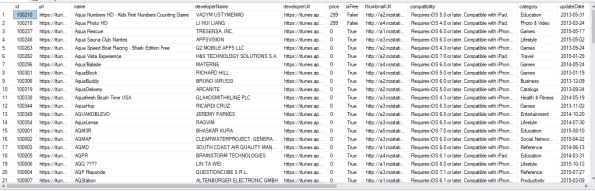
Check out this download: https://payhip.com/b/7NIg
A database of over 1.2 million iOS apps listed on the Apple App store, including the following details;
- url
- name
- developer Name
- developer Url
- price
- is Free
- thumbnail Url
- compatibility
- category
- update Date
- version
- size
- minimum Age
- developer Website
- support Website
- license Agreement
- description
Install #IPA – An over-the-air IOS app installation service

InstallIPA.com – is a website that helps you install .IPA files on your iOS device by automatically creating the OTA Manifest file, and creating a email-installable link, or QR code.
It’s designed so that you can provide an easy-to-install link to demo your app to your client, without asking them to plug their iPhone into iTunes.
Or, from the tester’s perpective – If you’ve been sent an .ipa file from your developer, and want an easy way to install it on your phone, then you can use this site to easily install this app on your phone.
#RoyalMail #PAF UK Postcode database

This is the Royal Mail PAF database of 1,841,177 postcodes in the UK, which can be downloaded here
50,000 Web Design Sales Leads for €5

If you are a web design company, and are looking for leads, this is a great resource, – a database of over 50,000 websites and associated names and email addresses that have not been launched yet – but have been registered.
These people are typically people who have taken the time to register a domain name for their company, but have not yet found a suitable web design company to develop their website.
Want to read more? check out https://payhip.com/b/jQul
Google #OAuth Login using #PhantomJS

So here’s some handy code to use PhantomJS to perform a Google OAuth Login in a headless browser. The exact login url and username/password have been omitted from this example;
page.open(‘https://accounts.google.com/o/oauth2/auth?redirect_uri=http://……’, function (status) {
page.evaluate(function() {
var usernameField = “Email”;
var elUsername = document.getElementById(usernameField);
elUsername.value = ‘xxxx@gmail.com’;
var buttonId = “next”;
var elNext = document.getElementById(buttonId);
elNext.click();
setTimeout(function(){
var passwordId = “Passwd”;
var elPassword = document.getElementById(passwordId);
elPassword.value = “xxxxxxx”;
var btnNext = document.getElementById(“signIn”);
btnNext.click();
},2000);
});
page.onLoadFinished = function(){
page.evaluate(function(){
setTimeout(function(){
var btnAllow = “submit_approve_access”;
var elAllow = document.getElementById(btnAllow);
elAllow.click();},2000);
});
page.onLoadFinished = function(){
// Now you can continue processing.
};
};
});
Clean up expired #S3 files in #AWS using C#

If you use Amazon S3 to store temporary files, that are perhaps autogenerated, then emailed to customers, or are otherwise obsolete after a few hours, then it’s a good idea to delete them – to keep your storage costs low, and prevent any leaks of sensitive data later down the line.
Here is some C# code that reads all files in a specified bucket, and deletes files older than 12 hours old. – This example is hard-coded to the EU West Region (Ireland).
First, you need to install the NUGET package:
Install-package AWSSDK.S3
Then, create a class called S3, with the following code – I’ve ommited the keys, that you can get from IAM
using Amazon.S3;
using Amazon.S3.Transfer;
using System;
using System.Collections.Generic;
using System.IO;
using Amazon.S3.Model;namespace S3Cleanup
{
/// <summary>
/// Amazon S3 functionality
/// </summary>
public static class S3
{
private static readonly AmazonS3Config Cfg = new AmazonS3Config { RegionEndpoint = Amazon.RegionEndpoint.EUWest1 };
private static readonly AmazonS3Client S3Client = new AmazonS3Client(“xxxx”, “xxx”, Cfg);public static IEnumerable<S3Object> ListBucket(string bucket)
{var request = new ListObjectsRequest {BucketName = bucket};
var lS3 = new List<S3Object>();
do
{
var response = S3Client.ListObjects(request);
lS3.AddRange(response.S3Objects);
if (response.IsTruncated)
{
request.Marker = response.NextMarker;
}
else
{
request = null;
}
} while (request != null);
return lS3;
}public static void DeleteObject(string bucket, S3Object s3Object)
{
var request = new DeleteObjectRequest { BucketName = bucket, Key = s3Object.Key };
S3Client.DeleteObject(request);
}public static string Upload(string bucket, byte[] data, string extension)
{
var ms = new MemoryStream(data);
var filename = Guid.NewGuid().ToString(“D”) + extension;
var fileTransferUtility = new TransferUtility(S3Client);
var fileTransferUtilityRequest = new TransferUtilityUploadRequest
{
BucketName = bucket,
InputStream = ms,
StorageClass = S3StorageClass.ReducedRedundancy,
Key = filename,
CannedACL = S3CannedACL.PublicRead
};
fileTransferUtility.Upload(fileTransferUtilityRequest);
return “https://s3-eu-west-1.amazonaws.com/” + bucket + “/” + filename;
}
}
}
Then you can write come code in your Main() method to do the following:
if (args.Length == 0)
{
Console.WriteLine(“Pass bucket name as argument”);
return;
}
var strBucketName = args[0];
var s3Objects = S3.ListBucket(strBucketName);
Console.WriteLine(“Found ” + s3Objects.Count() + ” objects in bucket”);
foreach (var s3object in s3Objects)
{
var age = DateTime.Now – s3object.LastModified;
if (age.TotalHours <= 12) continue;
Console.WriteLine(“Deleting ” + s3object.Key);
S3.DeleteObject(strBucketName, s3object);
}
Then, if you set that up as a scheduled task, you can delete your old S3 files, and keep your costs down.
Create a Real #IOS App with no coding in two minutes.
If you’ve got a mobile-friendly website, then you can also create an app for that website quickly and easily with CreateFreeApp.com – The video above shows just how simple it is to create a real iOS app that can run on your iPhone, you could share with your employees, or even submit to the iOS App store (* Although apple have strict quality guidelines, so you may not pass review)
The video above does gloss over the whole digital signing step – which is the toughest part of the process, and professional iOS developers struggle with this too. However, here are a few steps to create what’s known as an Ad-hoc provisioning profile used in the video above. This allows you to install the app on up to 100 iPhones / iPads without any review by Apple.
If you try to install an app that is not digitally signed, then you get an error message saying “Unable to download App, “CreateFreeApp.com” could not be downloaded at this time.”, and you get a darkened icon on the home screen called “CreateFreeApp”, that says “Unable to Install “CreateFreeApp.com” Please try again later.” if you click it.
You’ll need a developer account at apple, and I’m assuming you’ve got a Distribution certificate set up already – so go log in to developer.apple.com , and select “Certificates, IDs & profiles” – Click Devices > All Then press the plus icon in the top right
Now, on your iphone, go to “get.udid.io” in the Safari browser. Press “Tap to Find UDID”, Press “Allow” then “Install”, “Install”, and your UDID will be displayed on-screen.
Going back to the Apple, enter in the Name of the Device “Dave’s iPhone”, and fill in the UDID in the box below. Press “Continue”.
Now, go to App IDs under Indentifiers on the left hand side, and press the Plus icon in the top right.
Enter the App ID Decription “Create Free App”, and select a wildcard App ID named:
com.createfreeapp.*
Press Continue.
Select iOS provisioning profiles > All, then press the plus icon in the top right. Select Distribution > Ad Hoc then continue.
Select CreateFreeApp in the App ID box then continue.
Select your iOS Distribution Certifcate (Hoping you’ve already set this up!) then continue
Press Select All for the devices list, then press Continue
Enter a name for the profile, i.e. “Create Free App AdHoc” > Continue, then Download the mobileprovision file, and put it in a safe place, as you’ll need it later.
To create your p12 certificate, you will need to open the KeyChain Access utility on your Mac
Select “My Certificates” on the left hand side, and look down to find your “iPhone Distribution” certificate. Control-Click on the certificate, and select Export. Press Save, Enter a password, and again into the verify box, then press OK. You will need this password later, so don’t forget it!. Press “Allow”, and you should have a file on your desktop named Certificates.p12.
When creating an app on Create Free App.com, you will need your mobileprovision file, the p12 certificate, and the password for the certificate, and the app will work on every device that you have obtained a UDID for.
Create an #Android and #iOS app for #free with no coding
We’ve just launched https://www.createfreeapp.com/ today – It let’s you create an Android and iOS app in under 2 minutes by just filling out a form. What does the app do?, it links to your website – but guess what – you can submit this to the Google Play Store, and iOS App Store, and make your online business instantly more discoverable.
The service is backed by Adobe’s Phonegap build, and apps are held securely and safely with Amazon S3 storage.

