#India Car registration #API lookup

India Car registration API
Today, we just launched in.carregistrationapi.com ; an API that allows developers determine the make, model, age, VIN number, and location of Indian registered cars from their number plate.
Unlike many European countries, not all cars in India are digitally registered, and in order for a car to be returned by this API it must be registered with VAHAN (http://vahan.nic.in), of which there are almost 200 million vehicles registered. Furthermore, some imported cars from non-Indian manufacturers may have very limited technical information about the car.
In order to call the API you should call the /CheckIndia endpoint, and you can expect the following information back in the JSON
- Make
- Model
- Engine Size
- Year of first registration
- VIN (Chassis Number)
- Location
Sample JSON:
{“Description”:”HONDA CIVIC 1.8V MT”,”RegistrationYear”:”2007″,”CarMake”:{“CurrentTextValue”:”HONDA”},”CarModel”:{“CurrentTextValue”:”CIVIC”},”EngineSize”:{“CurrentTextValue”:”1.8V MT”},”MakeDescription”:{“CurrentTextValue”:”HONDA”},”ModelDescription”:{“CurrentTextValue”:”CIVIC”},”VechileIdentificationNumber”:”MAKFD153K7N 103531″,”Location”:”RTO, BANGALORE EAST , KARNATAKA”}
Chassis Number #API (VIN) available

A chassis number, or VIN number is etched into the chassis of all cars, and is unique to the car. The format of the number describes different aspects of the car, and this format varies from manufacturer to manufacturer. Without a manufacturer specific search, you can’t get much information, apart from the make, model, and age.
We’re offering a beta service on http://www.regcheck.org.uk/api/reg.asmx?op=VinCheck that allows a lookup of VIN numbers across several manufacturers. You’ll need a free account with regcheck.org.uk to get access.
Vin Check
As a beta feature, we also offer a VIN (Chassis number) check, where it is possible to return some basic information from a Chassis number.
- Make
- Model
- Registration year
- Engine Size
It returns XML only, in this format
<Vehicle xmlns:xsd=”http://www.w3.org/2001/XMLSchema” xmlns:xsi=”http://www.w3.org/2001/XMLSchema-instance” xmlns=”http://regcheck.org.uk”>
<vehicleData>
<Description>HONDA CIVIC 1.8V MT</Description>
<RegistrationYear>2007</RegistrationYear>
<CarMake>
<CurrentTextValue>HONDA</CurrentTextValue>
</CarMake>
<CarModel>CIVIC</CarModel>
<EngineSize>
<CurrentTextValue>1.8V MT</CurrentTextValue>
</EngineSize>
</vehicleData>
</Vehicle>
Funky new dashboard for RegCheck websites
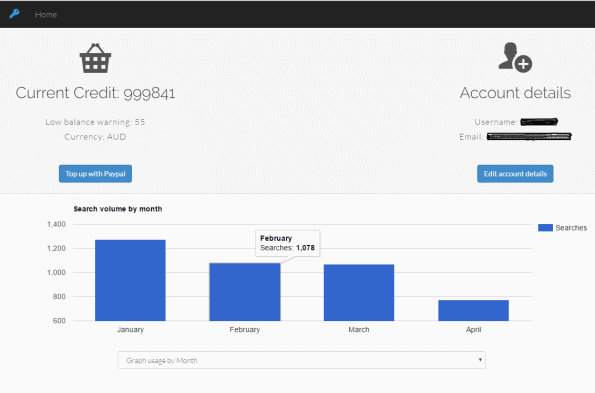
Not really a technical post, but this is the new dashboard that I’ve just created for my RegCheck websites. It’s developed using Bootstrap, Google Charts, icomoon for the icons, and mustache.js to provide a data binding between the JSON representation of the user and the HTML.
How to export a list of domains from #namecheap
I wanted to check the IP address of all the domains I had registered with namecheap, so I wanted to write a batch file to ping them all, so first step, was to export a list from namecheap. I couldn’t find the option, so I asked namecheap support who said there wasn’t an option.
But that just got me to look harder!
So, I enabled their API under Profile-Tools-API Access, whitelisted my IP, and created an api key, and with a bit of research, I got this:
#Smalig #ISAPI url #rewrite in IIS 7/8
 During an upgrade of my server from Windows 2008 / IIS 7 to Windows 2012 , one ISAPI url rewrite that I used did not work. The ISAPI filter appears to be obsolete and unmaintained, so I decided to try and write my own using IIS url rewrite rules, and it turned out to be really easy.
So, the premise of this url rewrite is to make a SEO unfriendly url like abc.aspx?id=10 into /web/id/10/abc.aspx – which is more SEO friendly. The smalig Url rewrite will work with any number of parameters, and this is designed to work with at most 2, but you can expand it, if you have more parameters in your url.
<system.webServer>
<security>
<requestFiltering allowDoubleEscaping=”true”/>
</security>
<rewrite>
<rules>
<rule name=”smalig1″>
<match url=”web/([^/]+)/([^/]+)/([^/]+).aspx” />
<action type=”Rewrite” url=”/{R:3}.aspx?{R:1}={R:2}” logRewrittenUrl=”true” />
</rule>
<rule name=”smalig2″>
<match url=”web/([^/]+)/([^/]+)/([^/]+)/([^/]+)/([^/]+).aspx” />
<action type=”Rewrite” url=”/{R:5}.aspx?{R:1}={R:2}&{R:3}={R:4}” logRewrittenUrl=”true” />
</rule>
</rules>
</rewrite>
</system.webServer>
The “Allow Double escaping” bit, allows for urls with a plus symbol in them, and if you don’t have this, then you can remove this security exception.
Consuming a .NET webservice with #python
 To consume a .NET SOAP ASMX webservice from Pyhon, you need to use a proxy class, which you can generate using Suds and a tool called wsdl2soaplib by fvieira .
You have to install Suds using
sudo python setup.py install
then generate the proxy class using
./wsdl2soaplib.py http://www.regcheck.org.uk/api/reg.asmx?wsdl > regcheck.py
And it generates a class such as
“””SOAP web services generated from:
http://www.regcheck.org.uk/api/reg.asmx?wsdl.
“””from soaplib.core.model.primitive import (
Any, AnyAsDict, AnyUri, Boolean, Date, DateTime,
Decimal, Double, Duration, Integer, Float, Mandatory, String
)
from soaplib.core.model.clazz import Array, ClassModelfrom soaplib.core.model.base import Null
from soaplib.core.service import soap, DefinitionBase
from soaplib.core.model.enum import Enum
class ArrayOfString(ClassModel):
“””SOAP complex type “{http://regcheck.org.uk}ArrayOfString“
“””
string = Array(String)
class ArrayOfArrayOfString(ClassModel):
“””SOAP complex type “{http://regcheck.org.uk}ArrayOfArrayOfString“
“””
ArrayOfString = Array(ArrayOfString)
class DataGrid(ClassModel):
“””SOAP complex type “{http://regcheck.org.uk}DataGrid“
“””
json = String
columnNames = ArrayOfString
data = ArrayOfArrayOfString
class UKTest(ClassModel):
“””SOAP complex type “{http://regcheck.org.uk}UKTest“
“””
TestDate = String
ExpiryDate = String
Result = String
Odometer = String
TestNumber = String
FailureReasons = ArrayOfString
class ArrayOfUKTest(ClassModel):
“””SOAP complex type “{http://regcheck.org.uk}ArrayOfUKTest“
“””
UKTest = Array(UKTest)
class UKMOTData(ClassModel):
“””SOAP complex type “{http://regcheck.org.uk}UKMOTData“
“””
Tests = ArrayOfUKTest
taxDate = String
Json = String
ExtendedInformation = ArrayOfArrayOfString
ExtendedInformationJson = String
class CarReg(DefinitionBase):
“””SOAP service “CarReg“ with target namespace http://regcheck.org.uk.
“””@soap(String, String, Integer, _returns=CarSpecificationsResponse)
def CarSpecifications(self, make, model, year):
“””Parameters:“make“ — string (optional)
“model“ — string (optional)
“year“ — intReturns: CarSpecificationsResponse
“””
return None
@soap(String, String, _returns=CheckResponse)
def Check(self, RegistrationNumber, username):
“””Parameters:“RegistrationNumber“ — string (optional)
“username“ — string (optional)Returns: CheckResponse
“””
return None
@soap(String, String, String, _returns=CheckAustraliaResponse)
def CheckAustralia(self, RegistrationNumber, State, username):
“””Parameters:“RegistrationNumber“ — string (optional)
“State“ — string (optional)
“username“ — string (optional)Returns: CheckAustraliaResponse
“””
return None
@soap(String, String, _returns=CheckDenmarkResponse)
def CheckDenmark(self, RegistrationNumber, username):
“””Parameters:“RegistrationNumber“ — string (optional)
“username“ — string (optional)Returns: CheckDenmarkResponse
“””
return None
@soap(String, String, _returns=CheckFinlandResponse)
def CheckFinland(self, RegistrationNumber, username):
“””Parameters:“RegistrationNumber“ — string (optional)
“username“ — string (optional)Returns: CheckFinlandResponse
“””
return None
@soap(String, String, _returns=CheckFranceResponse)
def CheckFrance(self, RegistrationNumber, username):
“””Parameters:“RegistrationNumber“ — string (optional)
“username“ — string (optional)Returns: CheckFranceResponse
“””
return None
@soap(String, String, _returns=CheckIrelandResponse)
def CheckIreland(self, RegistrationNumber, username):
“””Parameters:“RegistrationNumber“ — string (optional)
“username“ — string (optional)Returns: CheckIrelandResponse
“””
return None
@soap(String, String, _returns=CheckItalyResponse)
def CheckItaly(self, RegistrationNumber, username):
“””Parameters:“RegistrationNumber“ — string (optional)
“username“ — string (optional)Returns: CheckItalyResponse
“””
return None
@soap(String, String, _returns=CheckNetherlandsResponse)
def CheckNetherlands(self, RegistrationNumber, username):
“””Parameters:“RegistrationNumber“ — string (optional)
“username“ — string (optional)Returns: CheckNetherlandsResponse
“””
return None
@soap(String, String, _returns=CheckNewZealandResponse)
def CheckNewZealand(self, RegistrationNumber, username):
“””Parameters:“RegistrationNumber“ — string (optional)
“username“ — string (optional)Returns: CheckNewZealandResponse
“””
return None
@soap(String, String, _returns=CheckNorwayResponse)
def CheckNorway(self, RegistrationNumber, username):
“””Parameters:“RegistrationNumber“ — string (optional)
“username“ — string (optional)Returns: CheckNorwayResponse
“””
return None
@soap(String, String, _returns=CheckPortugalResponse)
def CheckPortugal(self, RegistrationNumber, username):
“””Parameters:“RegistrationNumber“ — string (optional)
“username“ — string (optional)Returns: CheckPortugalResponse
“””
return None
@soap(String, String, _returns=CheckSpainResponse)
def CheckSpain(self, RegistrationNumber, username):
“””Parameters:“RegistrationNumber“ — string (optional)
“username“ — string (optional)Returns: CheckSpainResponse
“””
return None
@soap(String, String, _returns=CheckSwedenResponse)
def CheckSweden(self, RegistrationNumber, username):
“””Parameters:“RegistrationNumber“ — string (optional)
“username“ — string (optional)Returns: CheckSwedenResponse
“””
return None
@soap(String, String, String, _returns=CheckUSAResponse)
def CheckUSA(self, RegistrationNumber, State, username):
“””Parameters:“RegistrationNumber“ — string (optional)
“State“ — string (optional)
“username“ — string (optional)Returns: CheckUSAResponse
“””
return None
@soap(String, String, String, _returns=UKMOTResponse)
def UKMOT(self, RegistrationNumber, Model, username):
“””Parameters:“RegistrationNumber“ — string (optional)
“Model“ — string (optional)
“username“ — string (optional)Returns: UKMOTResponse
“””
return NoneWSDL_TYPES = {
‘ArrayOfArrayOfString’: ArrayOfArrayOfString,
‘ArrayOfString’: ArrayOfString,
‘ArrayOfUKTest’: ArrayOfUKTest,
‘DataGrid’: DataGrid,
‘UKMOTData’: UKMOTData,
‘UKTest’: UKTest,
‘Vehicle’: Vehicle
}
Vehicle Number plate lookup API: Ireland

We’ve just updated the structure of the data returned from the API for Ireland, to provide more data, and some other under-the-hood improvements
The website has been updated to carregistrationapi.ie
Car registration plates in Ireland use the /CheckIreland endpoint and return the following information:
- Make & Model
- Style
- Transmission
- ABI Code
- Fuel Type
- Number of Seats
Sample JSON:
New Zealand Car Registration lookup API
 Yet another country is now supported by our rapidly growing car registration lookup API, which now supports New Zealand, and can be accessed via http://carregistrationapi.nz/
Car registration plates in New Zealand use the /CheckNewZealand endpoint and return the following information:
- Make
- Model
- Engine Size
- Fuel Type
- Body Style
- VIN number
- Engine Code
- Number of seats
- Colour
- Country of assembly
- Stolen indicator
- Odometer reading (last and current)
- Warrant of Fitness
- Import status
Sample Json:
{“Description”:”2003 FORD ESCAPE”,”RegistrationYear”:”2003″,”CarMake”:{“CurrentTextValue”:”FORD”},”CarModel”:{“CurrentTextValue”:”ESCAPE”},”EngineSize”:{“CurrentTextValue”:”2,967cc”},”FuelType”:{“CurrentTextValue”:”Petrol”},”MakeDescription”:{“CurrentTextValue”:”FORD”},”ModelDescription”:{“CurrentTextValue”:”ESCAPE”},”BodyStyle”:{“CurrentTextValue”:”Station Wagon”},”VechileIdentificationNumber”:”JC0CU041421109337″,”EngineNumber”:”1109337″,”Colour”:”Green”,”NumberOfSeats”:{“CurrentTextValue”:”5″},”Assembly”:”Japan”,”Stolen”:”No”,”EstimatedCurrentOdometer”:”167,000 “,”LastOdometerReading”:”154,228 “,”WarrantOfFitness”:”Yes”,”PlateType”:”Standard”,”Origin”:”NZ New”,”VehiclePurpose”:”Private Passenger vehicle”,”ReasonLatestRegistration”:”New”,”FirstLocalRegistration”:”08-Jul-2003″,”Imported”:”No”}
POP3 in C# with System.Net.Pop3 #bizzehdee

If you want to have your c# application receive email on behalf of a user, then there are plenty of solutions out there, but the one I picked had no documentation, and I had to figure it out myself. Not too hard but, I thought I’d include it here to help people out.
I picked the NuGet package System.Net.Pop3 by bizzehdee because it was the first result in NuGet, but then realised it didn’t even have a “hello world” example.
// https://www.nuget.org/packages/System.Net.Pop3/ (bizzehdee)
var pop3Client = new Pop3Client();
pop3Client.Connect(“mail.server.com”, 110, false);
pop3Client.SendAuthUserPass(“postmaster@server.com”, “Password!”);
var intEmails = pop3Client.GetEmailCount();
var emails = new List<Pop3Message>();
for (uint i = 1; i <= intEmails; i++)
{
var email = pop3Client.GetEmail(i);
emails.Add(email);
}
This particular code was tested against a MailEnable email server installed on an Azure Virtual machine, with a catch-all email address. As a little “Gotcha” during setup, on azure, you have to open an endpoint on port 110 before it will accept pop3 connections, regardless of what the firewall on the machine itself says.
USA number plate lookup API #easteregg
 This is a bit of an Easter egg, since it’s not been officially released yet, but we’ve developed a lookup for vehicle number plates that works across all 50 states of the US.
It’s located at http://www.regcheck.org.uk/api/reg.asmx?op=CheckUSA
It requires an account from RegCheck.org.uk – but you can get a free one with 10 credits for testing purposes.
The USA requires two parameters, the registration number, and the state where the vehicle was registered. The state is a two letter abbreviation of one of the 50 states, or DC (District of Columbia), GU (Guam), PR (Puerto Rico) or VI (Virgin Islands).
It returns the following information about the vehicle
- Description
- Body Style
- VIN
- Engine Size
- Country of Assembly
Sample Json:
{“Description”:”2003 Harley-Davidson FLHR/I Road King “,”BodyStyle”:{“CurrentTextValue”:””},”VechileIdentificationNumber”:”1HD1FWW1X3Y746238″,”Assembly”:”United States”,”EngineSize”:{“CurrentTextValue”:”1450CC 2 Unleaded Gas”}}
 Network Programming in .NET