TweetJS Display #Tweets on your website with #Javascript only

This is probably the start of a much larger project, but starting today, I launched TweetJS.com which is a browser-based Javascript library, that lets you display tweets on your website. No authentication needed.
Currently, it has two methods, ListTweetsOnUserTimeline and Search, where TweetJs.ListTweetsOnUserTimeline takes two parameters, the username, and a callback function. It will return data on tweets posted by a given user. and TweetJs.Search takes two parameters, the search query, and a callback function. It will return data on tweets that contain the search query.
They are called like this
TweetJs.ListTweetsOnUserTimeline("PetrucciMusic",
function (data) {
    console.log(data);
});
Under the hood, this makes an ajax call back to our server, which then makes the call to Twitter, using our authentication keys.
Using #tweetmoasharp to retrieve tweets from a user’s timeline

Since Tweetsharp is no longer being maintained, there is a fork called tweetmoasharp that is actively maintained. It is pretty much a drop-in replacement for Tweetsharp, with minor differences.
Here’s some code that I wrote to retrieve the tweets from a given user’s timeline
ServicePointManager.SecurityProtocol = SecurityProtocolType.Tls12;
var service = new TwitterService(_consumerKey, _consumerSecret);
service.AuthenticateWith(_accessToken, _accessTokenSecret);var xt = service.ListTweetsOnUserTimeline(new ListTweetsOnUserTimelineOptions() { ScreenName = “PetrucciMusic” });
var strJson = service.Response.Response;
This returns tweets from the account https://twitter.com/PetrucciMusic
The TLS1.2 setting may not be needed, depending on what version of .NET you are using, but I was using an old version, which needed it.
#Google Form restyler – edit the #CSS of Google Forms

Google forms give you a really easy way of asking your users questions, and storing the answers in a google sheet. The big downside, is that you loose alot of control over the way your page is displayed, and you can end up with an iframe in the middle of the page that looks really out of place.
This is where http://googleformrestyler.apixml.net/ can help.
You simply follow these three steps.
Step 1.
Create your google form, and get the embed script by pressing Send » Send via < > » Copy. Then take the “src” parameter out of the iframe element. Which should appear something like this;
https://docs.google.com/forms/..../viewform?embedded=true
Step 2.
Add the following script tag on to your page instead of the iframe element:
http://googleformrestyler.apixml.net/GoogleFormStyler.js
Step 3.
Edit the CSS as you wish
<style>
.freebirdFormviewerViewFooterFooterContainer {
    display: none !important
}
</style>
Now, if you want to change the functionality of the page, you can also hack the javascript. For example, by default, when you submit a Google form, it redirects back to Google. If you want to keep the user on your page, and do something else, here’s some Javascript that you can use to change this behaviour;
var ifrm = document.createElement("iframe");
ifrm.setAttribute("name", "swallow");
document.body.appendChild(ifrm);
ifrm.style.display = 'none';
document.forms[0].target="swallow";
var button = document.querySelectorAll("div[role='button']")[0];
button.addEventListener("click", function()
{
	alert('Here you can intercept the response');
}, true);
What this javascript does, is that it creates an invisible iframe called “swallow”, then changes the form target to output to this hidden iframe. It then attaches to the click event of the submit button and can run custom javascript once the submit is pressed.
Now, that’s the end-user description, How does this system work, let’s look at the inner workings, specifically, the Javascript that gets loaded:
This contains the following script
(function (XHR) {
    var open = XHR.prototype.open;
    XHR.prototype.open = function (method, url, async, user, pass) {
        this._url = url;
        if (url.indexOf("gstatic.com") !== -1 ||
            url.indexOf("docs.google.com") !== -1) {
            url = "http://googleformrestyler.apixml.net/corsProxy.aspx?base64Url=" + btoa(url);
        }
        open.call(this, method, url, async, user, pass);
    };
})(XMLHttpRequest);
(function() {
    var script = document.currentScript ||
        /*Polyfill*/ Array.prototype.slice.call(document.getElementsByTagName('script')).pop();
    var URL = script.getAttribute('form');
    var xhr = new XMLHttpRequest();
    xhr.open("GET", URL);
    xhr.onload = function() {
        document.write(xhr.response);
    };
    xhr.send();
})();
The first part, hijacks the Ajax functionality on the page, and if the Ajax request is bound for Google (gstatic.com or docs.google.com), and will route it instead via a page called corsProxy.aspx
The second part, makes an ajax request to fetch the contents of the url specified in the form attribute of the script tag, and then document.write’s it out to the page.
CorsProxy.aspx is a ASP.NET script that proxies the request, and returns the result, with the CORS header set.
protected void Page_Load(object sender, EventArgs e)
{
var base64Url = Request.QueryString[“base64Url”];
var data = Convert.FromBase64String(base64Url);
var url = Encoding.ASCII.GetString(data);
var wc = new WebClient();
Response.AppendHeader(“Access-Control-Allow-Origin”, “*”);
var bResponse = wc.DownloadData(url);
Response.BinaryWrite(bResponse);
}
Accepting Direct Debit #payments as an alternative to #Card payments online using .NET

Direct debit is an alternative way to recieve payments, and is the norm for long term subscriptions or utility payments.
GoCardless is a provider of Direct debits and it can accept payments from the following countries;
- United Kingdom – Bacs Direct Debit
- Eurozone – SEPA Direct Debit
- Sweden – Bg Autogiro
- Denmark – Betalingsservice
- Australia – BECS Direct Debit
- New Zealand – BECS Direct Debit
- Canada – Pre-Authorized Debit
Also, with the incomming new SCA applying to EU credit cards from september 14th 2019, this can protect recurring income, since ‘paperless’ direct debit is outside the scope of SCA.
Without further ado, here is a simple demo on how to get this running in Sandbox mode;
tl;dr; here’s the github repo https://github.com/infiniteloopltd/GoCardlessDemo
Create a new .NET console app in VS 2017, then add the GoCardless NUNIT package using
Install-Package GoCardless
Create the client as follows;
var client = GoCardlessClient.Create(
ConfigurationManager.AppSettings[“GoCardlessAccessToken”],
GoCardlessClient.Environment.SANDBOX
);
Defining your access token in the app.config
<appSettings>
<add key=”GoCardlessAccessToken” value=”sandbox_AnONLOlT7Xe4qH_kRNGKBHnp_NWytUpRXAQY4-7j”/>
</appSettings>
Now, you’ll need to generate a URL via the GoCardless API, in order to capture your customer’s details;
var SessionToken = Guid.NewGuid().ToString();
var redirectFlowResponse = client.RedirectFlows.CreateAsync(new RedirectFlowCreateRequest()
{
Description = “Cider Barrels”,
SessionToken = SessionToken,
SuccessRedirectUrl = “https://developer.gocardless.com/example-redirect-uri/”,
// Optionally, prefill customer details on the payment page
PrefilledCustomer = new RedirectFlowCreateRequest.RedirectFlowPrefilledCustomer()
{
GivenName = “Tim”,
FamilyName = “Rogers”,
Email = “tim@gocardless.com”,
AddressLine1 = “338-346 Goswell Road”,
City = “London”,
PostalCode = “EC1V 7LQ”
}
}).Result;var redirectFlow = redirectFlowResponse.RedirectFlow;
OpenUrl(redirectFlow.RedirectUrl);
If this were a website, then you’d Redirect to the RedirectUrl, but here I’m opening Chrome to display the website as follows;
private static void OpenUrl(string url)
{
var proc = new Process
{
StartInfo =
{
FileName = @”C:\Program Files (x86)\Google\Chrome\Application\chrome.exe”,
Arguments = url
}
};
proc.Start();
}
Which shows a page such as the following;

Once confirmed. you are directed to a page such as the following;
https://developer.gocardless.com/example-redirect-uri/?redirect_flow_id=RE0001V1ESQMPFBAMMP9NS869BPJJKKC
Note the redirect_flow_id, this is important, since you need to complete the signup process with some code as follows;
Console.WriteLine(“Type the redirect_flow_id”);
var redirect_flow_id = Console.ReadLine();var redirectFlowResponse2 = client.RedirectFlows
.CompleteAsync(redirect_flow_id,
new RedirectFlowCompleteRequest
{
SessionToken = SessionToken
}
).Result;Console.WriteLine($”Mandate: {redirectFlowResponse2.RedirectFlow.Links.Mandate}”);
Console.WriteLine($”Customer: {redirectFlowResponse2.RedirectFlow.Links.Customer}”);OpenUrl(redirectFlowResponse2.RedirectFlow.ConfirmationUrl);
var mandate = redirectFlowResponse2.RedirectFlow.Links.Mandate;
The ConfirmationUrl looks something like the following;
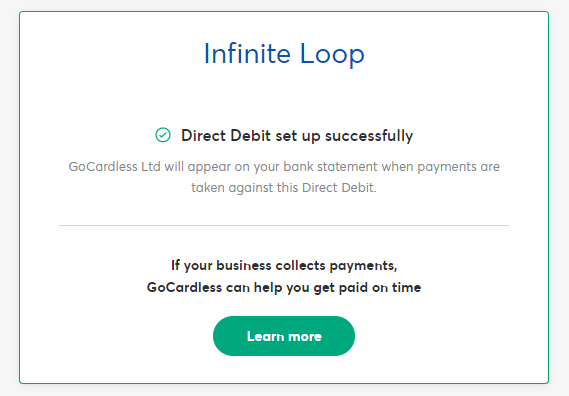
Now, you have the direct debit mandate, but in order to get money, you need to collect payments against it. – This example collects 10 GBP against the newly created direct debit mandate.
var createResponse = client.Payments.CreateAsync(new PaymentCreateRequest()
{
Amount = 1000,
Currency = PaymentCreateRequest.PaymentCurrency.GBP,
Links = new PaymentCreateRequest.PaymentLinks()
{
Mandate = mandate,
},
Metadata = new Dictionary<string, string>()
{
{“invoice_number”, “001”}
},
IdempotencyKey = SessionToken
}).Result;Payment payment = createResponse.Payment;
Console.WriteLine(payment.Id);
Now, the one thing about direct debit payments, is that there is a big delay between submitting the direct debit, and getting your money. It’s not like credit cards, where the payment is confirmed as soon as you get confirmation.
So, in order to handle out-of-band events from GoCardless, you need to handle webhooks, which I’ve created as follows (default.aspx)
protected void Page_Load(object sender, EventArgs e)
{
// start ngrok like follows
// ngrok http –host-header=rewrite localhost:12193
var requestBody = Request.InputStream;
var requestJson = new StreamReader(requestBody).ReadToEnd();
var secret = ConfigurationManager.AppSettings[“GoCardlessWebhookSecret”];
var signature = Request.Headers[“Webhook-Signature”] ?? “”;foreach (Event evt in WebhookParser.Parse(requestJson, secret, signature))
{
switch (evt.Action)
{
case “created”:
System.Diagnostics.Debug.WriteLine(“Mandate ” + evt.Links.Mandate + ” has been created, yay!”);
break;
case “cancelled”:
System.Diagnostics.Debug.WriteLine(“Mandate ” + evt.Links.Mandate + ” has been cancelled”);
break;
}
}
}
I’ve run it in Visual Studio embedded webserver, it obviously crashes, since there is no post data. But I then use ngrok to proxy the local webserver to the internet;
using the command
ngrok http –host-header=rewrite localhost:12193
Where 12193 is the port that the VS webserver chose.
When ngrok generates a custom domain, I add this into the webhook settings on GoCardless.
Here, for example, is the event when a mandate is cancelled;
{
“events”: [
{
“id”: “EVTESTFWPNEMJP”,
“created_at”: “2019-07-30T16:12:05.407Z”,
“resource_type”: “mandates”,
“action”: “cancelled”,
“links”: {
“mandate”: “index_ID_123”
},
“details”: {
“origin”: “bank”,
“cause”: “bank_account_closed”,
“scheme”: “ach”,
“reason_code”: “R14”,
“description”: “This bank account has been closed as the customer is deceased.”
},
“metadata”: {}
}
]
}
and here is one when a payment has been confirmed.
{
“events”: [
{
“id”: “EVTESTECKZWPZW”,
“created_at”: “2019-07-30T16:15:03.995Z”,
“resource_type”: “payments”,
“action”: “confirmed”,
“links”: {
“payment”: “index_ID_123”
},
“details”: {
“origin”: “gocardless”,
“cause”: “payment_confirmed”,
“description”: “Enough time has passed since the payment was submitted for the banks to return an error, so this payment is now confirmed.”
},
“metadata”: {}
}
]
}
Determine the colour of an object in an image using C# #ImageProcessing

We are going to add a new field to the data on CarImagery.com that shows the colour of the vehicle, and here is the image processing script that I used to determine the colour of the image.
First off, here’s the steps in broad strokes.
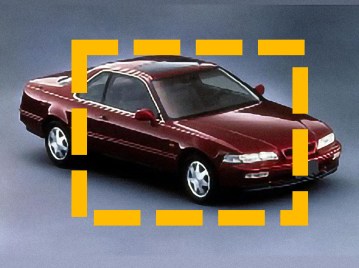
- Load the image from a URL
- Crop the image to the middle half, to discard some of the background.
- Average all the colours in the selected area
- Match the colour to the closest named colour, like “Red”, “Blue”, “Black” etc.
So, step 1, here’s how I load an image from a URL into a 2D array of Color[,] objects.
public static Color[,] ToColourArray(Uri url)
{
var wc = new WebClient();
var bData = wc.DownloadData(url);
return ToColourArray(bData);
}public static Color[,] ToColourArray(byte[] img)
{
Stream sInput = new MemoryStream(img);
var imgOriginal = Image.FromStream(sInput) as Bitmap;
var img2D = new Color[imgOriginal.Width, imgOriginal.Height];
for (var i = 0; i < imgOriginal.Width; i++)
{
for (var j = 0; j < imgOriginal.Height; j++)
{
var pixel = imgOriginal.GetPixel(i, j);
img2D[i, j] = pixel;
}
}
return img2D;
}
Now, once I have an array of Color[,] objects, I can more easily manipulate them. Here is how I crop the image to the center, something like this;
public static Color[,] CropMiddle(Color[,] img)
{
var width = img.GetLength(0);
var height = img.GetLength(1);
var rectangle = new Rectangle((int)(width * 0.25), (int)(height * 0.25), width / 2, height /2 );
var imgOutput = new Color[width/2,height/2];
for (var i = rectangle.Left; i < rectangle.Right; i++)
{
for (var j = rectangle.Top; j < rectangle.Bottom; j++)
{
imgOutput[i – rectangle.Left, j – rectangle.Top] = img[i, j];
}
}
return imgOutput;
}
Now, I average the colours within this area;
public static Color AverageColour(Color[,] img)
{
var width = img.GetLength(0);
var height = img.GetLength(1);
var rectangle = new Rectangle(0, 0, width , height);
int r = 0 , g = 0, b = 0;
for (var i = rectangle.Left; i < rectangle.Right; i++)
{
for (var j = rectangle.Top; j < rectangle.Bottom; j++)
{
r += img[i, j].R;
g += img[i, j].G;
b += img[i, j].B;
}
}
r /= width * height;
g /= width * height;
b /= width * height;
return Color.FromArgb(r, g, b);
}
Which leaves me with a Dark brown, specifically #45373B

Then, we need to map this colour to a set of named colours, there are a number of ways of doing this. The most simple way is to measure the euclidean distance (Root of the square of the distance) between the R, G, and B values. However, I found that comparing the Hue and Saturation works better in terms of how we perceive colours.
public static Color GetClosestColour(Color baseColour)
{
Color[] colourArray =
{
Color.Red,
Color.Black,
Color.White,
Color.Blue,
Color.Yellow,
Color.Green,
Color.Gray
};
var colors = colourArray.Select(x => new { Value = x, Diff = CustomColourDifference(x, baseColour) }).ToList();
var min = colors.Min(x => x.Diff);
return colors.Find(x => x.Diff == min).Value;
}
Specifically, what I did here, was say that if the Saturation is less than 10%, then the colour is grayscale (i.e. White, black or gray), otherwise it’s a fully saturated colour (Red, Blue, Green, Yellow, etc.), I’ve called this the CustomColourDifference Function
private static int CustomColourDifference(Color c1, Color c2)
{
int distance = 0;
if (c2.GetSaturation() < 0.1)
{
// Near 0 is grayscale
distance = (int)Math.Abs(c1.GetSaturation() – c2.GetSaturation());
}
else
{
distance = (int)Math.Abs(c1.GetHue() – c2.GetHue());
}
return distance;
}
Which gives me Color.Red. – Which I went on to store in the database, which is outside of the scope of this article.
Free #Alexa Skill for Air Quality in Northern Ireland – #OpenSource
This is a free skill available for Alexa, that you can enable here;
https://smile.amazon.co.uk/Open-Merchant-Account-Ltd-Northern/dp/B07TSRZCMT/ref=sr_1_1
It’s open source, and open to improvements and suggestions by anyone interested in collaborating.
You can ask it questions such as “Alexa, ask air quality northern Ireland what is the level of nitrous oxide in Belfast“, or ask about particulate matter, carbon monoxide, ozone, or sulfur dioxide.
The data itself is courtesty of the Northern Ireland Department of Environment. via AirQualityNI.
At a high level, this skill runs on the Alexa platform, which hooks into Amazon’s Lambda service, running NodeJS. From there, it connects to an API, which is described here; https://github.com/infiniteloopltd/airquality – Which is hosted on a Windows server, and makes the connection on to the AirQualityNI website, and dynamically converts CSV data to the more readable JSON format.
Here is a run down on the constituent parts
The Alexa interaction model is defined here; https://github.com/infiniteloopltd/AirQuality/blob/master/Alexa/interaction.json
This defines the phrases that can be used with the skill, such as
“What is the level of Nitrous oxide in {city}“
Where {city} is of type AMAZON.GB_CITY, this is interpreted as the NitrogenOxideIntent, and passed to the Lambda handler at index.js here;
https://github.com/infiniteloopltd/AirQuality/blob/master/Lambda/index.js
This, then checks the intentName, and if it’s equal to NitrogenOxideIntent, then handleNitrogenOxideIntent is called, which then calls airQuality.NitrogenOxide(..), which is defined here:
https://github.com/infiniteloopltd/AirQuality/blob/master/Lambda/airquality.js
The NitrogenOxide() function calls DescribePollutants(), passing a function to filter the data by city, and these three types of Nitrogen-Oxide pollutants; “NO“,”NO₂” and “NOₓ as NO₂“. DescribePollutants() then makes an HTTP request to http://airquality.derrycreativescollective.com/, which returns yesterday’s mean values of air pollutants in Northen Ireland. – It then formats the response into a spoken string, for example, using NamePollutant() to convert chemical formulae like “NO₂” to “Nitrogen Dioxide”.
Please, feel free to enable the skill on your alexa device, and give it a good rating, also feel free to contact me if you’d like to build upon this skill or API.
Air Quality #API for Northern Ireland

AirQuality
This is a simple API based on the data available from http://www.airqualityni.co.uk/ by default, it will return a daily mean of Yesterday’s Automatic Monitoring Data for all pollutants, for all regions in northern ireland.
To specify a specific date, other than yesterday, use a date parameter in the querystring, such as http://airquality.derrycreativescollective.com/?date=01/01/2019
Source: https://github.com/infiniteloopltd/AirQuality
Sample data:
[
 {
  "Date": "03/07/2019",
  "Site": "Armagh Lonsdale Road",
  "Pollutant": "NO",
  "Daily_Mean": "26",
  "Status": "P",
  "Unit": "µg/m³"
 },
 {
  "Date": "03/07/2019",
  "Site": "Armagh Lonsdale Road",
  "Pollutant": "NO₂",
  "Daily_Mean": "17",
  "Status": "P",
  "Unit": "µg/m³"
 },
Developed by http://www.derrycreativescollective.com / http://www.infiniteloop.ie
#Webcam streamer #app using C#

This is a bit of a resurrection of an old project http://mobilewebcam.co.uk/ – How it works, is that there is a iOS App available here “https://apps.apple.com/us/app/mobile-webcam/id652758590” which reads images that are posted to a URL via a Windows application that is downloadable here; http://j.mp/webpalm – and there is a Webservice here; http://www.mobilewebcam.co.uk/webcam.asmx
So, bascically, the windows application uploads images contstantly to the service via the webservice, and the mobile application reads the url of where the image should be from the web service, and constantly refreshes the image. If the connection is fast enough, it looks like video – although always a bit jerky.
Is it a great design, no – but to be honest, for me, this was about bringing an old app and website back to life, and I was surprised it still worked, all I did was renew the expired domain name!
You can probably see the age, from the links to Palm and Windows Phone, both of which are obsolete now!
#Unsplash #API using C#

Unsplash is a great source of free photos, that you can use in your websites, and it also offers an API that allows you to integrate free image searches into your app. This might be an easy way to add a splash of colour to features that otherwise might just have a placeholder image.
In order to use their API, you need to register as a developer with them, then create an application, and with that you’ll get your access key and secret key. For this application, I’m only using the access key, since I’m only looking at public data.
So, for those who want to cut right to the code, here is the github repo: https://github.com/infiniteloopltd/unsplash and here is a demo http://unsplash.apixml.net/
The page is written in bootstrap and jquery, with the results rendered using Mustache. The magic happens with a call from the javascript to an ASPX page with this AJAX call;
function callAPI(searchTerm) {
    if (searchTerm === "") {
        bootbox.alert("Please enter a search term");
        return;
    }
    $("#btnSearch").addClass("disabled");
    console.log("searching: " + searchTerm);
    $.getJSON("/search.aspx?searchTerm=" + searchTerm,
        function (data) {
            $("#btnSearch").removeClass("disabled");
            if (data.results.length === 0) {
                bootbox.alert("Sorry, No Results");
            }
            var tpl = $("#tplItem").html();
            var strHtml = Mustache.render(tpl, data);
            $("#divResults").html(strHtml);
        });
}
Then we just proxy the call to the unsplash /search/photos API call as follows;
var searchTerm = Request.QueryString[“searchTerm”];
if (string.IsNullOrEmpty(searchTerm))
{
throw new Exception(“searchTerm is required”);
}
var strUrl = “https://api.unsplash.com/search/photos?”;
strUrl += “client_id=c9492064c857d14c8704afd5e85e22df1413d97f54002f62037313049395b3c9”;
strUrl += “&query=” + searchTerm;
/*
query Search terms.
page Page number to retrieve. (Optional; default: 1)
per_page Number of items per page. (Optional; default: 10)
collections Collection ID(‘s) to narrow search. If multiple, comma-separated.
orientation Filter search results by photo orientation. Valid values are landscape, portrait, and squarish.
*/
var wc = new WebClient();
var strJson = wc.DownloadString(strUrl);
Response.Write(strJson);
Once the json is back, we can render it with the following Mustache template
   {{#results}}
        <a href="{{urls.full}}" class="list-group-item" target="_blank">
            <img src="{{urls.thumb}}" style="width: 100px; height: 100px; padding-right:10px" >{{alt_description}}
            <span class="badge badge-dark">{{likes}} Likes</span>
        </a>
        {{/results}}
#OCR using #Azure Cognitive services

OCR or Optical Character Recognition is the process of extracting text from an Image. Microsoft Azure offers a service within Azure, called “Computer Vision”, which offers a free tier, that you can use to run small batches of OCR on images.
Here’s some sample code to use it in C#. I’ve used the Nuget package Newtonsoft.JSON for Json processing. I’ve also omitted the key, which you can get from Azure
private static string OcrUsingAzure(string url)
{
const string strUrl = “https://westeurope.api.cognitive.microsoft.com/vision/v1.0/ocr?language=unk&detectOrientation=true&enhanced=True”;
var wc = new WebClient();
wc.Headers[“Ocp-Apim-Subscription-Key”] = “xxxxxxx”;
var jPost = new { url = url };
var strPost = JsonConvert.SerializeObject(jPost, Formatting.Indented);
var strJson = wc.UploadString(strUrl, “POST”, strPost);
var jObject = JObject.Parse(strJson);
var strOutput = “”;
foreach (var region in jObject[“regions”])
{
foreach (var line in region[“lines”])
{
foreach (var word in line[“words”])
{
strOutput += word[“text”] + ” “;
}
strOutput += Environment.NewLine;
}
}return strOutput.Trim();
}
You pass in a url of an image with some text, and it spits out the text the other side.
If you know in advance the language of the document, i.e. english, you can improve the accuracy by changing the language parameter in the Querystring.

