Bizspark WSDL xsd=xsd2 error #solved

When connecting to a Bizspark based WSDL webservice (.svc) endpoint, via add service reference in visual studio (same error with WSDL.exe), then I got this error;
The document was understood, but it could not be processed.
– The WSDL document contains links that could not be resolved.
– There was an error downloading ‘?xsd=xsd2’.
– Unable to connect to the remote server
– A connection attempt failed because the connected party did not properly respond after a period of time, or established connection failed because connected host has failed to respond
Now, I checked the WSDL, and it looked like valid XML, but I did see a reference to a URL that had a reference to a URL which had the ?xsd=xsd2 querystring, and didn’t actually go anywhere when I clicked it.
So, I then had a look at the webservice homepage again, and noticed that you can use an alternative WSDL document, which combines all the nested XSD’s in one: using ?singleWsdl in the querystring.
Key/Value storage using #Sqlite in #Cordova / #Phonegap

When offline data storage needs in a PhoneGap / Cordova application outgrow the 5Mb limits of LocalStorage, then you need to turn to Sqlite. However, this doesn’t mean that you have to redesign everything. Perhaps you are still happy with key/value storage. So, here’s two simple function calls to save and load data from a simple 2 column database table using Cordova / Phonegap and the plugin from litehelpers
function SqlStorageSetItem(key,value)
{
// Location 2 – not backed to iCloud
var db = window.sqlitePlugin.openDatabase({name: “sql.db”, location: 2}, function(){
console.log(“Opened database ok”);
}, function(err){
console.log(‘Open database ERROR: ‘ + JSON.stringify(err));
});db.executeSql(“Create table if not exists keyValuePair (key,value);”,[], function(res){
console.log(“Created table if not already present”);
});db.executeSql(“select key from keyValuePair where key='” + key + “‘”,[],function(res){
if (res.rows.length == 0)
{
console.log(“Key not present, inserting row”);
db.executeSql(“insert into keyValuePair (key,value) values (‘” + key + “‘,'” + value + “‘)”,[], function(res){
console.log(“Added ” + key + ” to keyValuePair database”);
});
}
else
{
db.executeSql(“update keyValuePair set value='” + value + “‘ where key = ‘” + key + “‘”,[], function(res){
console.log(“Updated ” + key + ” to keyValuePair database”);
});
}
});
}function SqlStorageGetItem(key,callback)
{
// Location 2 – not backed to iCloud
var db = window.sqlitePlugin.openDatabase({name: “sql.db”, location: 2}, function(){
console.log(“Opened database ok”);
}, function(err){
console.log(‘Open database ERROR: ‘ + JSON.stringify(err));
});db.executeSql(“select value from keyValuePair where key='” + key + “‘”,[],function(res){
if (res.rows.length == 0)
{
console.log(“No matching key found”);
callback(null);
}
else
{
console.log(“Key found”);
callback(res.rows.item(0).value);
}
});
}
The one key difference, is that the SqlStorageGetItem function is asynchronous, so you have to pass a callback to it, in order to get the value.
Unofficial LinkedIn API in .NET (C#)
The LinkedIn API has of late been very much limited to very basic functionality, and you may want to get more information out of it.
I based this API on these two sources
// https://github.com/nickls/linkedin-unofficial-api
and
// https://www.tarlogic.com/blog/usuarios-y-direcciones-de-correo-con-linkedin-harverster/
Unfortunately, this code is actually not suitable as a web service or from a website, since LinkedIn will detect that the login request is coming from a unusual IP (location), and kick you out. But it would be useful for client-side code.
So, here’s the login code – at a high level
HttpOverTcpRequest http = new HttpOverTcpRequest();
var welcomeRaw = http.Request(“https://www.linkedin.com/uas/authenticate”);
var welcome = http.ParseHttpResponse(welcomeRaw);
var lCookies = welcome.Headers[“Set-Cookie”];
lCookies.RemoveAll(c => c.Contains(“delete me”) || c.Contains(“deleteMe”)); // Remove empty cookies
var jSessionIdRaw = lCookies.First(c => c.Contains(“JSESSIONID”));
var jSessionId = jSessionIdRaw.Split(new[] { ‘;’ })[0].Substring(12);
var postdata = “session_key=” + username + “&session_password=” + password + “&JSESSIONID=”+ jSessionId;
var loginRaw = http.Request(“https://www.linkedin.com/uas/authenticate”, postdata, lCookies);
var login = http.ParseHttpResponse(loginRaw);
var lCookies2 = login.Headers[“Set-Cookie”];
lCookies.AddRange(lCookies2);
Then, you need to keep hold of your lCookies array, and pass it back in when making requests such as;
// /li/v1/pages/you
var YouRaw = http.Request(“https://touch.www.linkedin.com/” + query, lCookiesFromDb);
var you = http.ParseHttpResponse(YouRaw);
var strJson = RemoveQuirks(you.Body);
Response.Write(strJson);
Send Email via client-side Javascript

Typically, if you want to send an Email via Javascript, like in response to a feedback form, or other client-side user interaction. Then you end up having to write server-side code to send the email, and then client side code to make an Ajax call to the server, or force the user to move to another page.
Tired of writing this code over and over again for every web project I did, and increasingly every Phonegap App I wrote, I decided to write a general script that can send an email from Javascript, with no server side code required. – and no dependencies, like jQuery.
So, here’e the website http://www.smtpjs.com
It works as follows, you add a script reference to
http://smtpjs.com/smtp.js
Then you send the email like so…
Email.send("from@you.com",
"to@them.com",
"This is a subject",
"this is the body",
"smtp.yourisp.com",
"username",
"password");
But Wait!!!, I can hear you scream… My username and password are visible in client side script. – So The trick to this, is that you can encrypt the credentials on SMTPJS.com and receive a security token, and then use this to send the email instead.
In which case you can send Email as follows
Email.send("from@you.com",
"to@them.com",
"This is a subject",
"this is the body",
{token: "63cb3a19-2684-44fa-b76f-debf422d8b00"});
Which is much more secure, and we’d recommend this even if your code is packaged inside a Phonegap/Cordova App.
Call an ASMX webservice from Java
This is by no means the most elegant way of doing this, and I’d actively encourage using better code, but this works, and you’re welcome to copy it.
It uses the Norwegian asmx car lookup service here; http://no.registreringsnummerapi.com/developers.html
import java.net.*;
import java.io.*;
import org.w3c.dom.*;
import javax.xml.parsers.*;
import java.io.*;public class HelloWorld {
public static void main(String[] args) {
try{String host = “www.regcheck.org.uk”;
Socket socket = new Socket(host, 80);
// change yourusernamehere
String request = “GET http://www.regcheck.org.uk/api/reg.asmx/CheckNorway?RegistrationNumber=BS23162&username=yourusernamehere HTTP/1.0\r\n\r\n”;
OutputStream os = socket.getOutputStream();
os.write(request.getBytes());
os.flush();InputStream in = socket.getInputStream();
StringBuilder sb=new StringBuilder();
BufferedReader br = new BufferedReader(new InputStreamReader(in));
String read;while((read=br.readLine()) != null) {
//System.out.println(read);
sb.append(read);
}br.close();
String strXml = sb.toString();
int intStart = strXml.indexOf(“<?xml”);
strXml = strXml.substring(intStart);
//System.out.print(strXml);
socket.close();DocumentBuilderFactory factory = DocumentBuilderFactory.newInstance();
DocumentBuilder builder = factory.newDocumentBuilder();
ByteArrayInputStream input = new ByteArrayInputStream(strXml.getBytes(“UTF-8”));
Document doc = builder.parse(input);
NodeList nList = doc.getElementsByTagName(“Description”);
Node nNode = nList.item(0);
System.out.print(nNode.getTextContent());
}
catch(Exception ex)
{
System.out.print(“Error”);
}}
}
Resizing App Preview videos using EasyWMV
iMovie is a simple and intuitive app for creating AppPreview videos, but, what’s really annoying is that it only creates appPreview videos compatible with 4 inch iPhone displays – Like the iPhone 5s ? – really old.
You really need to have videos for the iPhone 6s, and 6 Plus. But before you buy QuickTime Pro, here’s a free way.
EasyWMV’s demo version is limited to 1 minute of video, but that’s fine for App Previews, which are only 30 seconds anyway. Now, you need to fiddle with the settings.
For the iPhone 6 Plus (5.5 inch), I selected Custom size – 1080×1920.
Deselect “Preserve aspect ratio”
Drop the bit rate down below 1200kbps.
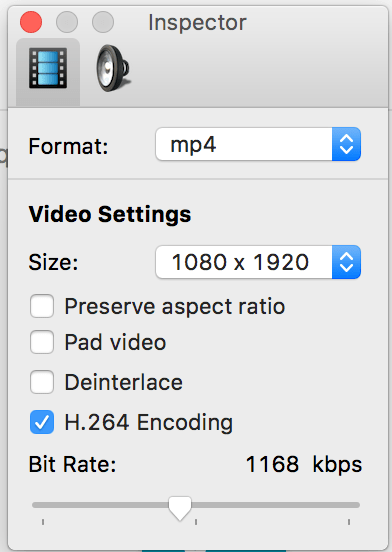
Now for the techy stuff, how I diagnosed this – I uploaded a video with the bit rate too high, and got a vague warning from iTunes Connect. I then looked in inspector for more details and saw this:
{
“statusCode” : 400,
“errorCodes” : [ “MOV_H264_LEVEL_TOO_HIGH”, “MOV_VIDEOCODEC_NOT_ACCEPTABLE_FOR_VIDEOTYPE” ],
“suggestionCode” : “MOV_RESAVE_LOWER_LEVEL”,
“nonLocalizedMessage” : “H264 Level is too high. Please refer to Apple’s documentation for appropriate levels.”,
“localizedMessage” : “The H264 Level is too high. Please refer to Apple’s documentation for appropriate formats.”
}
Which according to apple, this is the maximum specs:
| H.264 | ProRes 422 HQ only | Notes |
|---|---|---|
| Target Bit Rate | 10-12 Mbps | VBR ~220 Mbps |
And 12Mbps translates to 12000 Kbps
Then you get this a success in the trace once it works:
{
“responses” : [ {
“url” : “http://a364.phobos.apple.com/us/r30/VideoSource60/v4/0f/8d/42/0f8d42b0-c7a1-3bbc-0fd9-47e6ce27cd4b/pr_source.mp4?downloadKey=1450740609_4e0cd82c5efe91f96becf577bbc3cdc4”,
“token” : “VideoSource60/v4/0f/8d/42/0f8d42b0-c7a1-3bbc-0fd9-47e6ce27cd4b/pr_source.mp4”,
“groupToken” : {
“groupToken” : “VideoSource60/v4/0f/8d/42/0f8d42b0-c7a1-3bbc-0fd9-47e6ce27cd4b”,
“pool” : “VideoSource60”,
“syntaxVersion” : “HASH_MOUNT_UUID_GROUP”
},
“blobString” : “{\”token\”:\”VideoSource60/v4/0f/8d/42/0f8d42b0-c7a1-3bbc-0fd9-47e6ce27cd4b/pr_source.mp4\”,\”type\”:\”MZPurpleSoftwarePromoVideoFileType.SOURCE\”,\”originalFileName\”:\”App Preview webcam-1.mp4\”}”,
“descriptionDoc” : “<?xml version=\”1.0\” encoding=\”UTF-8\” standalone=\”no\”?><!–Generated by the FoghornLeghorn Quicktime MediaDescriptionGenerator, version 1.24–><!–File URL: \”\”–><movie xmlns:ma=\”http://beans.media.leghorn.jingle.apple.com\” codecs=\”avc1.6742C0, mp4a.40.2\” type=\”mpeg4\”><describer><ma:name>FoghornLeghorn MPEG-4 Parser</ma:name><ma:version>1.24</ma:version></describer><clock poster_time=\”0\” preview_duration=\”0\” preview_time=\”0\” time_scale=\”1000\” total_duration=\”22016\”/><tracks><video enabled=\”true\” index=\”0\” type=\”vide\”><track_id>1</track_id><language numeric=\”21956\”>und</language><alternate_group>0</alternate_group><matrix identity=\”true\”/><data_size units=\”bytes\”>2745711</data_size><duration milliseconds=\”21967\” track_duration=\”21967\” units=\”milliseconds\”>21967</duration><edit_list count=\”1\” empties=\”0\” normal_rate=\”true\”><edit_list_entry media_rate=\”1.0\” media_time=\”2\” track_duration=\”21967\”/></edit_list><sample_description_count>1</sample_description_count><duration_statistics mean_duration=\”1.0\” time_scale=\”30\” total_duration=\”659\” uniform=\”true\”/><user_data_atoms/><data_rate units=\”Kb/s\”>976.50415</data_rate><data_rate_statistics units=\”Kb/s\”><peak first_media_DTS=\”99\” last_media_DTS=\”99\”>2719</peak></data_rate_statistics><graphics_mode>copy</graphics_mode><codec name=\”H.264\” type=\”avc1.6742C0\”>avc1</codec><encoded_dimensions><width>1080</width><height>1920</height></encoded_dimensions><display_dimensions><width>1080</width><height>1920</height></display_dimensions><track_dimensions><width>1080</width><height>1920</height></track_dimensions><frame_rate_mode>CFR</frame_rate_mode><frame_rate>30.0</frame_rate><field_dominance>progressive</field_dominance><sample_description><avcC><profile>Baseline</profile><compatability>192</compatability><level>4.0</level><nal_units><picture_parameter_sets><pic_parameter_set entropy_coding_mode_flag=\”0\” pic_parameter_set_id=\”0\” seq_parameter_set_id=\”0\”/></picture_parameter_sets></nal_units><raw_avcc>0142C028FFE1001A6742C028D9004403C797C044000003000400000300F03C60C92001000468CB8CB2</raw_avcc></avcC></sample_description><maximum_sample_size>81858</maximum_sample_size></video><sound enabled=\”true\” index=\”1\” type=\”soun\”><track_id>2</track_id><language numeric=\”5575\”>eng</language><alternate_group>0</alternate_group><matrix identity=\”true\”/><data_size units=\”bytes\”>680375</data_size><duration milliseconds=\”22016\” track_duration=\”22016\” units=\”milliseconds\”>22016</duration><sample_description_count>1</sample_description_count><user_data_atoms/><data_rate units=\”Kb/s\”>241.43484</data_rate><codec name=\”aac \” type=\”mp4a.40.2\”>aac </codec><channel_layout name=\”Stereo (L R)\”><channel name=\”Left\”>L</channel><channel name=\”Right\”>R</channel></channel_layout><sample_rate units=\”kilohertz\”>48.0</sample_rate><bit_depth>16</bit_depth></sound></tracks><matrix identity=\”true\”/><itunes_metadata_atoms><itunes_metadata format=\”UTF-8\” type=\”©too\”>Lavf52.88.0</itunes_metadata></itunes_metadata_atoms><notifications><ma:notification code=\”mediaValidation.data\” level=\”INFO\”><ma:parameters><ma:entry key=\”moov.trak.1.mdia.minf.stbl.stsd.0.trackType\”>vide</ma:entry><ma:entry key=\”moov.trak.1.mdia.minf.stbl.stsd.0.dataFormat\”>avc1</ma:entry><ma:entry key=\”moov.trak.1.mdia.minf.stbl.stsd.0.vendor\”>????</ma:entry><ma:entry key=\”moov.trak.1.mdia.minf.stbl.stsd.0.temporalQuality\”>0</ma:entry><ma:entry key=\”moov.trak.1.mdia.minf.stbl.stsd.0.spatialQuality\”>0</ma:entry><ma:entry key=\”moov.trak.1.mdia.minf.stbl.stsd.0.width\”>1080</ma:entry><ma:entry key=\”moov.trak.1.mdia.minf.stbl.stsd.0.height\”>1920</ma:entry><ma:entry key=\”moov.trak.1.mdia.minf.stbl.stsd.0.hRes\”>72.0</ma:entry><ma:entry key=\”moov.trak.1.mdia.minf.stbl.stsd.0.vRes\”>72.0</ma:entry><ma:entry key=\”moov.trak.1.mdia.minf.stbl.stsd.0.frameCount\”>1</ma:entry><ma:entry key=\”moov.trak.1.mdia.minf.stbl.stsd.0.compressorName\”/><ma:entry key=\”moov.trak.1.mdia.minf.stbl.stsd.0.depth\”>24</ma:entry><ma:entry key=\”moov.trak.1.mdia.minf.stbl.stsd.0.avcC.0.version\”>1</ma:entry><ma:entry key=\”moov.trak.1.mdia.minf.stbl.stsd.0.avcC.0.profile\”>66</ma:entry><ma:entry key=\”moov.trak.1.mdia.minf.stbl.stsd.0.avcC.0.compatability\”>192</ma:entry><ma:entry key=\”moov.trak.1.mdia.minf.stbl.stsd.0.avcC.0.level\”>4.0</ma:entry><ma:entry key=\”moov.trak.1.mdia.minf.stbl.stsd.0.avcC.0.sps.0.profileIdc\”>66</ma:entry><ma:entry key=\”moov.trak.1.mdia.minf.stbl.stsd.0.avcC.0.sps.0.constraintSets\”>c0</ma:entry><ma:entry key=\”moov.trak.1.mdia.minf.stbl.stsd.0.avcC.0.sps.0.levelIdc\”>40</ma:entry><ma:entry key=\”moov.trak.1.mdia.minf.stbl.stsd.0.avcC.0.sps.0.seqParameterSetId\”>0</ma:entry><ma:entry key=\”moov.trak.1.mdia.minf.stbl.stsd.0.avcC.0.sps.0.log2MaxFrameNum\”>4</ma:entry><ma:entry key=\”moov.trak.1.mdia.minf.stbl.stsd.0.avcC.0.sps.0.picOrderCntType\”>2</ma:entry><ma:entry key=\”moov.trak.1.mdia.minf.stbl.stsd.0.avcC.0.sps.0.log2MaxPicOrderCountLsb\”>0</ma:entry><ma:entry key=\”moov.trak.1.mdia.minf.stbl.stsd.0.avcC.0.sps.0.deltaPictureAlwaysZero\”>false</ma:entry><ma:entry key=\”moov.trak.1.mdia.minf.stbl.stsd.0.avcC.0.sps.0.offsetForNonrefPic\”>0</ma:entry><ma:entry key=\”moov.trak.1.mdia.minf.stbl.stsd.0.avcC.0.sps.0.offsetForTopToBottomField\”>0</ma:entry><ma:entry key=\”moov.trak.1.mdia.minf.stbl.stsd.0.avcC.0.sps.0.numRefFramesInPicorderCntCycle\”>0</ma:entry><ma:entry key=\”moov.trak.1.mdia.minf.stbl.stsd.0.avcC.0.sps.0.numRefFrames\”>3</ma:entry><ma:entry key=\”moov.trak.1.mdia.minf.stbl.stsd.0.avcC.0.sps.0.gapsInFrameNumValueAllowedFlag\”>false</ma:entry><ma:entry key=\”moov.trak.1.mdia.minf.stbl.stsd.0.avcC.0.sps.0.picWidthInMbs\”>68</ma:entry><ma:entry key=\”moov.trak.1.mdia.minf.stbl.stsd.0.avcC.0.sps.0.picHeightInMapUnits\”>120</ma:entry><ma:entry key=\”moov.trak.1.mdia.minf.stbl.stsd.0.avcC.0.sps.0.frameMbsOnly\”>true</ma:entry><ma:entry key=\”moov.trak.1.mdia.minf.stbl.stsd.0.avcC.0.sps.0.mbAdaptiveFrameField\”>false</ma:entry><ma:entry key=\”moov.trak.1.mdia.minf.stbl.stsd.0.avcC.0.sps.0.direct8x8Inference\”>true</ma:entry><ma:entry key=\”moov.trak.1.mdia.minf.stbl.stsd.0.avcC.0.sps.0.frameCrop.left\”>0</ma:entry><ma:entry key=\”moov.trak.1.mdia.minf.stbl.stsd.0.avcC.0.sps.0.frameCrop.right\”>4</ma:entry><ma:entry key=\”moov.trak.1.mdia.minf.stbl.stsd.0.avcC.0.sps.0.frameCrop.top\”>0</ma:entry><ma:entry key=\”moov.trak.1.mdia.minf.stbl.stsd.0.avcC.0.sps.0.frameCrop.bottom\”>0</ma:entry><ma:entry key=\”moov.trak.1.mdia.minf.stbl.stsd.0.avcC.0.sps.0.vui.aspectRatio\”>1:1</ma:entry><ma:entry key=\”moov.trak.1.mdia.minf.stbl.stsd.0.avcC.0.sps.0.vui.videoSignalType.videoFormat\”>5</ma:entry><ma:entry key=\”moov.trak.1.mdia.minf.stbl.stsd.0.avcC.0.sps.0.vui.videoSignalType.videoFullRange\”>false</ma:entry><ma:entry key=\”moov.trak.1.mdia.minf.stbl.stsd.0.avcC.0.sps.0.vui.timeInfo.numUnitsInTick\”>1</ma:entry><ma:entry key=\”moov.trak.1.mdia.minf.stbl.stsd.0.avcC.0.sps.0.vui.timeInfo.timeScale\”>60</ma:entry><ma:entry key=\”moov.trak.1.mdia.minf.stbl.stsd.0.avcC.0.sps.0.vui.timeInfo.fixedFrameRate\”>false</ma:entry><ma:entry key=\”moov.trak.1.mdia.minf.stbl.stsd.0.avcC.0.sps.0.vui.bitStreamRestriction.motionVectorsOverPicBoundaries\”>true</ma:entry><ma:entry key=\”moov.trak.1.mdia.minf.stbl.stsd.0.avcC.0.sps.0.vui.bitStreamRestriction.maxBytesPerPicDenom\”>0</ma:entry><ma:entry key=\”moov.trak.1.mdia.minf.stbl.stsd.0.avcC.0.sps.0.vui.bitStreamRestriction.maxBitsPerMbDenom\”>0</ma:entry><ma:entry key=\”moov.trak.1.mdia.minf.stbl.stsd.0.avcC.0.sps.0.vui.bitStreamRestriction.log2MaxMvLengthHorizontal\”>11</ma:entry><ma:entry key=\”moov.trak.1.mdia.minf.stbl.stsd.0.avcC.0.sps.0.vui.bitStreamRestriction.log2MaxMvLengthVertical\”>11</ma:entry><ma:entry key=\”moov.trak.1.mdia.minf.stbl.stsd.0.avcC.0.sps.0.vui.bitStreamRestriction.maxNumReorderFrames\”>0</ma:entry><ma:entry key=\”moov.trak.1.mdia.minf.stbl.stsd.0.avcC.0.sps.0.vui.bitStreamRestriction.maxDecFrameBuffering\”>3</ma:entry><ma:entry key=\”moov.trak.1.mdia.minf.stbl.stsd.0.avcC.0.pps.0.ppsId\”>0</ma:entry><ma:entry key=\”moov.trak.1.mdia.minf.stbl.stsd.0.avcC.0.pps.0.spsId\”>0</ma:entry><ma:entry key=\”moov.trak.1.mdia.minf.stbl.stsd.0.avcC.0.pps.0.entropyCodingMode\”>false</ma:entry><ma:entry key=\”moov.trak.1.mdia.minf.stbl.stsd.0.avcC.0.pps.0.sliceGroupMapType\”>0</ma:entry><ma:entry key=\”moov.trak.1.mdia.minf.stbl.stsd.0.avcC.0.pps.0.bottomFieldPictureOrderInFramePresent\”>false</ma:entry><ma:entry key=\”moov.trak.1.mdia.minf.stbl.stsd.0.avcC.0.pps.0.numRefIdx10DefaultActive\”>3</ma:entry><ma:entry key=\”moov.trak.1.mdia.minf.stbl.stsd.0.avcC.0.pps.0.explicitWeightedPrediction\”>false</ma:entry><ma:entry key=\”moov.trak.1.mdia.minf.stbl.stsd.0.avcC.0.pps.0.weightedBiPredIdc\”>0</ma:entry><ma:entry key=\”moov.trak.1.mdia.minf.stbl.stsd.0.avcC.0.pps.0.chromaQpIndexOffset\”>1</ma:entry><ma:entry key=\”moov.trak.1.mdia.minf.stbl.stsd.0.avcC.0.pps.0.deblockingFilterControlPresent\”>true</ma:entry><ma:entry key=\”moov.trak.1.mdia.minf.stbl.stsd.0.avcC.0.pps.0.constrainedIntraPrediction\”>false</ma:entry><ma:entry key=\”moov.trak.1.mdia.minf.stbl.stsd.0.avcC.0.pps.0.redundantPicCountElementPresent\”>false</ma:entry><ma:entry key=\”moov.trak.1.mdia.minf.stbl.stsd.0.avcC.0.pps.0.transform8x8Mode\”>true</ma:entry><ma:entry key=\”moov.trak.2.mdia.minf.stbl.stsd.0.trackType\”>soun</ma:entry><ma:entry key=\”moov.trak.2.mdia.minf.stbl.stsd.0.dataFormat\”>mp4a</ma:entry><ma:entry key=\”moov.trak.2.mdia.minf.stbl.stsd.0.numChannels\”>2</ma:entry><ma:entry key=\”moov.trak.2.mdia.minf.stbl.stsd.0.compressionId\”>0</ma:entry><ma:entry key=\”moov.trak.2.mdia.minf.stbl.stsd.0.sampleRate\”>48000.0</ma:entry><ma:entry key=\”message\”>data</ma:entry></ma:parameters></ma:notification></notifications></movie>”
}
]
}
Get #ISO3166 Country code from #IP address in C#

Although an IP address can’t always pinpoint where a user is to the correct city, it’s pretty reliable way of getting the user’s country, and you can tailor the content for that user, i.e. show prices in GBP for UK users, and USD for USD users.
There are plenty of ways of doing this, and many services that provide this service, but this worked well for me in an ASP.NET MVC website
WebClient wc = new WebClient();
var strJson = wc.DownloadString(“http://ipinfo.io/” + Request.ServerVariables[“REMOTE_ADDR”]);
var ip = Newtonsoft.Json.Linq.JObject.Parse(strJson);
var country = ip[“country”].ToString();
WhitehatTwitterFollowers.com : a new way to boost your twitter presence

WhitehatTwitterFollowers.com is a website that gets you new twitter followers based on your chosen hashtags ; and it’s WhiteHat, which means that there’s nothing untoward about the service.
That means that it’s not a service that get’s you an instant following of 10,000 zombie twitter accounts that all seem to have random twitter handles, and come from Eblonia*, oh, and they all get cancelled by twitter after it discovers that they’ve been created by a bot.
What it does, is uses the Twitter API to automatically favourite hundreds of tweets based on your selected hashtags, and those “favourites”, get you noticed by the authors of the tweets, and we’ve seen ratios typical of 3 new followers per 100 favourites.
So, it’s not an instant win, but a slow burn. But that’s what Whitehat is all about. If you prefer the 10,000 zombie accounts, look elsewhere.
*No, Eblonia is not a real place, it’s actually a nod to Dilbert 🙂
Google Image Search No Longer Available
About 2 days ago, Google Image Search API was terminated, and attempts to call the API gives an error “No Longer Available”. There is a work around, using the Google Custom Search API, and here’s some code to do it using JQuery.
(You’ll need to get your own key, since it’s limited to 100 queries per day)
function GoogleImageSearch(searchTerm, callback)
{
var params = {};
params.q = searchTerm; // search text
params.num = 1; // integer value range between 1 to 10 including
params.start = 1; // integer value range between 1 to 101, it is like the offset
params.imgSize = “large”; // for image size
params.searchType = “image”; // compulsory
params.fileType = “jpg”; // you can leave these if extension does not matters you
params.key = “xxxxxxx”; // API_KEY got from https://console.developers.google.com/
params.cx = “xxxxxx”; // cx value is the custom search engine value got from https://cse.google.com/cse(if not created then create it).
$.get(“https://www.googleapis.com/customsearch/v1”,params,function(img){
console.log(img);
callback(img.items[0].link);
}).fail(function(y){
console.log(y);
});
}
Prerolled jqm themes #JQM #Themeroller
With the latest version of Jquery Mobile, the included themes have been made decidedly more bland, and the themes available for JQM are quite specialized, like the BlackBerry theme, NativeDroid, Flat UI etc., but if you just want something simple and attractive, here is a hack to show themes that other users have done on ThemeRoller,
Just go to the url – https://themeroller.jquerymobile.com/?ver=1.4.5&style_id=YYYYMMDD-NN
where YYYYMMDD is a date within the last 30 days, and N is a sequental number.
Most of them are un-styled, and a lot are quite ugly, but you might find a gem there,
https://themeroller.jquerymobile.com/?ver=1.4.5&style_id=20151124-15 – Cookie – colourful
https://themeroller.jquerymobile.com/?ver=1.4.5&style_id=20151124-11 – maroon
https://themeroller.jquerymobile.com/?ver=1.4.5&style_id=20151124-10 – blue green
https://themeroller.jquerymobile.com/?ver=1.4.5&style_id=20151123-10 – grey blue
https://themeroller.jquerymobile.com/?ver=1.4.5&style_id=20151123-14 – tourquize
https://themeroller.jquerymobile.com/?ver=1.4.5&style_id=20151123-15 – Grey green
https://themeroller.jquerymobile.com/?ver=1.4.5&style_id=20151123-17 – Grey cyan
https://themeroller.jquerymobile.com/?ver=1.4.5&style_id=20151123-19 – pink
https://themeroller.jquerymobile.com/?ver=1.4.5&style_id=20151123-2 – purple pink
https://themeroller.jquerymobile.com/?ver=1.4.5&style_id=20151122-10 – orange grey
https://themeroller.jquerymobile.com/?ver=1.4.5&style_id=20151122-12 – light green


