#Free #Whois #API in #PHP

Yes, I just discovered you can write your own WHOIS API in PHP in two lines of code;
$output = shell_exec(“whois ” . $_GET[“domain”]);
echo “$output”;
– Really easy.
So, you can call /whois.php?domain=google.com
Whois data is not very standardised, so be prepared to do a bit of parsing before you get what you need.
Use your own #domain on free-site providers without paying extra DomainDeflect.com

Use your own domain on free-site providers without paying extra
Have you Just designed your new website on a free website provider like Weebly, then find out they want to charge to use your own domain? Not any more!
SEO friendly site on your own domain
So, you don’t want your your website to be you.weebly.com, and you want your-cool-name.com instead? but guess what? they want money to set this up for you, and you’ve already paid for your domain name. What a rip-off!
Domain Deflect lets you use your own domain, and “deflect” it to the rubbish name that your free-site provider has allocated you. It’s free, and SEO friendly, so Google won’t know the difference.
What is Domain Deflection?
This is not URL masking, it’s not a redirect, and no, it’s not just limited to Weebly – it works with other free site providers too. A domain deflection is where we download your website, and serve it up on your own domain, not the one that Weebly has allocated to you.
You can still make changes to your site, as you usually do, and you can stop using this service whenever you want
How to get started?
Ok, you want to try this out?, ok, so the first thing you need to do is log into the website where you bought your domain name, go to the DNS settings, and add a “CNAME” record on “www” to point to “host.domaindeflect.com”. You should also add an A record on “@” to point to 95.154.244.106. Click here for a handy guide from Google on how to do this.
SEO Tips
Understanding what’s so important about your domain name
Your domain name should be considered as important as your business name. It is how people refer to your business on-line, and no self-respecting business would want to be referred to as SomeCompany.freewebsite.com – it instantly looks unprofessional and cheap.
Choosing a domain name shouldn’t be taken lightly, it should be the right balance between being brandable, and matching what your potential customers may search for online. For example, if you are a dog walking business based in Chicago, then DogWalkingChicago.com exactly matches what your customers would search, whereas SuperDooperK9.com does not match the search at all. However, If you do alot of printed advertising, then a short memorable name would be better, since there is no SEO gain in printed adverts.
If you’re not going to spend mega-bucks hiring a web designer, and want to design the site yourself, then the obvious place to start is one of the many free-website companies available, like Weebly, or the many others.
But once everything is finished, and you want to go live, you’ll quickly find out that they want money from you in order to have your own domain name, rather than the rubbish one they have allocated you.
This service allows you to stay on the “free plan” with your free website provider, but we do the mapping between your domain name and the free website. If you have more than one domain name, then you can use all of them if you want.
AvatarAPI .com now includes @DandyID and #Flickr
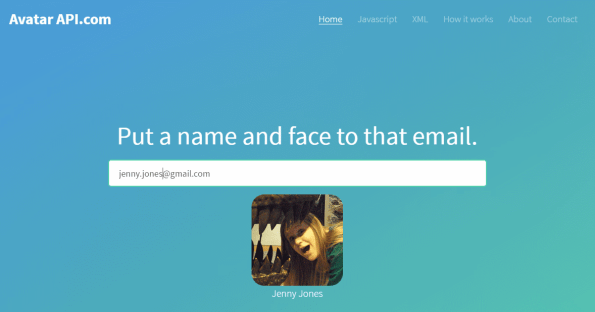
Want to pre-fill a contact form with the full name of the person contacting you?, got a database of email addresses that don’t include names? AvatarAPI.com solves that for you!
It’s even fun if you just want to put a face to that last email you were sent. Try it out! 🙂
We’ve now added extra sources, outside of Google, including Flickr and DandyID. Both significantly smaller than Google, but every little helps.
The DandyID API is quite niche, so I thought I’d share the c# implementation here:
var strUrl = “http://www.dandyId.org/api/return_profile/{APIKEY}/{0}/public”;
strUrl = string.Format(strUrl, email);
var wc = new WebClient { Encoding = System.Text.Encoding.UTF8 };
var strXml = wc.DownloadString(strUrl);
if (!strXml.Contains(“userId”)) throw new Exception(“DandyId lookup failed”);
var xmlDoc = new XmlDocument();
xmlDoc.LoadXml(strXml);
var strRealName = xmlDoc.SelectSingleNode(“userProfile/firstName”).InnerText;
strRealName += ” ” + xmlDoc.SelectSingleNode(“userProfile/lastName”).InnerText;
var strId = xmlDoc.SelectSingleNode(“userProfile/userId”).InnerText;
var Image = “http://www.dandyid.org/beta/avatar_image/” + strId;
Emergency #Website recovery service – WebserverDown.com
Has your website been hacked?, has your server crashed?, lost your backups?
This service allows you recover your website instantly from a cached copy held at the Internet Archive. This allows you get an old version of your website back online while you fix the problem with your server.
Just the thing to have close at hand during a server emergency WebserverDown.com
HOW DOES THIS WORK?
- After verifying that your website can be recovered we download the last working copy of your website from the Internet Archive
- By changing the DNS settings on your domain to point to our server, rather than your broken server, then we serve a working copy of your website instead.
- Once your server is back on-line, you change your DNS settings back, and you are back to normal
DNS Configuration
In order to direct traffic to the recovered website, then you will need to edit the DNS configuration of your domain to set your “www” CNAME record to point at host.webserverdown.com, This is typically done at the website where you bought your domain name, most common registrars are covered here.
Reverse #VAT lookup app


_SVG.svg/200px-Available_on_the_App_Store_(black)_SVG.svg.png)
Apple has just approved version 1.4 of our VAT App, which is available here;
https://itunes.apple.com/gb/app/vat/id524680827?mt=8&at=1000l9tW
It not only allows you to verify a VAT number, but also search for one based on the name of company, and/or a partial address. Thanks to http://www.vatapi.co.uk/ – an API we’ve created that lets you search automatically for company VAT numbers in most European countries.
Hope you like the app!
Refused to load gap://ready #Phonegap #Cordova #CSP
 [Error] Refused to load gap://ready because it appears in neither the child-src directive nor the default-src directive of the Content Security Policy.
I noticed in an app I just updated, that the phonegap plugins were not working, (i.e. InAppBrowser), but deviceReady was getting called, so it it was ‘sort of’ working.
When I attached the remote debugger to the app from Safari I saw the error above in the console window being fired over and over again.
The fix was to relax the CSP in the index.html, by adding
<meta http-equiv=”Content-Security-Policy” content=”default-src ‘self’ gap://ready file://* *; style-src ‘self’ ‘unsafe-inline’; script-src ‘self’ ‘unsafe-inline’ ‘unsafe-eval'”>
You have to make sure you only have one CSP meta tag, as it will only use the first one.
Custom #HttpModule to respond to every #HTTP request.

Let’s say you wanted to create a HTTP endpoint that could respond with data that is completely generated from a c# class, and independent of the structure of the Url – for example, if you wanted to create a REST based HTTP API, that could accept a very flexible Url structure.
For example, perhaps a API that allowed it’s users to specify clauses in the URL, like yourapi.com/filter/a=5 or something like that.
Anyway, you create a class that implements IHTTPHandler as follows;
using System;
using System.Web;
public class CacheModule : IHttpModule
{
public void Init(HttpApplication application)
{
application.BeginRequest += application_BeginRequest;
}
static void application_BeginRequest(object sender, EventArgs e)
{
var application = (HttpApplication)sender;
var context = application.Context;
context.Response.Write(“<b>Cache Module</b> – Requested url:” + context.Request.Url);
HttpContext.Current.Response.Flush(); // Sends all currently buffered output to the client.
HttpContext.Current.Response.SuppressContent = true; // Gets or sets a value indicating whether to send HTTP content to the client.
HttpContext.Current.ApplicationInstance.CompleteRequest();
}
public void Dispose() { }
}
Then you need to define this in the web.config;
<?xml version=”1.0″?>
<configuration>
<system.web>
<compilation debug=”true” targetFramework=”4.5″ />
<httpRuntime targetFramework=”4.5″ requestPathInvalidCharacters=”<,>,*,%,&,:,\,?”/>
</system.web>
<system.webServer>
<modules>
<add name=”CacheModule” type=”CacheModule“/>
</modules>
</system.webServer>
</configuration>
Framework CoreMedia not found error WatchOS / Cordova

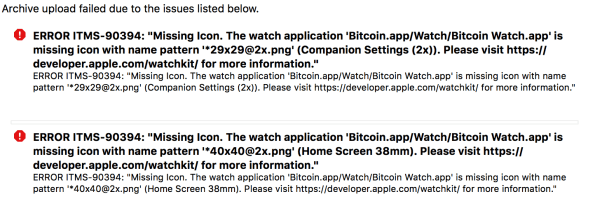
You have to make sure that all your icons for the WatchOS app (you drag the images into the Assets.XCassets file in XCode) match the required dimensions and are named WIDTHxHRIGHT@SCALEx.png. Make sure the images have no alpha channel, so export to web on Photoshop, and select No transparency, 8 bit PNG.
Modify #IIS bindings from c#

If you wanted to determine what host name an IIS website responded to dynamically, then you can use Microsoft.Web.Administration to do this. You need to run your application pool under localSystem privileges, so it’s perhaps not advisable to do on a public-facing website. You can find the DLL at Windows\system32\inetsrv
This little POC page, lists all sites on my local dev IIS, and then adds a new random binding to a site named “localhost90”
using (ServerManager serverManager = new ServerManager())
{
foreach (var site in serverManager.Sites)
{
Response.Write(site.Name);// add a random binding
if (site.Name == “localhost90”)
{
Random rnd = new Random();
int intRandomPort = rnd.Next(100, 1000);
Binding binding = site.Bindings.CreateElement(“binding”);
binding[“protocol”] = “http”;
binding[“bindingInformation”] = “:” + intRandomPort + “:”;
site.Bindings.Add(binding);
serverManager.CommitChanges();
}Response.Write(“<br>”);
Response.Write(“<ul>”);
foreach (var binding in site.Bindings)
{
Response.Write(“<li>” + binding.EndPoint + “</li>”);
}
Response.Write(“</ul>”);}
}
Get a #Temporary #Email #Address, administered via an #API

 Network Programming in .NET