“Hello World” in #GeneticAlgorithms in C#

Genetic algoritms are a computational representation of what happens in nature, how evolution solves problems, so it applies a “survival of the fittest” approach to solving a problem.
Like Machine Learning, instead of prescribing the solution to a problem you provide problem examples and corresponding solutions, and let the GA (Genetic Algorithm) try to figure out how to solve that problem.
Like in nature, (If we ignore religion for a moment!), nobody designed a cheetah to run faster than a gazelle, but when presented with a problem of a fast gazelle, the solution was to run faster than it. Other solutions, like running backwards, were not effective, and so were not selected for.
So, TL;DR; here is the github repo, which as code in C# using GeneticSharp to solve a very simple problem; https://github.com/infiniteloopltd/geneticAlgorithm_helloWorld
Here, the problem posed is simple addition;
// 1 + 1 = 2
// 2 + 2 = 4
// 3 + 2 = 5
However, you can substitute the parameters with more complex equations, and the GA will still try to solve it, it just will take longer.
The “Genes” of the GA are addition, substration, multiplation, division, and constant numbers (1,2,3). So, it will probably struggle to solve Sin(), Tan(), Cos() etc. Like in the same way that DNA is limited to making protiens, so you can’t make Petrol using DNA.
So, to wrap up this post, here is the code to run a simple equation solver using Genetic Algorithms;
static void Main(string[] args)
{
// Problem: Simple addition
// 1 + 1 = 2
// 2 + 2 = 4
// 3 + 2 = 5
var myInputs = new List<FunctionBuilderInput>
{
new FunctionBuilderInput(new List<double> {1, 1}, 2),
new FunctionBuilderInput(new List<double> {2, 2}, 4),
new FunctionBuilderInput(new List<double> {3, 2}, 5)
};
var myFitness = new FunctionBuilderFitness(myInputs.ToArray());
var myChromosome = new FunctionBuilderChromosome(myFitness.AvailableOperations, 5);
var selection = new EliteSelection();
var crossover = new ThreeParentCrossover();
var mutation = new UniformMutation(true);
var fitness = myFitness;
var chromosome = myChromosome;
var population = new Population(100, 200, chromosome)
{
GenerationStrategy = new PerformanceGenerationStrategy()
};
var ga = new GeneticAlgorithm(population, fitness, selection, crossover, mutation)
{
Termination = new FitnessThresholdTermination(0)
};
ga.GenerationRan += delegate
{
Console.Clear();
var bestChromosome = ga.Population.BestChromosome;
Console.WriteLine(“Generations: {0}”, ga.Population.GenerationsNumber);
Console.WriteLine(“Fitness: {0,10}”, bestChromosome.Fitness);
Console.WriteLine(“Time: {0}”, ga.TimeEvolving);
Console.WriteLine(“Speed (gen/sec): {0:0.0000}”, ga.Population.GenerationsNumber / ga.TimeEvolving.TotalSeconds);
var best = bestChromosome as FunctionBuilderChromosome;
Console.WriteLine(“Function: {0}”, best.BuildFunction());
};
ga.Start();
Console.WriteLine(“Evolved.”);
Console.ReadKey();
}
Cryptanalysis with #ML.NET (#AI / #ML)

Disclaimer: This approach works only when you have a limited-length plaintext, and plenty (millions) of examples of cyphertext / plaintext pairs. I achieved 90%+ accuracy with this approach, it’s not perfect, and requires several days of training (8 hours per character of plaintext)
So, imagine you have a database held in SQL server that holds a list of cyphertext and corresponding plaintext examples – even if you don’t even know the cypher used, you can still use ML.NET as a means of Cryptanalysis. Without knowing the cypher used, you can’t use brute-force as an approach.
What I did – I broke the cyphertext into individual columns – So one column represented one character of the cyphertext, and I did the same with the plaintext, breaking up the plaintext into one column per character.
Then I ran a classification model for 8 hours on 1 million rows of examples, using the ML.NET model builder, providing each column of the cyphertext as the input, and one column at a time of the plaintext as the label (output).
After 8 days, I had 8 different ML.NET models that could decode the cyphertext.
WITHOUT – even knowing what cypher was being used.
RESULT
Restoring a cancelled ML.NET trained network #AI #MachineLearning #ML.NET

If you’re using the ML.NET VS Add-in to train your models, you may find it really frustrating if the training suddenly cancels itself, or you accidentally cancel it, and if you’re doing an 8 hour train, then this can drive you nuts.
Thankfully, I found the temporary files, that it generates, and you can still use in your code, although it generates about 10 different models per algorithm, so you’ll need to experiment to find the one that works best (typically it’ll be the 9th or 10th)
So, where are the files?
<user>\AppData\Local\Temp\Microsoft.ML.AutoML
Phew!
And how to load them in?, here’s some sample code;
private static ModelOutput Predict(ModelInput input)
{if (predictionEngine == null)
{
// Create new MLContext
MLContext mlContext = new MLContext();ITransformer mlModel = mlContext.Model.Load(modelPath, out var modelInputSchema);
predictionEngine = mlContext.Model.CreatePredictionEngine<ModelInput, ModelOutput>(mlModel);
}// Use model to make prediction on input data
var result = predictionEngine.Predict(input);
return result;
}
Where you statically define the following variables;
private static PredictionEngine<ModelInput, ModelOutput> predictionEngine = null;
private static string modelPath = @””;
modelpath being the ZIP file of the model.
Super-simple way to deal with non-www #CNAME in #DNS
If you ever needed to point your domain at a external hosting provider, Blogger.com is a good example of this, and you suddenly find that the non-www version of your domain doesn’t work?
Back-up for a second, What is non-www?
non-www is your domain name without the “www” at the start. So “http://MyWebsite.com” is the non-www and “http://www.MyWebsite.com” is the with-www
If you use Blogger.com to host your blog, then you are told to use a CNAME DNS record to point your “www” domain to ghs.google.com , but you can’t set a CNAME on the “@” record (non-www”), and if you try guessing the IP, then you’ll end up breaking it.
TL DR; Want the solution already?
Just add an A record for “@” and point it to IP address 176.105.255.48 , this server will automatically redirect anything that lands there to the “www” version of the same domain.
If you want to take this further, and would like to explore more about hosting websites on your own domain, then take a look at domaindeflect.com
And for people who are techie, or paranoid, the tiny script used to do this is open source on github, here https://github.com/infiniteloopltd/nonwww
Using #MachineLearning to predict the age of a #VIN
TLDR; Source code for this is available on github here; https://github.com/infiniteloopltd/VinAge
This is a first working example of something useful that I’ve created with Microsoft’s ML.NET framework.
I’ve used the “Issue Classification” scenario, training the model on 10,000 known VIN’s and known ages, and then tested it against a VIN that wasn’t in the training data, and it successfully got the age.
It didn’t work so well on a US VIN, but I guess there needs to be more variation in the training data. Also, it took about 1 second per 100 rows to train, so I can imagine some overnight training sessions!
Antipatterns:
I had also tried this on a “Price prediction” scenario, but it gave quite innacurate results, even though the training only took 30 mins over 6 million rows.
Norwegian #VIN number #API (open source)

This website https://www.understellsnummer.com/(or in english here; https://www.understellsnummer.com/en.html) allows you to enter the VIN number of a norwegian vehicle, and search for details about it.
It’s not a VIN decoder, it looks up the exact vehicle in a database of over 10 million vehicles registered in Norway, which is what is used behind the norwegian version of our vehicle registration number lookup here; http://www.registreringsnummerapi.co.no/
The data comes from official governement sources in Norway, and is updated regularly.
Newly launched #Udemy course for Microsoft #SQL server.
This is my first Udemy course that I’ve published. It teaches you pretty much all I know about SQL server in 6 hours of videos, right from absolute beginner, to expert.
If you’re interested in finding out more about the course, please click the link below;
https://www.udemy.com/course/sql_server/?referralCode=8FFD23693EFA04445F99
If you ask nicely, I have a limted number of coupons available, if you contact me personally.
Here are the course contents;
Microsoft SQL server is the most popular database platform for Windows, and with this course, we will take you from absolute beginner to expert in just under six hours of hands-on experience.
We begin by teaching you how to install your own free copy of SQL server on your own machine, or if you prefer, to host SQL server on the cloud with Amazon Web Services or Microsoft Azure.
Following on, we teach you how to create tables, insert rows, update and delete them, and read them back. You’ll quickly learn how to write queries to filter and sort data, to group and summarize data, to run statistical queries on the data.
Once you’ve mastered the basics, we show you how to create database triggers, to manage transactions, and how to wrap up complex code as simpler code using stored procedures and user defined functions.
But, it’s not all about database development, we also teach you about database adminstration, how to backup and restore your database, and more importantly, transfer your backups to the cloud, like AWS S3 or Azure Blob storage.
We also teach you about database tuning, how to make your queries run faster, and make your system more performant, and about database security, how to protect your data, and comply with data protection laws like GDPR and CCPA.
And to wrap up, we teach you how to connect to SQL server from four different programming languages, Microsoft C# .NET Core, Node JS, Python and Java.
What you’ll learn
- Students will learn how to use the Microsoft SQL server database platform
Are there any course requirements or prerequisites?
- Students will require a Windows PC that meets the minimum specifications for installing Microsoft SQL server
Who this course is for:
- Students interested in learning about the Microsoft SQL server database platform
Online #PDB viewer for standard .NET references
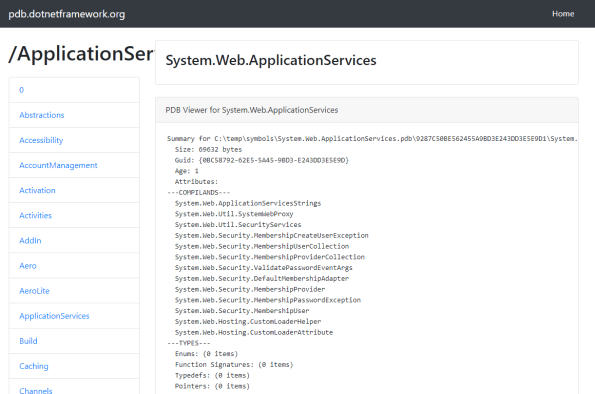
If you select the option Tools>options>Debugging>Symbols, and select to download PDB (Symbol files) from Microsoft Symbol services, then, in the event of a crash, you can step deeper into the code, and understand perhaps the underlying reason, coming from a Microsoft provided DLL.
 This website http://pdb.dotnetframework.org/ provides a viewer that lets you see what’s contained within each of the PDBs online. The text was created using the command;
llvm-pdbutil.exe pretty –all
It’s open source on GITHUB here; https://github.com/infiniteloopltd/pdb
Specifically holding data on the following PDBs;
0
Abstractions
Accessibility
AccountManagement
Activation
Activities
AddIn
Aero
AeroLite
ApplicationServices
Build
Caching
Channels
Classic
Client
Compatibility
ComponentModel
Compression
Configuration
Context
Contract
Core
CSharp
Data
DataAnnotations
DataSetExtensions
DataVisualization
Deployment
Design
Device
Discovery
Drawing
DurableInstancing
DynamicData
Engine
EnterpriseServices
Entity
Extensions
Forms
Framework
Hosting
Http
IdentityModel
Infrastructure
Instrumentation
Internals
ISymWrapper
JScript
Linq
Log
Luna
Manipulations
Messaging
Mobile
mscorlib
Net
Numerics
OracleClient
pdblist
Presentation
PresentationBuildTasks
Printing
Protocols
ReachFramework
Registration
RegularExpressions
Remoting
Ribbon
Routing
Royale
Runtime
Selectors
Serialization
ServiceModel
Services
SMDiagnostics
Soap
Speech
SqlXml
STLCLR
sysglobl
system.activities
System
Transactions
UIAutomationClient
UIAutomationClientsideProviders
VisualC
Web
Windows
WorkflowServices
Xaml
XamlBuildTask
Xml
Connect to Microsoft #SQL server using #Java and Windows Authentication.

This post outlines how to connect to a local instance of SQL server using Windows Authentication from Java.
TLDR; Here’s the github repo for anyone who wants the source;
This download assumes you are running JRE8 and on a 64 bit machine, if you have a different configuration, then this may not work, but assuming you are, then just download those files from the Github repo.
The code is as follows;
import java.sql.Connection;
import java.sql.DriverManager;
import java.sql.ResultSet;
import java.sql.Statement;public class SQLJava {
public static void main(String[] args) {
String dsn = “jdbc:sqlserver://localhost;databaseName=Library;integratedsecurity=true”;
try {
Connection conn = DriverManager.getConnection(dsn);
Statement stmt = conn.createStatement();
ResultSet result = stmt.executeQuery(“select * from students”);
while (result.next()) {
String firstname = result.getString(“Firstname”);
String surname = result.getString(“Surname”);
System.out.println(firstname + ” ” + surname);
}
conn.close();
} catch (Exception e) {
e.printStackTrace();
}
}
}
and to run this, you need
javac SQLJava.java
java -cp “.;sqljdbc42.jar” SQLJava
Note the inclusion of the -cp (classpath) switch, to ensure that the JDBC driver is included. You should also have the DLL sqljdbc_auth.dll in the same folder, otherwise this will only work with SQL authentication.
U2F API.com – a hosted service for handling hardware two factor authentication #U2F #2FA #API
U2FAPI.com is a hosted service for handling hardware two factor authentication, to make it easy for you to implement a secure alternative to SMS as a 2FA option. It requires your users to have a hardware security key such as that from HyperFido – but by using this free API, it greatly simplifies the process by moving the crypto code off your server.
To use U2F Two Factor Authentication you will need a U2F compatible hardware key such as HyperFIDO. Your website must be served via HTTPS, and you will also need to include a script tag to U2F.js as follows;
Then to register, you would use code such as;
let registerRequest = {
	challenge: 'RegisterChallenge',
	version: 'U2F_V2'
}
u2f.register("https://" + window.location.host, [registerRequest], [],
(response) => {
        fetch('https://www.u2fapi.com/api.aspx', {
            method: 'post',
            body: JSON.stringify{
                action : "REGISTER",
                data : response.registrationData
            })
            }).then(function(response) {
                return response.json();
            }).then(function(data) {
                alert(data.WebSafeKeyHandle);
        });
	}
);
Which registers the U2F device, and returns a KeyHandle, which you need to store for future logins (signing).
Then, when the user logs in, you use the sign method as follows
let registeredKey = {
  keyHandle:  keyHandle,
  version: 'U2F_V2'
}
u2f.sign("https://" + window.location.host, 'SigningChallenge', [registeredKey],
  (response) => {
    	 fetch('https://www.u2fapi.com/api.aspx', {
            method: 'post',
            body: JSON.stringify({
                action : "SIGN",
                data : response.signatureData
            })
            }).then(function(response) {
                return response.json();
            }).then(function(data) {
                alert(data.userCounter);
        });
  }
);
There is also a web service available that allows you to handle the U2F responses on the server side; This web service is accessible via https://www.u2fapi.com/api.asmx, and the WSDL can be downloaded here; https://www.u2fapi.com/api.asmx?WSDL
It is designed to be consumed via a C# (.NET) client, however, other clients can use
simple HTTPS GET and POST to access this web-service.
The service works only on Chrome, and I welcome feedback on how to improve this API in terms of compatibiliy and security. I’ve been studying U2F for a week now, but I’m no expert. But, this was just a fitting project to complete my academic interest in the device.
Happy signing!

