Archive
Load Cross Domain JSON via JSONP Proxy
A well known security constraint on modern browsers, is that AJAX requests can only be made to the server which served the page. To get around this, you can use CORS for modern browsers, or JSONP.
JSONP, however does require that the data provider wraps their JSON response in a function call, which they may not do. Therefore, an easy solution is to create a proxy that wraps JSON in a function call, such as:
public partial class JsonProxy : System.Web.UI.Page
{
protected void Page_Load(object sender, EventArgs e)
{
string link = Request.QueryString[“url”];
if (link == null || link == “”)
{
Response.Write(“Requires url parameter”);
return;
}
WebClient wc = new WebClient();
string strJson = wc.DownloadString(link);
Response.Write(“jsonp_callback(” + strJson + “);”);
}
}
Then, on the client side, a this can be used as follows (JQuery version):
<html>
<head>
<script type=”text/javascript” src=”jquery.js”></script>
<script language=”javascript”>
$(init)
function init()
{
LoadJson(“http://www.bbc.co.uk/tv/programmes/genres/comedy/schedules/upcoming.json”);
}function jsonp_callback(data)
{
$(“body”).html(“Found ” + data.broadcasts.length + ” upcoming comedy shows”);
}function LoadJson(url)
{
var s = document.createElement(“script”);
s.type = “text/javascript”;
s.src = “http://www.yourwebsite.com/jsonproxy.aspx?url=” + url;
$(“head”).append(s);
}
</script>
</head>
<body>
Please Wait.
</body>
</html>
Hosting files on Adobe’s Cloud
Adobe’s creative cloud allows 2GB of free storage, which is handy for uploading large files for personal use. But you can also use these to serve images and files on websites, like the image above. With a little trick.
1. Upload your image or file to Adobe’s cloud
2. Click on the arrow, and select send link
3. Change the slider to public
4. Select Allow Download
5. Select the link icon, and copy the url.
Now, modify the URL as follows:
https://creative.adobe.com/share/GUID
https://d2.creative.adobe.com/api/assets/GUID
Where {GUID} will be different in your case.
Cordova/PhoneGap for WP7 in Windows XP
 Normally, I develop my apps for WP7 natively using Silverlight for Windows Phone, but I thought that some of my apps would be easier to port, if I could use Phonegap (Cordova).
My home PC runs Windows XP, and VS 2010, which means that Windows Phone apps can’t be emulated, but can still be run on a real device (A better experience in any case). Unfortunately, the XNA framework for Windows Phone is not compatible with Windows XP, and Cordova / Phonegap relies heavily on this library.
So, I decided to take PhoneGap / Cordova version 2.4.0 for Windows Phone 7, take the standalone model, and then strip out all the code that relied on the XNA framework, or just anything that didn’t compile. I understand, that this does cripple many features, such as audio recording, video recording, some file operations, and perhaps other features. However, the code compiles and runs on a Windows Phone 7 device, and renders the HTML page.
You can download this library, from http://www.javatiger.com/downloads/wp7cordovaxp.zip – Should you want to develop Cordova / Phonegap Windows Phone 7 applications on Windows XP.
iOS6 support for PhoneGap 0.9.4

After 1st May 2013, Apple has begun enforcing iOS6 support, and effectively outlawed access to methods that access device UDID, for security reasons.
However, if your application is based on PhoneGap, and even if you do not access the device UDID via javascript, since the underlying PhoneGap library accesses the UDID, then Apple will reject the application. Now, the solution is to either upgrade to the latest version of PhoneGap – or a one line change 🙂
Double click on PhoneGapLib.xcodeProj then open the PhoneGapDelegate.m file, then scroll down to
– (NSDictionary*) deviceProperties
Then comment out the line
//[devProps setObject:[device uniqueIdentifier] forKey:@”uuid”];
Save the file, and then recompile your application. No more error!
Ajax HTTP status code 0 (zero)
I find that when I encounter a HTTP status code of 0 when using Ajax, it means there is some network error between the client and server, for example, a firewall issue, a network failure, or such forth.
The type of issue was spotted in code that looks like this;
$.get(“http://www.somedomain.com/yourajax.aspx”,function(data){
// Success case
}).fail(function(xhr,status){
if (xhr.status == 0)
{
// Network problem?
}
});
Of course, this is only likely to occur in cross-domain ajax, since it is unlikely for a server to serve a page, and then immediately become unreachable to ajax.
Capture webcam to file (VB.NET)

I decided to take a look again at my webcam streamer software that I wrote a few years ago for www.mobilewebcam.co.uk – to see if I could improve upon it. One of my biggest gripes with the software, was that it used the clipboard to hold the temporary image from the webcam prior to upload. This meant while the webcam software was running, the clipboard was useless.
I used the avicap32 API, which is much lower-level than the DirectX equivalent, and much more awkward to use, since you are dealing with a DLL that was never designed to work with .NET.
I’m omitting the setup code, you can probably get this from another site if you search, I just wanted to include the few lines of code required to take the image from the camera to a file:
Dim sFileName As String
sFileName = System.IO.Path.GetTempFileName
Call SendMessageAsString(lwndC, WM_CAP_FILE_SAVEDIB, 0&, sFileName)
Dim bmp As New System.Drawing.Bitmap(sFileName)
Now, SendMessageAsString is an alias of the ubiquitous SendMessage API call, with a twist as follows;
Declare Function SendMessageAsString Lib “user32” Alias “SendMessageA” (ByVal hWnd As Integer, ByVal Msg As UInteger, ByVal wParam As IntPtr, ByVal lParam As String) As IntPtr
WM_CAP_FILE_SAVEDIB is defined as WM_USER + 25 (&H400S), and lwndC is a window handle to the capture window, which is set up with capCreateCaptureWindowA.
Upload screencapture Windows Phone 7.8
After upgrading my phone to Windows Phone 7.8 from 7.1, I noticed that my screen capture app stopped working. Which was very unfortunate, since there doesn’t appear to be another way of capturing images via Windows Phone 7 (I’m not talking about WP8)
I found a snippet of code that captures screenshots from within your own app, and saves it in your media library, which is cool, but as soon as I tried to resolve the reference to new MediaLibrary(), I saw that you needed to include the Microsoft XNA framework for Wndows Phone 7, which wouldn’t be a problem, only I’m running on Windows XP, and XNA for WP7 does not install in Windows XP!
In frustration, I decided to see if I could upload the image to my server, using a script I wrote earlier to store camera images from a iPhone app, – Changing the upload folder, of course, so that I wouldn’t mix up the images.
private void Panorama_ManipulationCompleted(object sender,
ManipulationCompletedEventArgs e)
{

WriteableBitmap bmpCurrentScreenImage = new
WriteableBitmap((int)this.ActualWidth, (int)this.ActualHeight);
bmpCurrentScreenImage.Render(LayoutRoot, new
MatrixTransform());
bmpCurrentScreenImage.Invalidate();
SaveToMediaLibrary(bmpCurrentScreenImage,
100);

}

public void SaveToMediaLibrary(WriteableBitmap bitmap, int quality)
{
using (var stream = new System.IO.MemoryStream())
{
// Save the picture to the Windows Phone media library.
bitmap.SaveJpeg(stream, bitmap.PixelWidth,
bitmap.PixelHeight, 0, quality);
stream.Seek(0, SeekOrigin.Begin);
var byteArray = stream.ToArray();
string strBase64 = Convert.ToBase64String(byteArray);
WebClient webClient = new WebClient();
webClient.Headers[HttpRequestHeader.ContentType] =
"application/x-www-form-urlencoded";
var uri = new
Uri("http://yourdomain.com/upload.aspx", UriKind.Absolute);
string strPostData = "image=" +
HttpUtility.UrlEncode(strBase64);
webClient.Headers[HttpRequestHeader.ContentLength] =
strPostData.Length.ToString();
webClient.UploadStringAsync(uri, "POST", strPostData);
}
}
Note that I attached this to Panorama_ManipulationCompleted, which basically means it gets triggered every time the panorama control is scrolled, or touched, which tends to upload quite a large number of screenshots, but more is better than too few for my needs. Obviously, this code should be commented out before submitting to Microsft!
Internet Tethering with BB10

This morning, after loosing my broadband internet connection, I looked at my BB10 to see how I could tether it to my laptop, to share my mobile (3G) data connection. It worked a charm when connecting via USB – Bluetooth was another option.
It also has a handy indicator that shows how much data you are sending, and how long you are online, which matters quite a bit if you have a data cap.
To access it, select settings > Network connections > Internet Tethering
Turn it on, and connect the phone to your PC using USB.
Allow Geolocation BB10 / PlayBook (QNX)
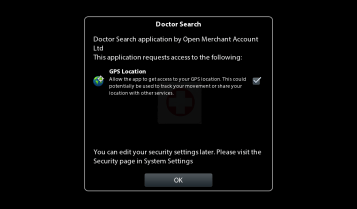
If you are porting BlackBerry WebWorks apps from BBOS to QNX, you may notice that Html5 Geolocation does not work by default. The fix is quite simple, just edit the config.xml file and add the following XML snippet (below). With this in place, the alert shown opposite will shown on first load of your application, allowing the user choose whether he wishes to allow your app access to location information.
<rim:permissions>
<rim:permit>access_location_services</rim:permit>
<rim:permit>read_geolocation</rim:permit>
</rim:permissions>
Cannot run program “C:\Program”: CreateProcess error
When building a Webworks / Phonegap app for BlackBerry, I got the following error message from ANT:
build:
[exec] [INFO] Parsing command line options
[exec] [INFO] Parsing bbwp.properties
[exec] [INFO] Validating application archive
[exec] [INFO] Parsing config.xml
[exec] [INFO] Populating application source
[exec] [INFO] Compiling BlackBerry WebWorks application
[exec] I/O Error: Cannot run program “C:\Program”: CreateProcess error=2, The system cannot find the file specified
[exec] [ERROR] RAPC exception occurred
This happened just after updating Java on my computer, so I assumed that it was something to do with Java, and that it was cutting off “Program Files” to “Program”.
After hunting around for the reference to Java that ANT uses, I spotted the file C:\BBWP\bin\bbwp.properties, which containted the following XML:
<?xml version=”1.0″ encoding=”UTF-8″?>
<wcp>
<additional>-quiet</additional>
<extension_repository>ext</extension_repository>
<jar>lib\net_rim_api.jar</jar>
<java>C:\Program files\Java\jdk1.6.0_25</java>
<rapc>bin\rapc.exe</rapc>
<wcp_template>device_templates</wcp_template>
</wcp>
So, using the old DOS hack, I changed Program files to “Progra~1”
<java>C:\Progra~1\Java\jdk1.6.0_25</java>
And re-ran ANT BUILD, and it worked!
 Network Programming in .NET