Archive
#Opensource #javascript library to help localize your multi-lingual website
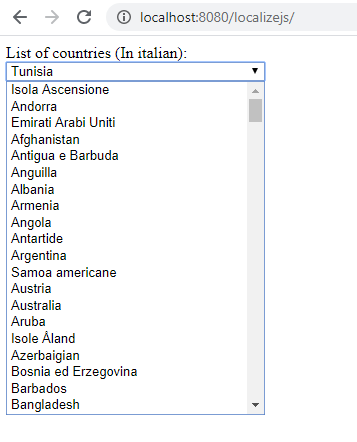
When developing a multi-lingual website, there are common elements that can be costly to translate if you are paying per-word, and it’s too risky to resort to automatic translation. How embarassing would it be to have Turkey (the country) translated as Tacchina (a bird)?
However, the folks at Unicode Inc, have a freely downloadable zip file, that contains common translations in every conceiveable language, known as the CLDR, and this is a javascript file that leverages the CLDR, so you don’t have to translate a list of countries (or languages, time zones, etc.)
So, to get to the point, You can clone the repo from github here; https://github.com/infiniteloopltd/LocalizeJS
It’s open source, so feel free to fork, and develop upon this library, as long as you keep the copyright notices in place
The simple example here, is to load the italian localisation file (it.xml), and then use it to display a drop down of countries as follows;
Localize.Load(“it.xml”).then( language => initializeWith(language));
function initializeWith(language)
{
var territories = language.localeDisplayNames.territories.territory;
var countries = territories.filter(country => country.type.length==2
&& country.alt == null);var CountriesSelect = document.getElementById(“countries”);
for(var i in countries)
{
var country= countries[i];
var el = document.createElement(“option”);
el.text = country[“#text”];
el.value = country.type;
CountriesSelect.add(el);
}
CountriesSelect.value=”US”;
}
Of course, if you are interested in creating a multi-lingual website, you should also check out http://www.resxtranslate.com – especially if you have a .NET based website.
Manage your #API firewall from within the dashboard

We’ve always had a way to limit access by IP on our websites like http://www.vehicleregistrationapi.com/ – however, it has always been on request, and that both takes time, and more importantly, if a customer didn’t know about the feature, their API access can be open to the world.
So, in order to make best practice easy, we’ve added a “Firewall” feature to the dashboard, where you can add and remove IP addresses from the firewall.
By default, if you don’t have any IP addresses in the Firewall, it is open to any user on the Internet, but if you want to lock it down – and you should – you can add your server IPs and office IPs to this list. The change takes effect immediately.
You can also use the bin icon to remove IP addresses that you no longer need, so you can keep the list tidy, and your access secure.
Determine the age of an Italian car from it’s number plate

The first two letters of an italian number plate increment slowly over years, and it’s possible to roughly estimate the age of an italian car by the first two letters of it’s number plate. Assuming it’s in the modern format of AA-NNN-AA rather than AA-NNNNN (Where A is Alpha and N is Numeric).
This is a rough table based on over 10,000 examples.
| Prefix | Year |
| AB | 1994 |
| AC | 1995 |
| AF | 1995 |
| AG | 1995 |
| AH | 1995 |
| AJ | 1995 |
| AK | 1996 |
| AL | 1996 |
| AP | 1997 |
| AS | 1997 |
| AT | 1997 |
| AV | 1997 |
| AW | 1998 |
| AX | 1998 |
| AY | 1998 |
| BA | 1998 |
| BB | 1998 |
| BC | 1998 |
| BD | 1998 |
| BE | 1999 |
| BG | 1999 |
| BH | 1999 |
| BJ | 1999 |
| BK | 1999 |
| BL | 1999 |
| BM | 1999 |
| BN | 2000 |
| BP | 2000 |
| BR | 2001 |
| BT | 2001 |
| BV | 2001 |
| BX | 2001 |
| BY | 2001 |
| BZ | 2001 |
| CA | 2001 |
| CB | 2002 |
| CE | 2002 |
| CF | 2002 |
| CG | 2003 |
| CJ | 2003 |
| CK | 2003 |
| CL | 2004 |
| CN | 2004 |
| CS | 2004 |
| CT | 2004 |
| CV | 2004 |
| CW | 2004 |
| CX | 2004 |
| CY | 2004 |
| CZ | 2005 |
| DA | 2005 |
| DB | 2005 |
| DC | 2005 |
| DD | 2005 |
| DE | 2006 |
| DF | 2006 |
| DG | 2006 |
| DH | 2006 |
| DJ | 2006 |
| DK | 2006 |
| DL | 2006 |
| DM | 2007 |
| DN | 2007 |
| DP | 2007 |
| DR | 2007 |
| DS | 2008 |
| DV | 2008 |
| DW | 2008 |
| DX | 2008 |
| DY | 2008 |
| DZ | 2008 |
| EA | 2009 |
| EB | 2009 |
| EC | 2009 |
| ED | 2009 |
| EF | 2009 |
| EG | 2010 |
| EH | 2010 |
| EJ | 2010 |
| EK | 2011 |
| EL | 2011 |
| EM | 2011 |
| EN | 2011 |
| EP | 2012 |
| ER | 2012 |
| ES | 2012 |
| ET | 2013 |
| EW | 2013 |
| EX | 2013 |
| EY | 2014 |
| EZ | 2014 |
| FA | 2014 |
| FB | 2014 |
| FC | 2015 |
| FE | 2015 |
| FF | 2015 |
| FG | 2015 |
| FH | 2015 |
| FJ | 2016 |
| FK | 2016 |
| FL | 2016 |
| FM | 2017 |
| FR | 2017 |
| FT | 2018 |
| FV | 2018 |
| FW | 2018 |
| FX | 2019 |
| GA | 2020 |
#LSTM cell simulation in c# #ml #ai
Thanks to James Mc Caffrey, code from Test Run for MSDN Magazine April 2018
using System;
namespace LSTM_IO
{
class LSTM_IO_Program
{
static void Main(string[] args)
{
Console.WriteLine(“\nBegin LSTM IO demo \n”);
Console.WriteLine(“Creating an n=2 input, m=3 state LSTM cell”);
Console.WriteLine(“Setting LSTM weights and biases to small arbitrary values \n”);
Console.WriteLine(“Sending input = (1.0, 2.0) to LSTM \n”);
float[][] xt = MatFromArray(new float[] { 1.0f, 2.0f }, 2, 1);
float[][] h_prev = MatFromArray(new float[] { 0.0f, 0.0f, 0.0f }, 3, 1);
float[][] c_prev = MatFromArray(new float[] { 0.0f, 0.0f, 0.0f }, 3, 1);
float[][] W = MatFromArray(new float[] { 0.01f, 0.02f,
0.03f, 0.04f,
0.05f, 0.06f }, 3, 2);
float[][] U = MatFromArray(new float[] { 0.07f, 0.08f, 0.09f,
0.10f, 0.11f, 0.12f,
0.13f, 0.14f, 0.15f }, 3, 3);
float[][] b = MatFromArray(new float[] { 0.16f, 0.17f, 0.18f }, 3, 1);
float[][] Wf = MatCopy(W); float[][] Wi = MatCopy(W);
float[][] Wo = MatCopy(W); float[][] Wc = MatCopy(W);
float[][] Uf = MatCopy(U); float[][] Ui = MatCopy(U);
float[][] Uo = MatCopy(U); float[][] Uc = MatCopy(U);
float[][] bf = MatCopy(b); float[][] bi = MatCopy(b);
float[][] bo = MatCopy(b); float[][] bc = MatCopy(b);
float[][] ht, ct;
float[][][] result;
result = ComputeOutputs(xt, h_prev, c_prev,
Wf, Wi, Wo, Wc, Uf, Ui, Uo, Uc, bf, bi, bo, bc);
ht = result[0]; // output
ct = result[1]; // new cell state
Console.WriteLine(“Output is:”);
MatPrint(ht, 4, true);
Console.WriteLine(“New cell state is:”);
MatPrint(ct, 4, true);
Console.WriteLine(“=====”);
Console.WriteLine(“\nSending input = (3.0, 4.0) to LSTM \n”);
h_prev = MatCopy(ht);
c_prev = MatCopy(ct);
xt = MatFromArray(new float[] { 3.0f, 4.0f }, 2, 1);
result = ComputeOutputs(xt, h_prev, c_prev,
Wf, Wi, Wo, Wc, Uf, Ui, Uo, Uc, bf, bi, bo, bc);
ht = result[0];
ct = result[1];
Console.WriteLine(“Output is:”);
MatPrint(ht, 4, true);
Console.WriteLine(“New cell state is:”);
MatPrint(ct, 4, true);
Console.WriteLine(“End LSTM demo “);
Console.ReadLine();
} // Main
static float[][][] ComputeOutputs(float[][] xt, float[][] h_prev, float[][] c_prev,
float[][] Wf, float[][] Wi, float[][] Wo, float[][] Wc,
float[][] Uf, float[][] Ui, float[][] Uo, float[][] Uc,
float[][] bf, float[][] bi, float[][] bo, float[][] bc)
{
float[][] ft = MatSig(MatSum(MatProd(Wf, xt), MatProd(Uf, h_prev), bf));
float[][] it = MatSig(MatSum(MatProd(Wi, xt), MatProd(Ui, h_prev), bi));
float[][] ot = MatSig(MatSum(MatProd(Wo, xt), MatProd(Uo, h_prev), bo));
float[][] ct = MatSum(MatHada(ft, c_prev),
MatHada(it, MatTanh(MatSum(MatProd(Wc, xt), MatProd(Uc, h_prev), bc))));
float[][] ht = MatHada(ot, MatTanh(ct));
float[][][] result = new float[2][][];
result[0] = MatCopy(ht);
result[1] = MatCopy(ct);
return result;
}
// Matrix routines
static float[][] MatCreate(int rows, int cols)
{
float[][] result = new float[rows][];
for (int i = 0; i < rows; ++i)
result[i] = new float[cols];
return result;
}
static float[][] MatFromArray(float[] arr, int rows, int cols)
{
if (rows * cols != arr.Length)
throw new Exception(“xxx”);
float[][] result = MatCreate(rows, cols);
int k = 0;
for (int i = 0; i < rows; ++i)
for (int j = 0; j < cols; ++j)
result[i][j] = arr[k++];
return result;
}
static float[][] MatCopy(float[][] m)
{
int rows = m.Length; int cols = m[0].Length;
float[][] result = MatCreate(rows, cols);
for (int i = 0; i < rows; ++i)
for (int j = 0; j < cols; ++j)
result[i][j] = m[i][j];
return result;
}
static float[][] MatProd(float[][] a, float[][] b)
{
int aRows = a.Length; int aCols = a[0].Length;
int bRows = b.Length; int bCols = b[0].Length;
if (aCols != bRows)
throw new Exception(“xxx”);
float[][] result = MatCreate(aRows, bCols);
for (int i = 0; i < aRows; ++i) // each row of a
for (int j = 0; j < bCols; ++j) // each col of b
for (int k = 0; k < aCols; ++k) // could use k < bRows
result[i][j] += a[i][k] * b[k][j];
return result;
}
// element-wise functions
static float[][] MatSig(float[][] m)
{
// element-wise sigmoid
int rows = m.Length; int cols = m[0].Length;
float[][] result = MatCreate(rows, cols);
for (int i = 0; i < rows; ++i) // each row
for (int j = 0; j < cols; ++j) // each col
result[i][j] = Sigmoid(m[i][j]);
return result;
}
static float[][] MatTanh(float[][] m)
{
// element-wise tanh
int rows = m.Length; int cols = m[0].Length;
float[][] result = MatCreate(rows, cols);
for (int i = 0; i < rows; ++i) // each row
for (int j = 0; j < cols; ++j) // each col
result[i][j] = Tanh(m[i][j]);
return result;
}
static float Sigmoid(float x)
{
if (x < -10.0) return 0.0f;
else if (x > 10.0) return 1.0f;
return (float)(1.0 / (1.0 + Math.Exp(-x)));
}
static float Tanh(float x)
{
if (x < -10.0) return -1.0f;
else if (x > 10.0) return 1.0f;
return (float)(Math.Tanh(x));
}
static float[][] MatHada(float[][] a, float[][] b)
{
// Hadamard element-wise multiplication
// assumes a, b have same shape
int rows = a.Length; int cols = a[0].Length;
float[][] result = MatCreate(rows, cols);
for (int i = 0; i < rows; ++i)
for (int j = 0; j < cols; ++j)
result[i][j] = a[i][j] * b[i][j];
return result;
}
static float[][] MatSum(float[][] a, float[][] b)
{
int rows = a.Length; int cols = a[0].Length;
float[][] result = MatCreate(rows, cols);
for (int i = 0; i < rows; ++i)
for (int j = 0; j < cols; ++j)
result[i][j] = a[i][j] + b[i][j];
return result;
}
static float[][] MatSum(float[][] a, float[][] b, float[][] c)
{
int rows = a.Length; int cols = a[0].Length;
float[][] result = MatCreate(rows, cols);
for (int i = 0; i < rows; ++i)
for (int j = 0; j < cols; ++j)
result[i][j] = a[i][j] + b[i][j] + c[i][j];
return result;
}
static void MatPrint(float[][] Mat, int dec, bool nl)
{
for (int i = 0; i < Mat.Length; ++i)
{
for (int j = 0; j < Mat[0].Length; ++j)
{
Console.Write(Mat[i][j].ToString(“F” + dec) + ” “);
}
Console.WriteLine(“”);
}
if (nl == true) Console.WriteLine(“”);
}
} // Program
} // ns
Sequence prediction in C# using Machine Learning. (1 of many…)

0.4 + 0.4 = 0.79 … well done!
Jokes aside, this is an example of how to use machine learning in C# to predict sequences, in this case to say the sequence of two inputs should result in the sum of the two inputs.
TLDR; the Github repo is here : https://github.com/infiniteloopltd/SharpML-Recurrent
It is 99.9% based on Andrew Fry’s code, but I have modified the dataset generator, that instead of modelling an XOR gate, it models a simple adder. I noticed that the values have to be between 0 and 1, but I guess, you just shift your range to that.
private static List<DataSequence> GetTrainingData()
{var result = new List<DataSequence>();
for (var a = 0.0; a < 0.5; a += 0.1)
{
for (var b = 0.0; b < 0.5; b += 0.1)
{
var sum = a + b;
result.Add(new DataSequence(new List<DataStep>() { new DataStep(new[] { a, b }, new[] { sum }) }));
}
}return result;
}
This simply provides a dataset of every combination of numbers in 0.1 increments between 0 and 0.5, and indicates the sum.
Obviously this training data can be improved, but it’s just a proof of concept, as you can imagine!
Next step is to add another dimension to the output. But that’s work for another day!
Generate large random dataset in SQL server

If you would like to learn about SQL server indexes, and SQL server performance in general, but can’t get your hands on a large dataset that really tests the limits of your SQL server, then here is a script that generates a huge dataset, based on random data.
create table Test1
(
id int identity(1,1),
guid varchar(36) default newid(),
dateCreated datetime default getdate(),
number float default rand()
)while 1=1
Begin
insert into Test1 default values
end
You just let it run for as long as you like, then stop it whenever you have enough rows.
Regular expression #CLR #UDF in SQL server

You can do very basic string matching using the LIKE operator in SQL server, but you quickly hit the limits of what you can easily do using the simple operations supported. .NET offers full Regex (Regular expression) support, and you can use this within SQL server by creating a UDF CLR (User defined function).
TL;DR; here is the Github repo: https://github.com/infiniteloopltd/SQLServerRegex
Which defines this one function;
using System.Data.SqlTypes;
using RX = System.Text.RegularExpressions;public partial class UserDefinedFunctions
{
[Microsoft.SqlServer.Server.SqlFunction]
public static SqlString Regex(string input, string regex)
{
var match = RX.Regex.Match(input, regex).Groups[1].Value;
return new SqlString (match);
}
}
Which you can install into your SQL server database as follows;
EXEC sp_changedbowner ‘sa’
ALTER DATABASE [<your database here>] SET trustworthy ONsp_configure ‘show advanced options’, 1;
GO
RECONFIGURE;
GOsp_configure ‘clr enabled’, 1;
GO
RECONFIGURE;
GOCREATE ASSEMBLY [DbRegex] AUTHORIZATION [dbo]
FROM 0x4D5A90000300000004000000FFFF0000B800000000000000400000000000000000000000000000000000000000000000000000000000000000000000800000000E1FBA0E00B409CD21B8014CCD21546869732070726F6772616D2063616E6E6F742062652072756E20696E20444F53206D6F64652E0D0D0A2400000000000000504500004C01030079D4F85D0000000000000000E00022200B0130000008000000060000000000003A260000002000000040000000000010002000000002000004000000000000000600000000000000008000000002000000000000030060850000100000100000000010000010000000000000100000000000000000000000E82500004F00000000400000A002000000000000000000000000000000000000006000000C000000B02400001C0000000000000000000000000000000000000000000000000000000000000000000000000000000000000000200000080000000000000000000000082000004800000000000000000000002E7465787400000040060000002000000008000000020000000000000000000000000000200000602E72737263000000A00200000040000000040000000A0000000000000000000000000000400000402E72656C6F6300000C0000000060000000020000000E000000000000000000000000000040000042000000000000000000000000000000001C2600000000000048000000020005008C200000240400000100000000000000000000000000000000000000000000000000000000000000000000000000000000000000000000000000000000000000133002002400000001000011000203280500000A6F0600000A176F0700000A6F0800000A0A06730900000A0B2B00072A2202280A00000A002A00000042534A4201000100000000000C00000076342E302E33303331390000000005006C00000080010000237E0000EC010000AC01000023537472696E6773000000009803000004000000235553009C030000100000002347554944000000AC0300007800000023426C6F620000000000000002000001471502000900000000FA013300160000010000000C0000000200000002000000020000000A000000040000000100000001000000030000000000A800010000000000060050000E01060070000E0106002700FB000F002E01000006009101BD000A003B00DA000A0098003D010E00A00152010E00A20052010E00C40052010E00D40052010E001F005201000000000100000000000100010001001000710100001500010001005020000000009600A0013A0001008020000000008618F5000600030000000100980100000200A6010900F50001001100F50006001900F5000A003100F50006004100A2001600490086011D005100B400220061008E0028003900F5002C002900F50006002000230072002E000B0041002E0013004A002E001B00690010000480000000000000000000000000000000009E010000040000000000000000000000310016000000000004000000000000000000000031000A00000000000400000000000000000000003100BD00000000000000003C4D6F64756C653E0053797374656D2E44617461006D73636F726C696200436170747572650044656275676761626C654174747269627574650053716C46756E6374696F6E41747472696275746500436F6D70696C6174696F6E52656C61786174696F6E734174747269627574650052756E74696D65436F6D7061746962696C697479417474726962757465006765745F56616C75650053716C537472696E67004D6174636800446252656765782E646C6C006765745F4974656D0053797374656D0047726F7570436F6C6C656374696F6E0047726F7570004D6963726F736F66742E53716C5365727665722E536572766572002E63746F720053797374656D2E446961676E6F73746963730053797374656D2E52756E74696D652E436F6D70696C6572536572766963657300446562756767696E674D6F6465730053797374656D2E446174612E53716C54797065730053797374656D2E546578742E526567756C617245787072657373696F6E730055736572446566696E656446756E6374696F6E73006765745F47726F757073004F626A65637400696E707574004462526567657800726567657800000000000F4DE26091FA75478EA1FCAB7323A50F000420010108032000010520010111110507020E111D06000212250E0E0420001229052001122D080320000E042001010E08B77A5C561934E089060002111D0E0E0801000800000000001E01000100540216577261704E6F6E457863657074696F6E5468726F7773010801000701000000000401000000000000000079D4F85D00000000020000001C010000CC240000CC06000052534453DAF00DA62F5BD1478B583CA3D74FE38B01000000433A5C55736572735C46696163685C736F757263655C7265706F735C446252656765785C446252656765785C6F626A5C44656275675C446252656765782E7064620000000000000000000000000000000000000000000000000000000000000000000000000000000000000000000000000000000000000000000000000000000000000000000000000000000000000000000000000000000000000000000000000000000000000000000000000000000000000000000000000000000000000000000000000000000000000000000000000000000000000000000000000000000000000000000000000000000000000000000000000000000000000000000000000000001026000000000000000000002A2600000020000000000000000000000000000000000000000000001C260000000000000000000000005F436F72446C6C4D61696E006D73636F7265652E646C6C0000000000FF25002000100000000000000000000000000000000000000000000000000000000000000000000000000000000000000000000000000000000000000000000000000000000000000000000000000000000000000000000000000000000000000000000000000000000000000000000000000000000000000000000000000000000000000000000000000000000000000000000000000000000000000000000000000000000000000000000000000000000000000000000000000000000000000000000000000000000000000000000000000000000000000000000000000000000000000000000000000000000000000000000000000000000000000000000000000000000000000000000000000000000000000000000000000000000000000000000000000000000000000000000000000000000000000000000000000000000000000000000000000000000000000000000000000000000000000000000000000000000000000000000000000000000000000000000000000000000000000000000000000000000000000000000000000000000000000000000000000000000000000000000000000000000000000000000000000000000000000000000000000000000000000000000000000000000000000100100000001800008000000000000000000000000000000100010000003000008000000000000000000000000000000100000000004800000058400000440200000000000000000000440234000000560053005F00560045005200530049004F004E005F0049004E0046004F0000000000BD04EFFE00000100000000000000000000000000000000003F000000000000000400000002000000000000000000000000000000440000000100560061007200460069006C00650049006E0066006F00000000002400040000005400720061006E0073006C006100740069006F006E00000000000000B004A4010000010053007400720069006E006700460069006C00650049006E0066006F0000008001000001003000300030003000300034006200300000002C0002000100460069006C0065004400650073006300720069007000740069006F006E000000000020000000300008000100460069006C006500560065007200730069006F006E000000000030002E0030002E0030002E003000000038000C00010049006E007400650072006E0061006C004E0061006D006500000044006200520065006700650078002E0064006C006C0000002800020001004C006500670061006C0043006F00700079007200690067006800740000002000000040000C0001004F0072006900670069006E0061006C00460069006C0065006E0061006D006500000044006200520065006700650078002E0064006C006C000000340008000100500072006F006400750063007400560065007200730069006F006E00000030002E0030002E0030002E003000000038000800010041007300730065006D0062006C0079002000560065007200730069006F006E00000030002E0030002E0030002E00300000000000000000000000000000000000000000000000000000000000000000000000000000000000000000000000000000000000000000000000000000000000000000000000000000000000000000000000000000000000000000000000000000000000000000000000000000000000000000000000000000000000000000000000000000000000000000000000000000000000000000000000000000000000000000000000000000000000000000000000000000000000000000000000000000000000000000000000000000000000000000000000000000000000000000000000000000000000000000000000000000000000000000000000000000000000000000000000000000000000000000000000000000000000000000000000000000000000000000000000000000000000000000000000000000000000000000000000000000000000000000000000000000000000000000000000000000000000000000000000002000000C0000003C3600000000000000000000000000000000000000000000000000000000000000000000000000000000000000000000000000000000000000000000000000000000000000000000000000000000000000000000000000000000000000000000000000000000000000000000000000000000000000000000000000000000000000000000000000000000000000000000000000000000000000000000000000000000000000000000000000000000000000000000000000000000000000000000000000000000000000000000000000000000000000000000000000000000000000000000000000000000000000000000000000000000000000000000000000000000000000000000000000000000000000000000000000000000000000000000000000000000000000000000000000000000000000000000000000000000000000000000000000000000000000000000000000000000000000000000000000000000000000000000000000000000000000000000000000000000000000000000000000000000000000000000000000000000000000000000000000000000000000000000000000000000000000000000000000000000000000000000000000000000000000000000000000000000000000000000000000000000000000000000000000000000000000000000000000000000000000000000
WITH PERMISSION_SET = UNSAFECREATE FUNCTION [dbo].[regex] (@text [nvarchar](MAX), @regex [nvarchar](MAX))
RETURNS [nvarchar](MAX)
AS EXTERNAL NAME [DbRegex].[UserDefinedFunctions].[Regex]
Once that’s done, then you can run SQL commands like;
select dbo.regex(‘1234abc123′,’\d+([a-z]+)\d+’)
#Transliterate #Greek with Microsoft #SQL User Defined Function

My disclaimer is that I don’t speak greek, and this code is far from a perfect transliteration from english to greek, but it’s a good starting point I guess.
It transliterates English to Greek; in a SQL UDF
create function Transliterate (@english nvarchar(max))
returns nvarchar(max)
as
begin
set @english = replace(@english,N’th’,N’θ’)
set @english = replace(@english,N’ch’,N’χ’)
set @english = replace(@english,N’ps’,N’ψ’)
set @english = replace(@english,N’q’,N’κο’)
set @english = replace(@english,N’w’,N’ου’)
set @english = replace(@english,N’a’,N’α’)
set @english = replace(@english,N’b’,N’β’)
set @english = replace(@english,N’c’,N’χ’)
set @english = replace(@english,N’v’,N’β’)
set @english = replace(@english,N’g’,N’γ’)
set @english = replace(@english,N’d’,N’δ’)
set @english = replace(@english,N’e’,N’ε’)
set @english = replace(@english,N’z’,N’ζ’)
set @english = replace(@english,N’i’,N’η’)
set @english = replace(@english,N’k’,N’κ’)
set @english = replace(@english,N’l’,N’λ’)
set @english = replace(@english,N’m’,N’μ’)
set @english = replace(@english,N’n’,N’ν’)
set @english = replace(@english,N’x’,N’ξ’)
set @english = replace(@english,N’o’,N’ο’)
set @english = replace(@english,N’p’,N’π’)
set @english = replace(@english,N’r’,N’ρ’)
set @english = replace(@english,N’s’,N’σ’)
set @english = replace(@english,N’t’,N’τ’)
set @english = replace(@english,N’y’,N’υ’)
set @english = replace(@english,N’h’,N”)
set @english = replace(@english,N’j’,N’ι’)
set @english = replace(@english,N’f’,N’φ’)
set @english = replace(@english,N’u’,N’υ’)
return @english
end
Accessing #AWS #CLI from #SQL Server Agent

The AWS CLI allows you to interact with AWS from the command line, and an obvious use of the tool, is to upload your Database Backups to S3, to keep them safe.
Once you’ve configured AWS to run from the command line on your server, and tested it, then you try the exact same command from xp_cmdshell and it fails with “unable to locate credentials“.
What is happening here, is your remote desktop user, is probably “Adminstrator” but SQL server agent runs under the username MSSQLSERVER
You can verify the username used by SQL server agent by runing the command
xp_cmdshell ‘echo %username%’
The AWS CLI is looking for the configuration file under c:\users\MSSQLSERVER\.aws – but the configuration file is actually under c:\users\Adminstrator\.aws , so you need to copy the configuration file using xp_cmdshell as follows
- Using remote desktop, copy the configuration file to an accessible folder, like C:\temp
- xp_cmdshell ‘md C:\users\MSSQLSERVER\.aws’
xp_cmdshell ‘copy c:\temp\credentials c:\users\MSSQLSERVER\.aws’
- And then test with
xp_cmdshell ‘”C:\Program Files\Amazon\AWSCLI\bin\aws.exe” s3 ls’
Call an #API from within #GoogleSheets
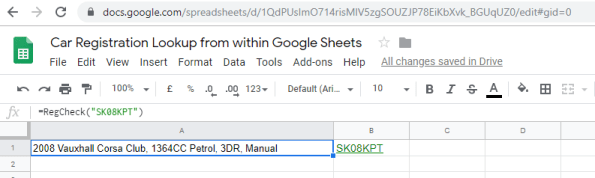
Google sheets is an amazing product, but let’s imagine, you’d like to expand upon Google Sheets to fill in the details of a cell by calling an API.
In this example, we’re using an API that determines the make and model of a car from it’s license plate, If you’d like to follow along, then you can create your own free account at https://www.regcheck.org.uk – The username and password for this particular API have been removed from the demo code, you’ll need to use your own.
So, Open Google Sheets, and Press Tools -> Script Editor, then enter the following script;
function RegCheck(RegistrationNumber) {
var encode = Utilities.base64Encode(‘***USERNAME***:***PASSWORD***’, Utilities.Charset.UTF_8);
var option = {
headers : {
Authorization: “Basic “+ encode
}
}var url = “https://www.regcheck.org.uk/api/json.aspx/Check/” + RegistrationNumber;
var response = UrlFetchApp.fetch(url, option).getContentText()
response = JSON.parse(response);return response.Description;
}
What this does, is that it first creates the basic authenticatio header from your username and password, which you used to register with the API. And then passes the registration Number into the URL.
Once the URL returns, we extract the Description from the JSON returned, and return it back to Google Sheets.
Now, In google Sheets, all you need to do is enter =RegCheck(“xxxxx”) in a cell in order to call the API. Where “RegCheck” is the function name
Of course, you can use the same approach to call any API you wanted.
 Network Programming in .NET