Archive
Inspect #SOAP XML Messages in #VB.NET
 When you call a webservice in .NET (Either C# or VB.NET), you don’t really get to see exactly what XML is being sent down the wire. This might not matter, but if something is not working as it should, then you might need to look at the exact XML being sent, to tweak the reference.cs file accordingly.
There’s plenty of code on the web that shows how to do this in C#, but I needed to port this code to VB.NET; so here it is:
Imports System.ServiceModel
Imports System.ServiceModel.Channels
Imports System.ServiceModel.Description
Imports System.ServiceModel.Dispatcher
”’ <summary>
”’ WCFLogger: Use like “ws.Endpoint.Behaviors.Add(new InspectorBehavior())”
”’ http://stackoverflow.com/questions/5493639/how-do-i-get-the-xml-soap-request-of-an-wcf-web-service-request
”’ </summary>
Public Class WcfLogger
Implements IClientMessageInspector
Public Sub AfterReceiveReply(ByRef reply As Message, _
correlationState As Object) Implements IClientMessageInspector.AfterReceiveReply
Debug.WriteLine(reply)
End SubPublic Function BeforeSendRequest(ByRef request As Message, _
channel As IClientChannel) As Object Implements IClientMessageInspector.BeforeSendRequest
Debug.WriteLine(request)
Return Nothing
End Function
End Class”’ <summary>
”’
”’ </summary>
Public Class InspectorBehavior
Implements IEndpointBehavior
”’ <summary>
”’ Implement to confirm that the endpoint meets some intended criteria.
”’ </summary>
”’ <param name=”endpoint”>The endpoint to validate.</param>
Public Sub Validate(endpoint As ServiceEndpoint) Implements IEndpointBehavior.Validate
End Sub”’ <summary>
”’ Implement to pass data at runtime to bindings to support custom behavior.
”’ </summary>
”’ <param name=”endpoint”>The endpoint to modify.</param>
”’ <param name=”bindingParameters”>The objects that binding elements require to support the behavior.</param>
Public Sub AddBindingParameters(endpoint As ServiceEndpoint, _
bindingParameters As BindingParameterCollection) Implements IEndpointBehavior.AddBindingParameters
End Sub”’ <summary>
”’ Implements a modification or extension of the service across an endpoint.
”’ </summary>
”’ <param name=”endpoint”>The endpoint that exposes the contract.</param>
”’ <param name=”endpointDispatcher”>The endpoint dispatcher to be modified or extended.</param>
Public Sub ApplyDispatchBehavior(endpoint As ServiceEndpoint, _
endpointDispatcher As EndpointDispatcher) Implements IEndpointBehavior.ApplyDispatchBehavior
End Sub”’ <summary>
”’ Implements a modification or extension of the client across an endpoint.
”’ </summary>
”’ <param name=”endpoint”>The endpoint that is to be customized.</param>
”’ <param name=”clientRuntime”>The client runtime to be customized.</param>
Public Sub ApplyClientBehavior(endpoint As ServiceEndpoint, _
clientRuntime As ClientRuntime) Implements IEndpointBehavior.ApplyClientBehavior
clientRuntime.MessageInspectors.Add(New WCFLogger())
End Sub
End Class
Car Registration plate API lookup for #Australia #Rego #myRego

Our RegCheck.org.uk API searches eleven european countries for car number plate data, including the UK, Ireland, France, Spain, Italy, Portugal, and all the Scandinavian countries. Today, we’ve started to expand into Australia – gone down under to check your “Rego” (Aussie Slang), with our new website http://www.carregistrationapi.com
Since Australia is quite federalised, each state manages their own driver licensing, so and provides different levels of information, it means that we have to implement it state by state. So far, we’ve integrated NSW (New South Wales) and VIC (Victoria), QLD (Queensland incl. NQLD), SA (South Australia), NT (Northern Territory), ACT (Canberra) and TAS (Tasmania), so for residents of Sydney, Melbourne, Brisbane, Adelaide, Darwin, and Hobart you’re in luck.
Each state should provide some data, with the exception of Western Australia (Perth), but, what we do with the API request, is that we query each state, and return whatever data is available for that state. Some fields, such as Description, will be common to all, and the variable data will be contained in the JSON section.
So, within a week or so, we should have Australia covered, and it will be added officially to our iOS app, and our developer documentation. If you come across it earlier then it’s a bit of an easter egg!
Using the official #VIES API in c# for #VAT lookups
Sometimes it surprises me how some companies repackage a free, official API, and then charge for it, VATAPI.com is a good example of this, the official VIES EU VAT commission offers a free webservice available here:
http://ec.europa.eu/taxation_customs/vies/checkVatService.wsdl
And you can use it from C# with some code as follows,
var vat = new vat.checkVatPortTypeClient();
bool blnValid;
string strName;
string strAddress;
vat.checkVat(ref strCountryCode, ref strVatNumber, out blnValid, out strName, out strAddress);
That’s what’s behind my VAT checker app for iOS:
https://itunes.apple.com/pl/app/vat/id524680827?mt=8

Connect to a #MySQL database from #Javascript with MySqlJS.com
 If you’ve ever needed to develop something in a hurry, and you find yourself writing more middleware than business logic or the website itself, then this is going to be a real time-saver.
MySqlJS.com cuts out the middle tier of a website by communicating directly from the Javascript to the MySql database, using a statement such as
MySql.Execute(
    "mysql.yourhost.com",
    "username",
    "password",
    "database",
    "select * from Users",
    function (data) {
        console.log(data)
});
But then, I see that you’re screaming at me!, this isn’t secure, everyone can see my database password!, but the point of this code is, that it’s not for scenarios where the source code is accessible to the public. So, it’s fine for Phonegap / Cordova / WinJS apps where the end user can’t access the source code. Or perhaps, if it’s a password-protected private website where only trusted employees are going to access it. – Or, it’s just a quick mock up for a demo, or school project.
If you want to play with it, and need a test database to play with, then you can use this:
Host: sql8.freemysqlhosting.net
Database name: sql8110237
Database user: sql8110237
Database password: Gn1uMM2Adr
Bizspark WSDL xsd=xsd2 error #solved

When connecting to a Bizspark based WSDL webservice (.svc) endpoint, via add service reference in visual studio (same error with WSDL.exe), then I got this error;
The document was understood, but it could not be processed.
– The WSDL document contains links that could not be resolved.
– There was an error downloading ‘?xsd=xsd2’.
– Unable to connect to the remote server
– A connection attempt failed because the connected party did not properly respond after a period of time, or established connection failed because connected host has failed to respond
Now, I checked the WSDL, and it looked like valid XML, but I did see a reference to a URL that had a reference to a URL which had the ?xsd=xsd2 querystring, and didn’t actually go anywhere when I clicked it.
So, I then had a look at the webservice homepage again, and noticed that you can use an alternative WSDL document, which combines all the nested XSD’s in one: using ?singleWsdl in the querystring.
Key/Value storage using #Sqlite in #Cordova / #Phonegap

When offline data storage needs in a PhoneGap / Cordova application outgrow the 5Mb limits of LocalStorage, then you need to turn to Sqlite. However, this doesn’t mean that you have to redesign everything. Perhaps you are still happy with key/value storage. So, here’s two simple function calls to save and load data from a simple 2 column database table using Cordova / Phonegap and the plugin from litehelpers
function SqlStorageSetItem(key,value)
{
// Location 2 – not backed to iCloud
var db = window.sqlitePlugin.openDatabase({name: “sql.db”, location: 2}, function(){
console.log(“Opened database ok”);
}, function(err){
console.log(‘Open database ERROR: ‘ + JSON.stringify(err));
});db.executeSql(“Create table if not exists keyValuePair (key,value);”,[], function(res){
console.log(“Created table if not already present”);
});db.executeSql(“select key from keyValuePair where key='” + key + “‘”,[],function(res){
if (res.rows.length == 0)
{
console.log(“Key not present, inserting row”);
db.executeSql(“insert into keyValuePair (key,value) values (‘” + key + “‘,'” + value + “‘)”,[], function(res){
console.log(“Added ” + key + ” to keyValuePair database”);
});
}
else
{
db.executeSql(“update keyValuePair set value='” + value + “‘ where key = ‘” + key + “‘”,[], function(res){
console.log(“Updated ” + key + ” to keyValuePair database”);
});
}
});
}function SqlStorageGetItem(key,callback)
{
// Location 2 – not backed to iCloud
var db = window.sqlitePlugin.openDatabase({name: “sql.db”, location: 2}, function(){
console.log(“Opened database ok”);
}, function(err){
console.log(‘Open database ERROR: ‘ + JSON.stringify(err));
});db.executeSql(“select value from keyValuePair where key='” + key + “‘”,[],function(res){
if (res.rows.length == 0)
{
console.log(“No matching key found”);
callback(null);
}
else
{
console.log(“Key found”);
callback(res.rows.item(0).value);
}
});
}
The one key difference, is that the SqlStorageGetItem function is asynchronous, so you have to pass a callback to it, in order to get the value.
Unofficial LinkedIn API in .NET (C#)
The LinkedIn API has of late been very much limited to very basic functionality, and you may want to get more information out of it.
I based this API on these two sources
// https://github.com/nickls/linkedin-unofficial-api
and
// https://www.tarlogic.com/blog/usuarios-y-direcciones-de-correo-con-linkedin-harverster/
Unfortunately, this code is actually not suitable as a web service or from a website, since LinkedIn will detect that the login request is coming from a unusual IP (location), and kick you out. But it would be useful for client-side code.
So, here’s the login code – at a high level
HttpOverTcpRequest http = new HttpOverTcpRequest();
var welcomeRaw = http.Request(“https://www.linkedin.com/uas/authenticate”);
var welcome = http.ParseHttpResponse(welcomeRaw);
var lCookies = welcome.Headers[“Set-Cookie”];
lCookies.RemoveAll(c => c.Contains(“delete me”) || c.Contains(“deleteMe”)); // Remove empty cookies
var jSessionIdRaw = lCookies.First(c => c.Contains(“JSESSIONID”));
var jSessionId = jSessionIdRaw.Split(new[] { ‘;’ })[0].Substring(12);
var postdata = “session_key=” + username + “&session_password=” + password + “&JSESSIONID=”+ jSessionId;
var loginRaw = http.Request(“https://www.linkedin.com/uas/authenticate”, postdata, lCookies);
var login = http.ParseHttpResponse(loginRaw);
var lCookies2 = login.Headers[“Set-Cookie”];
lCookies.AddRange(lCookies2);
Then, you need to keep hold of your lCookies array, and pass it back in when making requests such as;
// /li/v1/pages/you
var YouRaw = http.Request(“https://touch.www.linkedin.com/” + query, lCookiesFromDb);
var you = http.ParseHttpResponse(YouRaw);
var strJson = RemoveQuirks(you.Body);
Response.Write(strJson);
Send Email via client-side Javascript

Typically, if you want to send an Email via Javascript, like in response to a feedback form, or other client-side user interaction. Then you end up having to write server-side code to send the email, and then client side code to make an Ajax call to the server, or force the user to move to another page.
Tired of writing this code over and over again for every web project I did, and increasingly every Phonegap App I wrote, I decided to write a general script that can send an email from Javascript, with no server side code required. – and no dependencies, like jQuery.
So, here’e the website http://www.smtpjs.com
It works as follows, you add a script reference to
http://smtpjs.com/smtp.js
Then you send the email like so…
Email.send("from@you.com",
"to@them.com",
"This is a subject",
"this is the body",
"smtp.yourisp.com",
"username",
"password");
But Wait!!!, I can hear you scream… My username and password are visible in client side script. – So The trick to this, is that you can encrypt the credentials on SMTPJS.com and receive a security token, and then use this to send the email instead.
In which case you can send Email as follows
Email.send("from@you.com",
"to@them.com",
"This is a subject",
"this is the body",
{token: "63cb3a19-2684-44fa-b76f-debf422d8b00"});
Which is much more secure, and we’d recommend this even if your code is packaged inside a Phonegap/Cordova App.
Call an ASMX webservice from Java
This is by no means the most elegant way of doing this, and I’d actively encourage using better code, but this works, and you’re welcome to copy it.
It uses the Norwegian asmx car lookup service here; http://no.registreringsnummerapi.com/developers.html
import java.net.*;
import java.io.*;
import org.w3c.dom.*;
import javax.xml.parsers.*;
import java.io.*;public class HelloWorld {
public static void main(String[] args) {
try{String host = “www.regcheck.org.uk”;
Socket socket = new Socket(host, 80);
// change yourusernamehere
String request = “GET http://www.regcheck.org.uk/api/reg.asmx/CheckNorway?RegistrationNumber=BS23162&username=yourusernamehere HTTP/1.0\r\n\r\n”;
OutputStream os = socket.getOutputStream();
os.write(request.getBytes());
os.flush();InputStream in = socket.getInputStream();
StringBuilder sb=new StringBuilder();
BufferedReader br = new BufferedReader(new InputStreamReader(in));
String read;while((read=br.readLine()) != null) {
//System.out.println(read);
sb.append(read);
}br.close();
String strXml = sb.toString();
int intStart = strXml.indexOf(“<?xml”);
strXml = strXml.substring(intStart);
//System.out.print(strXml);
socket.close();DocumentBuilderFactory factory = DocumentBuilderFactory.newInstance();
DocumentBuilder builder = factory.newDocumentBuilder();
ByteArrayInputStream input = new ByteArrayInputStream(strXml.getBytes(“UTF-8”));
Document doc = builder.parse(input);
NodeList nList = doc.getElementsByTagName(“Description”);
Node nNode = nList.item(0);
System.out.print(nNode.getTextContent());
}
catch(Exception ex)
{
System.out.print(“Error”);
}}
}
Resizing App Preview videos using EasyWMV
iMovie is a simple and intuitive app for creating AppPreview videos, but, what’s really annoying is that it only creates appPreview videos compatible with 4 inch iPhone displays – Like the iPhone 5s ? – really old.
You really need to have videos for the iPhone 6s, and 6 Plus. But before you buy QuickTime Pro, here’s a free way.
EasyWMV’s demo version is limited to 1 minute of video, but that’s fine for App Previews, which are only 30 seconds anyway. Now, you need to fiddle with the settings.
For the iPhone 6 Plus (5.5 inch), I selected Custom size – 1080×1920.
Deselect “Preserve aspect ratio”
Drop the bit rate down below 1200kbps.
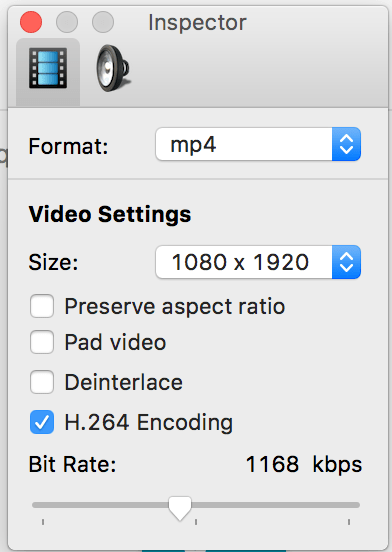
Now for the techy stuff, how I diagnosed this – I uploaded a video with the bit rate too high, and got a vague warning from iTunes Connect. I then looked in inspector for more details and saw this:
{
“statusCode” : 400,
“errorCodes” : [ “MOV_H264_LEVEL_TOO_HIGH”, “MOV_VIDEOCODEC_NOT_ACCEPTABLE_FOR_VIDEOTYPE” ],
“suggestionCode” : “MOV_RESAVE_LOWER_LEVEL”,
“nonLocalizedMessage” : “H264 Level is too high. Please refer to Apple’s documentation for appropriate levels.”,
“localizedMessage” : “The H264 Level is too high. Please refer to Apple’s documentation for appropriate formats.”
}
Which according to apple, this is the maximum specs:
| H.264 | ProRes 422 HQ only | Notes |
|---|---|---|
| Target Bit Rate | 10-12 Mbps | VBR ~220 Mbps |
And 12Mbps translates to 12000 Kbps
Then you get this a success in the trace once it works:
{
“responses” : [ {
“url” : “http://a364.phobos.apple.com/us/r30/VideoSource60/v4/0f/8d/42/0f8d42b0-c7a1-3bbc-0fd9-47e6ce27cd4b/pr_source.mp4?downloadKey=1450740609_4e0cd82c5efe91f96becf577bbc3cdc4”,
“token” : “VideoSource60/v4/0f/8d/42/0f8d42b0-c7a1-3bbc-0fd9-47e6ce27cd4b/pr_source.mp4”,
“groupToken” : {
“groupToken” : “VideoSource60/v4/0f/8d/42/0f8d42b0-c7a1-3bbc-0fd9-47e6ce27cd4b”,
“pool” : “VideoSource60”,
“syntaxVersion” : “HASH_MOUNT_UUID_GROUP”
},
“blobString” : “{\”token\”:\”VideoSource60/v4/0f/8d/42/0f8d42b0-c7a1-3bbc-0fd9-47e6ce27cd4b/pr_source.mp4\”,\”type\”:\”MZPurpleSoftwarePromoVideoFileType.SOURCE\”,\”originalFileName\”:\”App Preview webcam-1.mp4\”}”,
“descriptionDoc” : “<?xml version=\”1.0\” encoding=\”UTF-8\” standalone=\”no\”?><!–Generated by the FoghornLeghorn Quicktime MediaDescriptionGenerator, version 1.24–><!–File URL: \”\”–><movie xmlns:ma=\”http://beans.media.leghorn.jingle.apple.com\” codecs=\”avc1.6742C0, mp4a.40.2\” type=\”mpeg4\”><describer><ma:name>FoghornLeghorn MPEG-4 Parser</ma:name><ma:version>1.24</ma:version></describer><clock poster_time=\”0\” preview_duration=\”0\” preview_time=\”0\” time_scale=\”1000\” total_duration=\”22016\”/><tracks><video enabled=\”true\” index=\”0\” type=\”vide\”><track_id>1</track_id><language numeric=\”21956\”>und</language><alternate_group>0</alternate_group><matrix identity=\”true\”/><data_size units=\”bytes\”>2745711</data_size><duration milliseconds=\”21967\” track_duration=\”21967\” units=\”milliseconds\”>21967</duration><edit_list count=\”1\” empties=\”0\” normal_rate=\”true\”><edit_list_entry media_rate=\”1.0\” media_time=\”2\” track_duration=\”21967\”/></edit_list><sample_description_count>1</sample_description_count><duration_statistics mean_duration=\”1.0\” time_scale=\”30\” total_duration=\”659\” uniform=\”true\”/><user_data_atoms/><data_rate units=\”Kb/s\”>976.50415</data_rate><data_rate_statistics units=\”Kb/s\”><peak first_media_DTS=\”99\” last_media_DTS=\”99\”>2719</peak></data_rate_statistics><graphics_mode>copy</graphics_mode><codec name=\”H.264\” type=\”avc1.6742C0\”>avc1</codec><encoded_dimensions><width>1080</width><height>1920</height></encoded_dimensions><display_dimensions><width>1080</width><height>1920</height></display_dimensions><track_dimensions><width>1080</width><height>1920</height></track_dimensions><frame_rate_mode>CFR</frame_rate_mode><frame_rate>30.0</frame_rate><field_dominance>progressive</field_dominance><sample_description><avcC><profile>Baseline</profile><compatability>192</compatability><level>4.0</level><nal_units><picture_parameter_sets><pic_parameter_set entropy_coding_mode_flag=\”0\” pic_parameter_set_id=\”0\” seq_parameter_set_id=\”0\”/></picture_parameter_sets></nal_units><raw_avcc>0142C028FFE1001A6742C028D9004403C797C044000003000400000300F03C60C92001000468CB8CB2</raw_avcc></avcC></sample_description><maximum_sample_size>81858</maximum_sample_size></video><sound enabled=\”true\” index=\”1\” type=\”soun\”><track_id>2</track_id><language numeric=\”5575\”>eng</language><alternate_group>0</alternate_group><matrix identity=\”true\”/><data_size units=\”bytes\”>680375</data_size><duration milliseconds=\”22016\” track_duration=\”22016\” units=\”milliseconds\”>22016</duration><sample_description_count>1</sample_description_count><user_data_atoms/><data_rate units=\”Kb/s\”>241.43484</data_rate><codec name=\”aac \” type=\”mp4a.40.2\”>aac </codec><channel_layout name=\”Stereo (L R)\”><channel name=\”Left\”>L</channel><channel name=\”Right\”>R</channel></channel_layout><sample_rate units=\”kilohertz\”>48.0</sample_rate><bit_depth>16</bit_depth></sound></tracks><matrix identity=\”true\”/><itunes_metadata_atoms><itunes_metadata format=\”UTF-8\” type=\”©too\”>Lavf52.88.0</itunes_metadata></itunes_metadata_atoms><notifications><ma:notification code=\”mediaValidation.data\” level=\”INFO\”><ma:parameters><ma:entry key=\”moov.trak.1.mdia.minf.stbl.stsd.0.trackType\”>vide</ma:entry><ma:entry key=\”moov.trak.1.mdia.minf.stbl.stsd.0.dataFormat\”>avc1</ma:entry><ma:entry key=\”moov.trak.1.mdia.minf.stbl.stsd.0.vendor\”>????</ma:entry><ma:entry key=\”moov.trak.1.mdia.minf.stbl.stsd.0.temporalQuality\”>0</ma:entry><ma:entry key=\”moov.trak.1.mdia.minf.stbl.stsd.0.spatialQuality\”>0</ma:entry><ma:entry key=\”moov.trak.1.mdia.minf.stbl.stsd.0.width\”>1080</ma:entry><ma:entry key=\”moov.trak.1.mdia.minf.stbl.stsd.0.height\”>1920</ma:entry><ma:entry key=\”moov.trak.1.mdia.minf.stbl.stsd.0.hRes\”>72.0</ma:entry><ma:entry key=\”moov.trak.1.mdia.minf.stbl.stsd.0.vRes\”>72.0</ma:entry><ma:entry key=\”moov.trak.1.mdia.minf.stbl.stsd.0.frameCount\”>1</ma:entry><ma:entry key=\”moov.trak.1.mdia.minf.stbl.stsd.0.compressorName\”/><ma:entry key=\”moov.trak.1.mdia.minf.stbl.stsd.0.depth\”>24</ma:entry><ma:entry key=\”moov.trak.1.mdia.minf.stbl.stsd.0.avcC.0.version\”>1</ma:entry><ma:entry key=\”moov.trak.1.mdia.minf.stbl.stsd.0.avcC.0.profile\”>66</ma:entry><ma:entry key=\”moov.trak.1.mdia.minf.stbl.stsd.0.avcC.0.compatability\”>192</ma:entry><ma:entry key=\”moov.trak.1.mdia.minf.stbl.stsd.0.avcC.0.level\”>4.0</ma:entry><ma:entry key=\”moov.trak.1.mdia.minf.stbl.stsd.0.avcC.0.sps.0.profileIdc\”>66</ma:entry><ma:entry key=\”moov.trak.1.mdia.minf.stbl.stsd.0.avcC.0.sps.0.constraintSets\”>c0</ma:entry><ma:entry key=\”moov.trak.1.mdia.minf.stbl.stsd.0.avcC.0.sps.0.levelIdc\”>40</ma:entry><ma:entry key=\”moov.trak.1.mdia.minf.stbl.stsd.0.avcC.0.sps.0.seqParameterSetId\”>0</ma:entry><ma:entry key=\”moov.trak.1.mdia.minf.stbl.stsd.0.avcC.0.sps.0.log2MaxFrameNum\”>4</ma:entry><ma:entry key=\”moov.trak.1.mdia.minf.stbl.stsd.0.avcC.0.sps.0.picOrderCntType\”>2</ma:entry><ma:entry key=\”moov.trak.1.mdia.minf.stbl.stsd.0.avcC.0.sps.0.log2MaxPicOrderCountLsb\”>0</ma:entry><ma:entry key=\”moov.trak.1.mdia.minf.stbl.stsd.0.avcC.0.sps.0.deltaPictureAlwaysZero\”>false</ma:entry><ma:entry key=\”moov.trak.1.mdia.minf.stbl.stsd.0.avcC.0.sps.0.offsetForNonrefPic\”>0</ma:entry><ma:entry key=\”moov.trak.1.mdia.minf.stbl.stsd.0.avcC.0.sps.0.offsetForTopToBottomField\”>0</ma:entry><ma:entry key=\”moov.trak.1.mdia.minf.stbl.stsd.0.avcC.0.sps.0.numRefFramesInPicorderCntCycle\”>0</ma:entry><ma:entry key=\”moov.trak.1.mdia.minf.stbl.stsd.0.avcC.0.sps.0.numRefFrames\”>3</ma:entry><ma:entry key=\”moov.trak.1.mdia.minf.stbl.stsd.0.avcC.0.sps.0.gapsInFrameNumValueAllowedFlag\”>false</ma:entry><ma:entry key=\”moov.trak.1.mdia.minf.stbl.stsd.0.avcC.0.sps.0.picWidthInMbs\”>68</ma:entry><ma:entry key=\”moov.trak.1.mdia.minf.stbl.stsd.0.avcC.0.sps.0.picHeightInMapUnits\”>120</ma:entry><ma:entry key=\”moov.trak.1.mdia.minf.stbl.stsd.0.avcC.0.sps.0.frameMbsOnly\”>true</ma:entry><ma:entry key=\”moov.trak.1.mdia.minf.stbl.stsd.0.avcC.0.sps.0.mbAdaptiveFrameField\”>false</ma:entry><ma:entry key=\”moov.trak.1.mdia.minf.stbl.stsd.0.avcC.0.sps.0.direct8x8Inference\”>true</ma:entry><ma:entry key=\”moov.trak.1.mdia.minf.stbl.stsd.0.avcC.0.sps.0.frameCrop.left\”>0</ma:entry><ma:entry key=\”moov.trak.1.mdia.minf.stbl.stsd.0.avcC.0.sps.0.frameCrop.right\”>4</ma:entry><ma:entry key=\”moov.trak.1.mdia.minf.stbl.stsd.0.avcC.0.sps.0.frameCrop.top\”>0</ma:entry><ma:entry key=\”moov.trak.1.mdia.minf.stbl.stsd.0.avcC.0.sps.0.frameCrop.bottom\”>0</ma:entry><ma:entry key=\”moov.trak.1.mdia.minf.stbl.stsd.0.avcC.0.sps.0.vui.aspectRatio\”>1:1</ma:entry><ma:entry key=\”moov.trak.1.mdia.minf.stbl.stsd.0.avcC.0.sps.0.vui.videoSignalType.videoFormat\”>5</ma:entry><ma:entry key=\”moov.trak.1.mdia.minf.stbl.stsd.0.avcC.0.sps.0.vui.videoSignalType.videoFullRange\”>false</ma:entry><ma:entry key=\”moov.trak.1.mdia.minf.stbl.stsd.0.avcC.0.sps.0.vui.timeInfo.numUnitsInTick\”>1</ma:entry><ma:entry key=\”moov.trak.1.mdia.minf.stbl.stsd.0.avcC.0.sps.0.vui.timeInfo.timeScale\”>60</ma:entry><ma:entry key=\”moov.trak.1.mdia.minf.stbl.stsd.0.avcC.0.sps.0.vui.timeInfo.fixedFrameRate\”>false</ma:entry><ma:entry key=\”moov.trak.1.mdia.minf.stbl.stsd.0.avcC.0.sps.0.vui.bitStreamRestriction.motionVectorsOverPicBoundaries\”>true</ma:entry><ma:entry key=\”moov.trak.1.mdia.minf.stbl.stsd.0.avcC.0.sps.0.vui.bitStreamRestriction.maxBytesPerPicDenom\”>0</ma:entry><ma:entry key=\”moov.trak.1.mdia.minf.stbl.stsd.0.avcC.0.sps.0.vui.bitStreamRestriction.maxBitsPerMbDenom\”>0</ma:entry><ma:entry key=\”moov.trak.1.mdia.minf.stbl.stsd.0.avcC.0.sps.0.vui.bitStreamRestriction.log2MaxMvLengthHorizontal\”>11</ma:entry><ma:entry key=\”moov.trak.1.mdia.minf.stbl.stsd.0.avcC.0.sps.0.vui.bitStreamRestriction.log2MaxMvLengthVertical\”>11</ma:entry><ma:entry key=\”moov.trak.1.mdia.minf.stbl.stsd.0.avcC.0.sps.0.vui.bitStreamRestriction.maxNumReorderFrames\”>0</ma:entry><ma:entry key=\”moov.trak.1.mdia.minf.stbl.stsd.0.avcC.0.sps.0.vui.bitStreamRestriction.maxDecFrameBuffering\”>3</ma:entry><ma:entry key=\”moov.trak.1.mdia.minf.stbl.stsd.0.avcC.0.pps.0.ppsId\”>0</ma:entry><ma:entry key=\”moov.trak.1.mdia.minf.stbl.stsd.0.avcC.0.pps.0.spsId\”>0</ma:entry><ma:entry key=\”moov.trak.1.mdia.minf.stbl.stsd.0.avcC.0.pps.0.entropyCodingMode\”>false</ma:entry><ma:entry key=\”moov.trak.1.mdia.minf.stbl.stsd.0.avcC.0.pps.0.sliceGroupMapType\”>0</ma:entry><ma:entry key=\”moov.trak.1.mdia.minf.stbl.stsd.0.avcC.0.pps.0.bottomFieldPictureOrderInFramePresent\”>false</ma:entry><ma:entry key=\”moov.trak.1.mdia.minf.stbl.stsd.0.avcC.0.pps.0.numRefIdx10DefaultActive\”>3</ma:entry><ma:entry key=\”moov.trak.1.mdia.minf.stbl.stsd.0.avcC.0.pps.0.explicitWeightedPrediction\”>false</ma:entry><ma:entry key=\”moov.trak.1.mdia.minf.stbl.stsd.0.avcC.0.pps.0.weightedBiPredIdc\”>0</ma:entry><ma:entry key=\”moov.trak.1.mdia.minf.stbl.stsd.0.avcC.0.pps.0.chromaQpIndexOffset\”>1</ma:entry><ma:entry key=\”moov.trak.1.mdia.minf.stbl.stsd.0.avcC.0.pps.0.deblockingFilterControlPresent\”>true</ma:entry><ma:entry key=\”moov.trak.1.mdia.minf.stbl.stsd.0.avcC.0.pps.0.constrainedIntraPrediction\”>false</ma:entry><ma:entry key=\”moov.trak.1.mdia.minf.stbl.stsd.0.avcC.0.pps.0.redundantPicCountElementPresent\”>false</ma:entry><ma:entry key=\”moov.trak.1.mdia.minf.stbl.stsd.0.avcC.0.pps.0.transform8x8Mode\”>true</ma:entry><ma:entry key=\”moov.trak.2.mdia.minf.stbl.stsd.0.trackType\”>soun</ma:entry><ma:entry key=\”moov.trak.2.mdia.minf.stbl.stsd.0.dataFormat\”>mp4a</ma:entry><ma:entry key=\”moov.trak.2.mdia.minf.stbl.stsd.0.numChannels\”>2</ma:entry><ma:entry key=\”moov.trak.2.mdia.minf.stbl.stsd.0.compressionId\”>0</ma:entry><ma:entry key=\”moov.trak.2.mdia.minf.stbl.stsd.0.sampleRate\”>48000.0</ma:entry><ma:entry key=\”message\”>data</ma:entry></ma:parameters></ma:notification></notifications></movie>”
}
]
}
 Network Programming in .NET