Archive
Supporting #IE10 on #AWS #Cloudfront
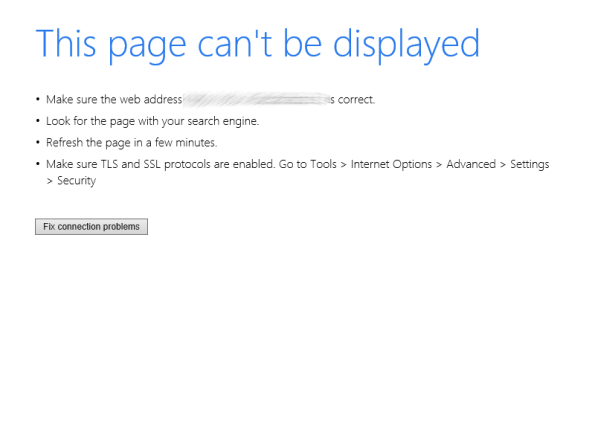
IE10 may have less than 5% worldwide usage, but if you want to have a inclusive website, then perhaps you shouldn’t confront them with this error message (above) when you try to serve them HTTPS content. – Maybe they should updgrade. but as a developer, that’s not your choice to make.
If you use Amazon Cloudfront over HTTPS, then by default, TLS 1.0 is not supported, and by default, TLS 1.1 and TLS 1.2 are not supported on IE 10. So, if you can’t get your user to upgrade, then you have to make cloudfront more inclusive (and yes. less secure). But if you’re just serving images, then perhaps it’s not a big issue.
So, to fix this, go to Cludfront, and click on your distribution, click edit, and change your security policy to TLSv1_2016 and Edit.

Wait for your distribution to deploy, and you can use SSLscan to verify that TLS 1.0 is now supported, along with TLS 1.1 and TLS 1.2
Make an HTTP request via #TCP over an Authenticated #proxy in C#

If you ever find yourself reverting to writing HTTP code using TCPClient, do a double-think, since there is very few situations where you genuinely need to resort to writing TCP/IP code. You can do an Authenticated proxy call using standard HTTP calls, by just setting the networkCredentials on a WebProxy class.
However, if you’ve read this caveat, and you still insist that you need to write code at TCP/IP level, then here’s some code that demonstrates how to make a simple HTTPS get request via an Authenticated HTTP Proxy (Luminati)
The authentication token, which I’ve omitted below, for obvious reasons is a base64 encoded version of your username : your password .
var tcp = new TcpClient(“zproxy.luminati.io”, 22225);
var stream = tcp.GetStream();var connect = Encoding.ASCII.GetBytes(“CONNECT icanhazip.com:443 HTTP/1.0\n” +
“proxy-authorization: Basic XXXXXX==\n\n”);
stream.Write(connect, 0, connect.Length);
var rawStream = new StreamReader(stream);
rawStream.ReadLine();
var ssl = new SslStream(stream);
ssl.AuthenticateAsClient(“www.icanhazip.com”, null, SslProtocols.Tls12, false);
var strPostString = “GET / HTTP/1.0\r\n” +
“Host:www.icanhazip.com\r\n” +
“\r\n”;
var send = Encoding.ASCII.GetBytes(strPostString);
ssl.Write(send, 0, send.Length);
var sr = new StreamReader(ssl);
var str = sr.ReadToEnd();
tcp.Close();
ssl.Close();
return str;
Determine the age of a #Spanish Vehicle through it’s number plate

Take the last three digits of a spanish number plate, and find the closest three letters in the grid above to aproximate the age of the vehicle. This grid also gives an idea of how many cars are sold in spain in any given month.
Need to code this up in C#? here’s a GIT repo that you can clone freely;
https://github.com/infiniteloopltd/MonthAndYearFromSpanishRegistration
Need more info, check our our spanish API at http://www.matriculaapi.com/
Creating a #macOS App using HTML and #Javascript

You can create great macOS apps with Swift, and if you’ve got the time to learn a new language, then this is the way to go. But if you already have something cool made with HTML and Javascript, then you can turn it into a macOS app with a few simple steps.
TL;DR;
If you want to skip to the end, you can just clone the GIT repo at https://github.com/infiniteloopltd/UnderTheCryptOSX
But, if you fancy going step by step, – open up XCode and create a new macOS / Cocoa app. Drop a WKWebView onto the form, and set it’s constraints so that it fills the view. Then drag an outlet called;
@IBOutlet weak var webkitview: WKWebView!
You’ll need to add a reference to WebKit as follows;
import WebKit
Then in the viewDidLoad, add the following lines
let url = Bundle.main.url(forResource: “index”, withExtension: “html”)!
webkitview.loadFileURL(url, allowingReadAccessTo: url)
let request = URLRequest(url: url)
webkitview.load(request)
You can then go Add files to … and add your index.html to the project. Now, if you run this now, you may get a white page. To get around this, you will need to go to the project > Capabilities > App Sandbox and click “Outgoing connections (Client)”
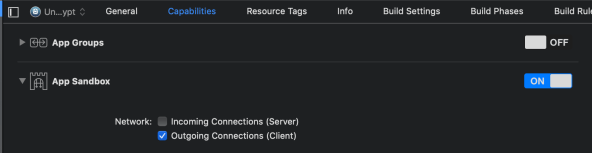
Another thing that you may have to do, or else the app may get rejected by apple, is to exit the app when the window is closed. you do this in AppDelegate.swift as follows;
func applicationShouldTerminateAfterLastWindowClosed(_ sender: NSApplication) -> Bool
{
return true
}
Sending multiple attachments with #SMTPJS

UPDATE:
Check out the V3 version of the API for a much easier way to do this:
One of the limitations of SMTPJS.com is that you can only send one attachment, this blog post demonstrates a way of sending multiple attachments, by zipping them into one file. It also keeps the size of your email down also.
This uses the JSZip library, which I’ve loaded via the cloudflare CDN. Note the mime type used: application/x-zip-compressed this is important, so that SMTPJS will send the file as a attachment named file.zip, rather than the default file.txt
<html>
src="https://smtpjs.com/v2/smtp.js">
src="https://cdnjs.cloudflare.com/ajax/libs/jszip/3.1.5/jszip.js">
language="javascript">
function uploadFileToServer()
{
  var zip = new JSZip();
  var numberOfFiles = event.srcElement.files.length;
  var numberOfProcessedFiles = 0;
  for(var i=0; inumberOfFiles; i++)
  {
    (function(i){
     var file = event.srcElement.files[i];
     var reader = new FileReader();
     reader.readAsBinaryString(file);
     reader.onload = function () {
        numberOfProcessedFiles++;
        zip.file(file.name,btoa(reader.result), {base64: true} );
        if (numberOfProcessedFiles == numberOfFiles)
        {
          zip.generateAsync({type:"base64"})
          .then(function(content) {
            var datauri = "data:application/x-zip-compressed;base64," + content;
            Email.sendWithAttachment("YOUR@EMAIL.com",
                "THEIR@EMAIL.com",
                "This is the Subject ",
                "This is the Body - see file.zip attachment!",
                "****SMTP HOST****",
                "****SMTP USERNAME****",
                "****SMTP PASSWORD****",
                datauri,
                function done(message)
                {
                   alert("Message sent OK")
                }
              );
          });
        }
     };
     })(i);
  }
}

<input type="file" id="fileupload" onchange="uploadFileToServer()" multiple/>
</html>
Charging a credit card with #Stripe in C#

This has been demoed a million times before, but just to show how ridiculously simple it is to bill a card with stripe, here’s a code example in C#
You first open package manager and type
Install-Package Stripe.net
Then use the following code:
var strStripeSecretKey = “sk_live_xxxxxxxxxxxxxx”;
var strCardNumber = “xxxxxxxxxxxxxxxxx”; // Long card number
var strCvCNumber = “xxx”;
var intExpiryMonth = 1;
var intExpiryYear = 2019;
var requestOptions = new StripeRequestOptions() { ApiKey = strStripeSecretKey };
var chargeService = new StripeChargeService();
var chareResponse = chargeService.Create(new StripeChargeCreateOptions()
{
Amount = 1000, // In pence – i.e. £10
Currency = “GBP”,
SourceCard = new SourceCard()
{
Number = strCardNumber,
Cvc = strCvCNumber,
ExpirationMonth = intExpiryMonth,
ExpirationYear = intExpiryYear
}
}, requestOptions);
And that’s all there is! – wow…
#Javascript Error handling with #Chakra in C#

Microsoft’s ChakraCore DLL allows you run Javascript within C# applications using IE’s Javascript interpreter, without having to spawn an exernal process like PhantomJS. This has great applications for situations where you might want to evaluate a user-provided mathematical equation, perhaps like within a spreadsheet, or a statistical application.
The Hello world example can be cloned from Github here; https://github.com/Microsoft/Chakra-Samples/tree/master/ChakraCore%20Samples/Hello%20World/Windows/C%23
You’ll also need to get the built version of the DLL from Nuget here;
Install-Package Chakra.Core
I noticed that I had to copy the DLL from bin\x86 into the bin folder when running an application as 32 bit (A console app), and copy bin\x64 into the bin folder when running under IIS (64 bit)
One thing that I had to build myself in the C# code, was error handling. If the Javascript expression was buggy, then the result was null, with no information about why the Javascript had failed (for example, I noticed that btoa() and atob() were missing in Chakra – for base64 encoding/decoding).
So, to capture the error message, you need to add the following lines after RunScript
varerror = Native.JsRunScript(script, currentSourceContext++, “”, outresult);JavaScriptValueexception;Native.JsGetAndClearException(outexception);JavaScriptValueexceptionString;Native.JsConvertValueToString(exception, outexceptionString);varstrEx = JavascriptValueToString(exceptionString);
Where JavascriptValueToString is defined as follows;
private static string JavascriptValueToString(JavaScriptValuevalue){// Project script result in JS back to C#.IntPtr resultPtr;UIntPtr stringLength;Native.JsStringToPointer(value, outresultPtr, outstringLength);stringresultString = Marshal.PtrToStringUni(resultPtr);return resultString;}
Database mail not working from #SQL server (fixed)

Database mail allows you send email from SQL server, which is handy to report the status of jobs. It’s easy to set up, if you expand Management, select Configure Database Mail, to set your SMTP credentials. Then press send Test Email to check it works.
If it doesn’t work, then, here was a issue I ran in to; if you run
EXEC msdb.dbo.sysmail_help_queue_sp
And both queues are marked as INACTIVE, then you may be missing .NET 3.5 from your server,

You can add .NET 3.5 via server managment, Add Roles and Features Wizard.
You may need to restart your SQL server service after installation.
Car registration #API for #Colombia launched

Colombia is one of the largest automotive markets in South America, after Brazil and Argentina.
At the end of 2017 there were 13 million vehicles in Colombia, according to data from the Ministry of Transportation and the automotive association Andemos. Of those, 912,142 were registered for transportation (freight and passenger) and 7.4 million were motorcycles (57%). Not including motorcycles, 83% of Colombian vehicles are for private use, 16% are in public service, and one percent is for official use (7). According to research conducted by Business Monitor International in 2017, Colombia’s car ownership is still far from reaching saturation point. [Source: Export.gov]
We have launched an API that can return vehicle details from a number plate registered in Colombia at http://co.placaapi.com
Car registration plates in Colombia use the /CheckColombia endpoint and return the following information:
- Make & Model
- Age
- VIN
- Insurance details
- Owner
Sample Registration Number:
HBK482
Sample Json:
{
“Description”: “FORD ECOSPORT [2] SE TP 2000CC 4X2”,
“CarMake”: “FORD”,
“CarModel”: “ECOSPORT [2] SE TP 2000CC 4X2”,
“EngineSize”: “1999”,
“NumberOfDoors”: “0”,
“FuelType”: “COMBUSTIBLE SIN ESPECIFICAR”,
“Vin”: “9BFZB55F6F8517816”,
“VehicleType”: “CAMPEROS Y CAMIONETAS”,
“MotorCode”: “AOJAF8517816”,
“RegistrationYear”: “2015”,
“ImageUrl”: “http://co.placaapi.com/image.aspx/@Rk9SRCBFQ09TUE9SVCBbMl0gU0UgVFAgMjAwMENDIDRYMg==”,
“Insurance”: {
“InsuranceCompany”: “SURAMERICANA”,
“PolicyNumber”: “40006946171”,
“FasecoldaCode”: “03006130”,
“ValidityEndDate”: “03/06/2018 00:00:00”,
“ValidityStartDate”: “03/06/2017 00:00:00”,
“DocumentId”: “79643987”,
“DocumentType”: “CC”,
“Owner”: “JARAMILLO RUBIO WILLIAM”
}
}
Car Registration #API in #Ecuador launched

Ecuador is a country with almost 2 million vehicles registered via the AMT, and we now offer an API that allows users query the make, model and age of a vehicle registered in Ecuador, via it’s number plate, at the website ec.placaapi.com
Car registration plates in Ecuador use the /CheckEcuador endpoint and return the following information:
- Make & Model
- Age
- Representative image
Sample Registration Number:
PBU2742
Sample Json:
{
“Description”: “JEEP RENEGADE”,
“CarMake”: {
“CurrentTextValue”: “JEEP”
},
“CarModel”: {
“CurrentTextValue”: “RENEGADE”
},
“MakeDescription”: {
“CurrentTextValue”: “JEEP”
},
“ModelDescription”: {
“CurrentTextValue”: “RENEGADE”
},
“Year”: “1979”,
“Type”: “LIVIANO”,
“Subtype”: “AUTOMOVIL 4 TIEMPOS”,
“ImageUrl”: “http://ec.placaapi.com/image.aspx/@SkVFUCBSRU5FR0FERQ==”
}
This brings our south american coverage to the following countries:
 Network Programming in .NET