Free Microsoft Certification exam

STUDENTS! Get a FREE Microsoft Certification Exam Voucher Code –and a head start on your IT career.
While supplies last!
These days, the job market can be a tough ride—but it doesn’t have to be. Boost your resume by getting Microsoft Certified. A Microsoft Certification can help validate your technical skills and show hiring managers you have the right stuff for the job. And right now, you can get a voucher code to take a FREE Microsoft Certification Exam.
Like new jobs, these codes are in limited supply so don’t wait!
Please select “Get Key” above to get your voucher code, then follow the steps below to redeem it.
Voucher Redemption Instructions
NOTE: This offer is for select exams (with 072 prefix) for students globally who have valid student identification (not available in India and China). Each voucher code can only be redeemed once. Once the code has been redeemed, it cannot be used again. Students must redeem and take exams by June 30, 2011. This offer is non-transferable and cannot be combined with any other offer. This offer expires when supply is depleted and is not redeemable for cash.
Once you have your free exam voucher code, follow the instructions below on how to redeem it:
- Prometric is Microsoft’s Exam Delivery Provider
- Go to Prometric’s website:
- Click on the “Start” icon located in the “Get Started” section
- Select “Schedule an Appointment”
- Select your Country and State (if applicable)
- Click Next
- Next to Client, select Microsoft
- Next to Program, select Microsoft (072)
- Click Next
- Please read the page titled Microsoft Certified Exam Provider
- Click Next
- Select the exam number and the exam language for the exam you would like to take
- Click Next
- Select the test center location where you would like to take the exam by clicking on Schedule an Appointment next to the location that is nearest you
- When the next page appears you have the option of either logging in, if you have been to the site before or you can register as a new user
- NOTE if you are a new user – PLEASE enter a VALID EMAIL ADDRESS for Prometric and Microsoft.
- All information for the Microsoft Certification Program will be sent via email and without a valid email address, you will not receive access to the MCP Secure site or be able to order your Welcome Kit when you achieve your certification
- NOTE if you are a new user – PLEASE enter a VALID EMAIL ADDRESS for Prometric and Microsoft.
- Once you are logged in, you will then be able to select a date and time for your appointment, select a date and time
- Click Next
- Under Payment Information in the box that states Promotion Code or Voucher click Yes
- Next to Discount Type select Voucher Number
- Next to Voucher Number / Promotion Code – enter the code number you have been provided
- Click Validate – if the voucher has not been used you will be automatically directed back to the Payment Information Page
- Validate your email address and click on the radio button I agree (as long as you agree to the terms of the privacy notice)
- Click Commit Registration
- A Confirmation Page will come up, please print this page for your records and ensure you have noted the date and time for your exam
- When you go to the testing center to take your exam, you must have valid student identification with a photograph. You will not be allowed to take your exam without student identification with photo.
IMPORTANT:
- Your code can be redeemed for one Microsoft Certification exam.
- This offer is only applicable to students, and is worldwide (offer not valid in China and India).
- Students must have a valid student identification card with photo in order to take the exam. Students without a valid student ID card will have to pay full professional price for the exam.
- You must use the code and take your exam by June 30, 2011.
Get your latitude and longitude in Javascript
Here’s an AJAX request that gets your longitude and latitude in javascript. It’s using XML, not JSON, since there was some problems using eval() for non-US addresses.
var strUrl = “http://maps.googleapis.com/maps/api/geocode/xml?”;
strUrl += “address=bt489ph “;
strUrl += “&sensor=false”;
ajaxRequest = new XMLHttpRequest();
ajaxRequest.onreadystatechange = function() {
if (ajaxRequest.readyState != 4)
{
return;
};
var xmlDoc = ajaxRequest.responseXML;
var latitude = xmlDoc.getElementsByTagName(‘lat’)[0].firstChild.nodeValue;
var longditude = xmlDoc.getElementsByTagName(‘lng’)[0].firstChild.nodeValue;
alert(latitude);
alert(longditude);
};
ajaxRequest.open(“GET”,strUrl,true);
ajaxRequest.send(null);
Viewing a webcam on a Palm or Nokia Phone
Here’s a project I’m trying to get off the ground; a mobile app for viewing webcam images streamed from your PC.
Scrollable image in WP7/XAML
Probably really obvious for anybody who’s worked with XAML before, but I was happy with a little discovery, where you can show an image and have it scroll too…
<ScrollViewer
            HorizontalScrollBarVisibility="Auto"
            VerticalScrollBarVisibility="Auto">
        <Image
               HorizontalAlignment="Stretch"
               Margin="0" Name="image1"
               Stretch="None"
               VerticalAlignment="Stretch"

               Source="/ScrollViewer2;component/Images/dubai.png" />
        </ScrollViewer>
error 907 icon data is too large
When compiling (ant build) a BlackBerry Webworks project, I got this error: error 907 icon data is too large.
The icon was about 42K. I discovered that, I had created the Icon with Fireworks 8, which had somehow jam packed the PNG full of layers, metadata, and larger images, that I had used to create the icon. I discovered, that if you export as image only, or select batch process, select export, then custom, the png 32, then it drops it down to a few Kb, and the build goes ok.
PhoneGap for Windows Phone 7
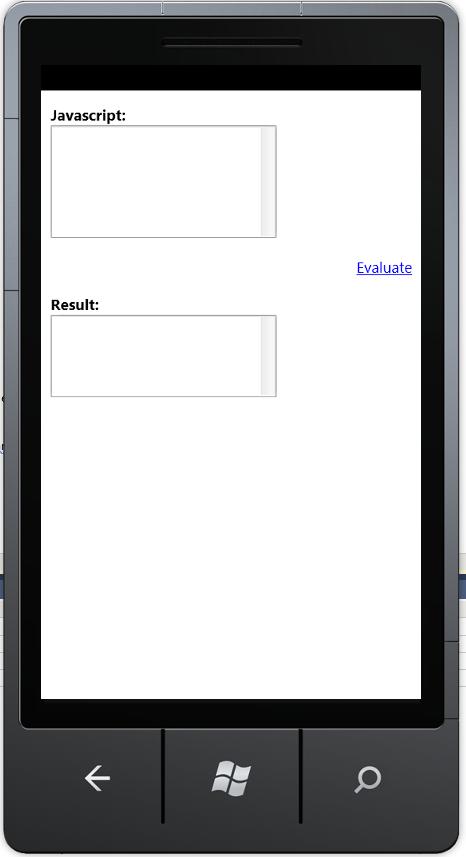 Not exactly phonegap… but an easy way to create WP7 (Windows Phone 7) apps without any .NET / XAML / Silverlight knowledge.
Basically, I created a XAML front end as follows:
<phone:PhoneApplicationPage x:Class=”WebBrowserControl.MainPage” xmlns=”http://schemas.microsoft.com/winfx/2006/xaml/presentation” xmlns:x=”http://schemas.microsoft.com/winfx/2006/xaml” xmlns:phone=”clr-namespace:Microsoft.Phone.Controls;assembly=Microsoft.Phone” xmlns:shell=”clr-namespace:Microsoft.Phone.Shell;assembly=Microsoft.Phone” xmlns:d=”http://schemas.microsoft.com/expression/blend/2008″ xmlns:mc=”http://schemas.openxmlformats.org/markup-compatibility/2006″ mc:Ignorable=”d” d:DesignWidth=”480″ d:DesignHeight=”768″ FontFamily=”{StaticResource PhoneFontFamilyNormal}” FontSize=”{StaticResource PhoneFontSizeNormal}” Foreground=”{StaticResource PhoneForegroundBrush}” SupportedOrientations=”Portrait” Orientation=”Portrait” shell:SystemTray.IsVisible=”True”> <phone:WebBrowser x:Name=”Browser1″ IsScriptEnabled=”True” Loaded=”Browser1_Loaded” > </phone:WebBrowser> </phone:PhoneApplicationPage>
Then, the MainPage.Xaml.cs file contains:
using System;using System.Collections.Generic;using System.IO;using System.Linq;using System.Net;using System.Reflection;using System.Windows;using System.Windows.Controls;using System.Windows.Documents;using System.Windows.Input;using System.Windows.Media;using System.Windows.Media.Animation;using System.Windows.Shapes;using Microsoft.Phone.Controls;
namespace WebBrowserControl{ public partial class MainPage : PhoneApplicationPage { // Constructor public MainPage() { InitializeComponent(); }
private void Browser1_Loaded(object sender, RoutedEventArgs e) { var _assembly = Assembly.GetExecutingAssembly(); var _textStreamReader = new StreamReader(_assembly.GetManifestResourceStream(“WebBrowserControl.Index.html”)); var strHtml = _textStreamReader.ReadToEnd(); Browser1.NavigateToString(strHtml); }
}}
Then Index.Html contains the following:
<!DOCTYPE html PUBLIC “-//W3C//DTD XHTML 1.0 Transitional//EN””http://www.w3.org/TR/xhtml1/DTD/xhtml1-transitional.dtd”><html xmlns=”http://www.w3.org/1999/xhtml”> <head> <title>Javascript Evalulator</title> <meta http-equiv=”Content-Type” content=”text/html; charset=UTF-8″ /> <meta name=”viewport” content=”width=400; user-scalable=no”; </head> <body sytle=”font-family: Arial, Helvetica, sans-serif;”> <b>Javascript:</b><br> <textarea id=”taJS” rows=”7″ cols=”27″></textarea> <p align=”right”> <a href=”javascript:evaluate();”>Evaluate</a> </p> <b>Result:</b><br> <textarea id=”taResult” rows=”5″ cols=”27″></textarea> <script language=”javascript”> function evaluate() { var JS = document.getElementById(“taJS”); var Result = document.getElementById(“taResult”); Result.value = eval(JS.value); } </script> </body></html>
In order to get a 2/way communication between the WebBrowserControl / Javascript and C#, then The ScriptNotify Event could be used, along with InvokeScript.
Pity the emulator was too slow to see this working properly…
Convert between actual Hard drive sizes and logical sizes
 Hard drive manufacturers quote every 1,000 bytes as 1 Kb, whereas a computer will
call 1,024 bytes as 1 Kb. On big hard drives, this does add up, giving the impression that you
buy 1 Tb hard drive, and it appears as 921 GB.
There is FAT32 overhead also, but this is the main reason for the discrepancy.
To calculate the physical (manufacturer’s) size from the the logical (Computers) size,
multiply it by 1.073741824 – and add a bit to round it up.
Fix Malformed JSON in C#
When converting JSON to XML in C# using JsonReaderWriterFactory.CreateJsonReader, then you will find that it’s quite alot stricter at interpreting JSON than Javascript.
For Example { a:”b” } is valid JSON for javascript, but with JsonReaderWriterFactory.CreateJsonReader, it will return an error such as The token ‘”‘ was expected but found ‘a’.
This is some handy code that fixes malformed JSON for use with JsonReaderWriterFactory.CreateJsonReader, If Json is Malformed, i.e. no inverted commas around field names, then this function adds them back in
public static string NormalizeJson(string json)
{
    const string strFindRegex = @"(?[,{]\s*)(?\w+):";
    const string strReplaceRegex = @"${prefix}""${field}"":";
    var strWellFormedJson = Regex.Replace(json, strFindRegex, strReplaceRegex);
    // functions are valid in javascript, but not valid for a JsonReader
    const string strNoFunctionRegex = @"function..\s+{.*}";
    strWellFormedJson = Regex.Replace(strWellFormedJson, strNoFunctionRegex, "false");
    // Json should end with a close-curly-bracket
    if (!strWellFormedJson.EndsWith("}"))
    {
	var intLastCurlyBracket = strWellFormedJson.LastIndexOf("}");
	strWellFormedJson = strWellFormedJson.Substring(0, intLastCurlyBracket + 1);
    }
    return strWellFormedJson;
}
Create ORM using Reflection C#
Here is a simple bit of code that can create an ORM (Object Relational Mapping) using reflection on the types being inserted or updated. It’s still a work in progress, since it assumes a flat object structure, each field being stored as a varchar(1000) and field names in the database must exactly match that in the object. I’ve based this on MySQL, but by simply changing “Limit 1” to “top 1”, that should be MSSQL sorted too.
using System;
using System.Reflection;
using MySql.Data.MySqlClient;/// <summary>
/// Creates an object / relational mapping using reflection
/// </summary>
public class ReflectiveORM
{
private static string sqlConnection = “Server=…;Database=…;Uid=…;Pwd=…;”;public static void InsertOrUpdateObjectInDB<T>(T o, string table, string uniqueField)
{
if (CheckIfAlreadyExists(o, table, uniqueField))
{
updateObjectInDB(o, table, uniqueField);
}
else
{
insertObjectIntoDB(o, table);
}
}public static bool CheckIfAlreadyExists<T>(T o, string table, string uniqueField)
{
PropertyInfo piUnique = typeof(T).GetProperty(uniqueField);
string strSQL = “select ” + uniqueField + ” from ” + table + ” where “;
strSQL += uniqueField + “='” + piUnique.GetValue(o, null).ToString().Replace(“‘”, “””) + “‘”;
strSQL += ” limit 1″;
string strReadBack = getSingleValue(strSQL, uniqueField);
if (string.IsNullOrEmpty(strReadBack))
{
// No record in db, do insert.
return false;
}
// record in db, do update
return true;
}public static void updateObjectInDB<T>(T o, string table, string uniqueField)
{
PropertyInfo[] fields = typeof(T).GetProperties(BindingFlags.Public | BindingFlags.Instance);
string strSql = “update ” + table + ” set “;
string strSeperator = “”;
foreach (PropertyInfo field in fields)
{
string strValue = field.GetValue(o, null).ToString();
strSql += strSeperator + field.Name;
strSql += ” = ‘” + strValue.Replace(“‘”, “””) + “‘”;
strSeperator = “,”;
}
PropertyInfo piUnique = typeof(T).GetProperty(uniqueField);
string strUnique = piUnique.GetValue(o, null).ToString();
strUnique = strUnique.Replace(“‘”, “””);
strSql += ” where ” + uniqueField + “='” + strUnique + “‘”;
ExecuteNonQuery(strSql);
}public static void insertObjectIntoDB<T>(T o, string table)
{
PropertyInfo[] fields = typeof(T).GetProperties(BindingFlags.Public | BindingFlags.Instance);
string strSql = “insert into ” + table + ” (“;
string strSeperator = “”;
foreach (PropertyInfo field in fields)
{
strSql += strSeperator + field.Name;
strSeperator = “,”;
}
strSql += “) values (“;
strSeperator = “”;
foreach (PropertyInfo field in fields)
{
string strValue = field.GetValue(o, null).ToString();
strSql += strSeperator + “‘” + strValue.Replace(“‘”, “””) + “‘”;
strSeperator = “,”;
}
strSql += “);”;
ExecuteNonQuery(strSql);
}/// <summary>
/// Executes a query that returns no data
/// </summary>
/// <param name=”sql”>The sql statement to execute</param>
public static void ExecuteNonQuery(string sql)
{
using (var conn = new MySqlConnection(sqlConnection))
{
var cmd = new MySqlCommand(sql, conn);
conn.Open();
cmd.ExecuteNonQuery();
conn.Close();
}
return;
}public static string getSingleValue(string sql, string field)
{
string returnVal = null;
MySqlConnection DSN = new MySqlConnection(sqlConnection);
DSN.Open();
MySqlCommand Database = new MySqlCommand(sql, DSN);
MySqlDataReader dr = Database.ExecuteReader();
if (dr.Read())
{
returnVal = dr[field].ToString();
}
DSN.Close();
return returnVal;
}}
To use it, set the connection string in this class, then call
ReflectiveORM.InsertOrUpdateObjectInDB(product, “product”, “Code”);
The table “product” must be set up in advance..
Blackberry on Phonegap
 This morning, I decided to take a look at the Blackberry support for phonegap. So far, their sample app works a charm.
Here is the steps to create and build this sample app:
ant create -Dpro
h=E:\research\phonegap\phonegap-0.9.4\BlackBerry\WebWorks\Sample
Buildfile: E:\research\phonegap\phonegap-0.9.4\BlackBerry\WebWorks\build
clean:
build-javascript:
[mkdir] Created dir: E:\research\phonegap\phonegap-0.9.4\BlackBerry\
\build\javascript
[delete] Deleting: E:\research\phonegap\phonegap-0.9.4\BlackBerry\Web
ild\javascript\phonegap.0.9.4.min.js.tmp
build-extension:
[mkdir] Created dir: E:\research\phonegap\phonegap-0.9.4\BlackBerry\
\build\ext
[zip] Building zip: E:\research\phonegap\phonegap-0.9.4\BlackBerry
s\build\ext\phonegap.0.9.4.jar
create:
[mkdir] Created dir: E:\research\phonegap\phonegap-0.9.4\BlackBerry\
\Sample
[copy] Copying 10 files to E:\research\phonegap\phonegap-0.9.4\Blac
ebWorks\Sample
[copy] Copying 2 files to E:\research\phonegap\phonegap-0.9.4\Black
bWorks\Sample\www\javascript
[copy] Copying 1 file to E:\research\phonegap\phonegap-0.9.4\BlackB
Works\Sample\www\ext
[mkdir] Created dir: E:\research\phonegap\phonegap-0.9.4\BlackBerry\
\Sample\lib\phonegap.0.9.4
[copy] Copying 3 files to E:\research\phonegap\phonegap-0.9.4\Black
bWorks\Sample\lib\phonegap.0.9.4
[echo]
[echo] Project Creation Complete!
[echo] ==========================
[echo]
[echo] Getting Started:
[echo] —————-
[echo]
[echo] cd E:\research\phonegap\phonegap-0.9.4\BlackBerry\WebWorks
[echo]
[echo] ant help
[echo]
BUILD SUCCESSFUL
Total time: 9 seconds
E:\research\phonegap\phonegap-0.9.4\BlackBerry\WebWorks>cd sample
E:\research\phonegap\phonegap-0.9.4\BlackBerry\WebWorks\Sample>dir
Volume in drive E is Data
Volume Serial Number is 9E79-47CC
Directory of E:\research\phonegap\phonegap-0.9.4\BlackBerry\WebWorks\Sa
22/03/2011 10:33 <DIR> .
22/03/2011 10:33 <DIR> ..
22/03/2011 10:33 9,193 build.xml
22/03/2011 10:33 <DIR> lib
22/03/2011 10:33 1,966 project.properties
22/03/2011 10:33 <DIR> www
2 File(s) 11,159 bytes
4 Dir(s) 99,064,516,608 bytes free
E:\research\phonegap\phonegap-0.9.4\BlackBerry\WebWorks\Sample>notepad p
roperties
E:\research\phonegap\phonegap-0.9.4\BlackBerry\WebWorks\Sample>ant build
Buildfile: E:\research\phonegap\phonegap-0.9.4\BlackBerry\WebWorks\Sampl
xml
generate-cod-name:
[echo] Generated name: PhoneGapSample.cod
clean:
package-app:
[mkdir] Created dir: E:\research\phonegap\phonegap-0.9.4\BlackBerry\
\Sample\build\widget
[copy] Copying 9 files to E:\research\phonegap\phonegap-0.9.4\Black
bWorks\Sample\build\widget
[zip] Building zip: E:\research\phonegap\phonegap-0.9.4\BlackBerry
s\Sample\build\PhoneGapSample.zip
build:
[exec] [INFO] Parsing command line options
[exec] [INFO] Parsing bbwp.properties
[exec] [INFO] Validating application archive
[exec] [INFO] Parsing config.xml
[exec] [WARNING] Failed to find the <author> elem
[exec] [INFO] Populating application source
[exec] [INFO] Compiling BlackBerry WebWorks ap
n
[exec] [INFO] Generating output files
[exec] [INFO] BlackBerry WebWorks application
g complete
BUILD SUCCESSFUL
Total time: 32 seconds
E:\research\phonegap\phonegap-0.9.4\BlackBerry\WebWorks\Sample>ant load-
r
Buildfile: E:\research\phonegap\phonegap-0.9.4\BlackBerry\WebWorks\Sampl
xml
generate-cod-name:
[echo] Generated name: PhoneGapSample.cod
clean:
[delete] Deleting directory E:\research\phonegap\phonegap-0.9.4\Black
bWorks\Sample\build
package-app:
[mkdir] Created dir: E:\research\phonegap\phonegap-0.9.4\BlackBerry\
\Sample\build\widget
[copy] Copying 9 files to E:\research\phonegap\phonegap-0.9.4\Black
bWorks\Sample\build\widget
[zip] Building zip: E:\research\phonegap\phonegap-0.9.4\BlackBerry
s\Sample\build\PhoneGapSample.zip
build:
[exec] [INFO] Parsing command line options
[exec] [INFO] Parsing bbwp.properties
[exec] [INFO] Validating application archive
[exec] [INFO] Parsing config.xml
[exec] [WARNING] Failed to find the <author> elem
[exec] [INFO] Populating application source
[exec] [INFO] Compiling BlackBerry WebWorks ap
n
[exec] [INFO] Generating output files
[exec] [INFO] BlackBerry WebWorks application
g complete
load-simulator:
[echo] Simulator directory=C:\BBWP\simpack\5.0.0.469
[echo] Simulator executable=C:\BBWP\simpack\5.0.0.469/9550.bat
[echo] MDS directory=C:\BBWP/mds
[copy] Copying 4 files to C:\BBWP\simpack\5.0.0.469
BUILD SUCCESSFUL
Total time: 19 seconds
SCM 4.1.5.32 32 2008/04/23
<2011-03-22 10:36:53.631 GMT>:[0]:<MDS-CS_MDS>:<INFO >:<LAYER = SCM, J2SE 1.6.0_24 Charsets supported:Big5,Big5-HKSCS,EUC-JP,EUC-KR,GB18030,GB2312,GBK,IBM-Thai,IBM00858,IBM01140,IBM01141,IBM01142,IBM01143,IBM01144,IBM01145,IBM01146,IBM01147,IBM01148,IBM01149,IBM037,IBM1026,IBM1047,IBM273,IBM277,IBM278,IBM280,IBM284,IBM285,IBM297,IBM420,IBM424,IBM437,IBM500,IBM775,IBM850,IBM852,IBM855,IBM857,IBM860,IBM861,IBM862,IBM863,IBM864,IBM865,IBM866,IBM868,IBM869,IBM870,IBM871,IBM918,ISO-2022-CN,ISO-2022-JP,ISO-2022-JP-2,ISO-2022-KR,ISO-8859-1,ISO-8859-13,ISO-8859-15,ISO-8859-2,ISO-8859-3,ISO-8859-4,ISO-8859-5,ISO-8859-6,ISO-8859-7,ISO-8859-8,ISO-8859-9,JIS_X0201,JIS_X0212-1990,KOI8-R,KOI8-U,Shift_JIS,TIS-620,US-ASCII,UTF-16,UTF-16BE,UTF-16LE,UTF-32,UTF-32BE,UTF-32LE,UTF-8,windows-1250,windows-1251,windows-1252,windows-1253,windows-1254,windows-1255,windows-1256,windows-1257,windows-1258,windows-31j,x-Big5-Solaris,x-euc-jp-linux,x-EUC-TW,x-eucJP-Open,x-IBM1006,x-IBM1025,x-IBM1046,x-IBM1097,x-IBM1098,x-IBM1112,x-IBM1122,x-IBM1123,x-IBM1124,x-IBM1381,x-IBM1383,x-IBM33722,x-IBM737,x-IBM833,x-IBM834,x-IBM856,x-IBM874,x-IBM875,x-IBM921,x-IBM922,x-IBM930,x-IBM933,x-IBM935,x-IBM937,x-IBM939,x-IBM942,x-IBM942C,x-IBM943,x-IBM943C,x-IBM948,x-IBM949,x-IBM949C,x-IBM950,x-IBM964,x-IBM970,x-ISCII91,x-ISO-2022-CN-CNS,x-ISO-2022-CN-GB,x-iso-8859-11,x-JIS0208,x-JISAutoDetect,x-Johab,x-MacArabic,x-MacCentralEurope,x-MacCroatian,x-MacCyrillic,x-MacDingbat,x-MacGreek,x-MacHebrew,x-MacIceland,x-MacRoman,x-MacRomania,x-MacSymbol,x-MacThai,x-MacTurkish,x-MacUkraine,x-MS932_0213,x-MS950-HKSCS,x-mswin-936,x-PCK,x-SJIS_0213,x-UTF-16LE-BOM,X-UTF-32BE-BOM,X-UTF-32LE-BOM,x-windows-50220,x-windows-50221,x-windows-874,x-windows-949,x-windows-950,x-windows-iso2022jp>
<2011-03-22 10:36:53.786 GMT>:[1]:<MDS-CS_MDS>:<INFO >:<LAYER = SCM, EVENT = Default Job Pool size = 10>
<2011-03-22 10:36:53.787 GMT>:[2]:<MDS-CS_MDS>:<INFO >:<LAYER = SCM, maxMem: 518979584 maxPoolSize: 10>
<2011-03-22 10:36:54.270 GMT>:[3]:<MDS-CS_MDS>:<DEBUG>:<LAYER = SCM, EVENT = Connected, TOPSERVICE = SRPH, LOWERSERVICE = GME>
<2011-03-22 10:36:54.271 GMT>:[4]:<MDS-CS_MDS>:<DEBUG>:<LAYER = SCM, EVENT = Connected, TOPSERVICE = IPPP, LOWERSERVICE = GME>
<2011-03-22 10:36:54.271 GMT>:[5]:<MDS-CS_MDS>:<DEBUG>:<LAYER = SCM, EVENT = Connected, TOPSERVICE = GME, LOWERSERVICE = MDP>
<2011-03-22 10:36:54.272 GMT>:[6]:<MDS-CS_MDS>:<DEBUG>:<LAYER = SCM, EVENT = Connected, TOPSERVICE = MDP, LOWERSERVICE = GPAK>
<2011-03-22 10:36:54.273 GMT>:[7]:<MDS-CS_MDS>:<DEBUG>:<LAYER = SCM, EVENT = Connected, TOPSERVICE = GPAK, LOWERSERVICE = UDP>
<2011-03-22 10:36:54.275 GMT>:[8]:<MDS-CS_MDS>:<EVENT>:<LAYER = SCM, EVENT = MDS-CS server has started>
<2011-03-22 10:36:54.453 GMT>:[9]:<MDS-CS_MDS>:<DEBUG>:<LAYER = MDP, EVENT = Initialization>
<2011-03-22 10:36:54.453 GMT>:[10]:<MDS-CS_MDS>:<DEBUG>:<LAYER = MDP, EVENT = Started>
<2011-03-22 10:36:54.455 GMT>:[11]:<MDS-CS_MDS>:<DEBUG>:<LAYER = MDP, EVENT = Started, THREAD = MdpLayerHigherLayerListeningThread:GME>
<2011-03-22 10:36:54.456 GMT>:[12]:<MDS-CS_MDS>:<DEBUG>:<LAYER = MDP, EVENT = Started, THREAD = MdpLayerLowerLayerListeningThread:GPAK>
<2011-03-22 10:36:54.457 GMT>:[13]:<MDS-CS_MDS>:<DEBUG>:<LAYER = MDP, EVENT = Started, THREAD = MdpLayerDatagramGC>
<2011-03-22 10:36:54.528 GMT>:[14]:<MDS-CS_MDS>:<DEBUG>:<LAYER = UDP, EVENT = Initialization>
<2011-03-22 10:36:54.529 GMT>:[15]:<MDS-CS_MDS>:<DEBUG>:<LAYER = UDP, EVENT = Started>
<2011-03-22 10:36:54.531 GMT>:[16]:<MDS-CS_MDS>:<DEBUG>:<LAYER = UDP, EVENT = Started, THREAD = UdpLayerSenderThread:GPAK>
<2011-03-22 10:36:54.531 GMT>:[17]:<MDS-CS_MDS>:<DEBUG>:<LAYER = UDP, EVENT = Started, THREAD = UdpLayerReceiverThread>
<2011-03-22 10:36:54.824 GMT>:[18]:<MDS-CS_MDS>:<INFO >:<LAYER = IPPP, Sending Queue Size per device =200>
<2011-03-22 10:36:54.839 GMT>:[19]:<MDS-CS_MDS>:<INFO >:<LAYER = IPPP, IPPP: Receiving Queue Size =20>
<2011-03-22 10:36:54.840 GMT>:[20]:<MDS-CS_MDS>:<INFO >:<LAYER = IPPP, IPPP: Receiving Queue Size =20>
<2011-03-22 10:36:54.868 GMT>:[21]:<MDS-CS_MDS>:<DEBUG>:<LAYER = IPPP, LAYER = IPPP, EVENT = Started>
<2011-03-22 10:36:54.870 GMT>:[22]:<MDS-CS_MDS>:<DEBUG>:<LAYER = IPPP, EVENT = Started, THREAD = ConnectionsInputStreamesReader0>
<2011-03-22 10:36:54.871 GMT>:[23]:<MDS-CS_MDS>:<DEBUG>:<LAYER = IPPP, EVENT = Started, THREAD = ConnectionsInputStreamesReader2>
<2011-03-22 10:36:54.871 GMT>:[24]:<MDS-CS_MDS>:<DEBUG>:<LAYER = SRPH, LAYER = SRPH, EVENT = Initialization>
<2011-03-22 10:36:54.873 GMT>:[27]:<MDS-CS_MDS>:<DEBUG>:<LAYER = IPPP, EVENT = Started, THREAD = ListenForClientsPackets>
<2011-03-22 10:36:54.873 GMT>:[26]:<MDS-CS_MDS>:<DEBUG>:<LAYER = IPPP, EVENT = Started, THREAD = ConnectionsInputStreamesReader3>
<2011-03-22 10:36:54.875 GMT>:[29]:<MDS-CS_MDS>:<DEBUG>:<LAYER = IPPP, EVENT = Started, THREAD = ConnectionsInputStreamesReader4>
<2011-03-22 10:36:54.872 GMT>:[25]:<MDS-CS_MDS>:<DEBUG>:<LAYER = IPPP, EVENT = Started, THREAD = ConnectionsInputStreamesReader1>
<2011-03-22 10:36:54.877 GMT>:[31]:<MDS-CS_MDS>:<DEBUG>:<LAYER = IPPP, EVENT = Started, THREAD = IPLayerHttpClientIdleConnectionTimeoutThread>
<2011-03-22 10:36:54.876 GMT>:[30]:<MDS-CS_MDS>:<DEBUG>:<LAYER = IPPP, EVENT = Started, THREAD = ListenOnDatagramStatus>
<2011-03-22 10:36:54.874 GMT>:[28]:<MDS-CS_MDS>:<DEBUG>:<LAYER = IPPP, EVENT = Started, THREAD = QueuesManager>
<2011-03-22 10:36:54.882 GMT>:[32]:<MDS-CS_MDS>:<INFO >:<maxMem: 518979584 maxQueueSize: 250>
<2011-03-22 10:36:54.885 GMT>:[33]:<MDS-CS_MDS>:<DEBUG>:<LAYER = SRPH, LAYER = SRPH, EVENT = Started>
<2011-03-22 10:36:54.887 GMT>:[34]:<MDS-CS_MDS>:<DEBUG>:<LAYER = SRPH, EVENT = Started, THREAD = SRPHprotocolMainThread>
<2011-03-22 10:36:54.888 GMT>:[35]:<MDS-CS_MDS>:<DEBUG>:<LAYER = SRPH, EVENT = Started, THREAD = SRPHListenForClientsPackets>
<2011-03-22 10:36:54.890 GMT>:[36]:<MDS-CS_MDS>:<DEBUG>:<LAYER = SRPH, EVENT = Started, THREAD = SRPHQueuesManager>
<2011-03-22 10:36:54.890 GMT>:[37]:<MDS-CS_MDS>:<DEBUG>:<LAYER = SRPH, EVENT = Started, THREAD = SRPHListenOnDatagramStatus>
<2011-03-22 10:36:54.896 GMT>:[38]:<MDS-CS_MDS>:<DEBUG>:<LAYER = GPAK, EVENT = Initialization>
<2011-03-22 10:36:54.897 GMT>:[39]:<MDS-CS_MDS>:<DEBUG>:<LAYER = GPAK, EVENT = Started>
<2011-03-22 10:36:54.899 GMT>:[40]:<MDS-CS_MDS>:<DEBUG>:<LAYER = GPAK, EVENT = Started, THREAD = GpakLayerHigherLayerListeningThread:MDP>
<2011-03-22 10:36:54.900 GMT>:[41]:<MDS-CS_MDS>:<DEBUG>:<LAYER = GPAK, EVENT = Started, THREAD = GpakLayerLowerLayerListeningThread:UDP>
22-Mar-2011 10:36:55 org.apache.catalina.startup.Embedded start
INFO: Starting tomcat server
22-Mar-2011 10:36:56 org.apache.catalina.core.StandardEngine start
INFO: Starting Servlet Engine: Apache Tomcat/5.5.23
22-Mar-2011 10:36:56 org.apache.catalina.core.StandardHost start
INFO: XML validation disabled
22-Mar-2011 10:36:57 org.apache.catalina.startup.ContextConfig defaultWebConfig
INFO: No default web.xml
22-Mar-2011 10:36:57 org.apache.catalina.core.ApplicationContext logINFO: AdministrationController (Status):init
22-Mar-2011 10:36:57 org.apache.catalina.core.ApplicationContext logINFO: C:\BBWP\mds
22-Mar-2011 10:36:57 org.apache.catalina.core.ApplicationContext logINFO: AdministrationController (Statistics):init
22-Mar-2011 10:36:57 org.apache.catalina.core.ApplicationContext logINFO: C:\BBWP\mds
22-Mar-2011 10:36:57 org.apache.coyote.http11.Http11BaseProtocol initINFO: Initializing Coyote HTTP/1.1 on http-28080
22-Mar-2011 10:36:57 org.apache.coyote.http11.Http11BaseProtocol startINFO: Starting Coyote HTTP/1.1 on http-28080
<2011-03-22 10:36:57.581 GMT>:[42]:<MDS-CS_MDS>:<DEBUG>:<LAYER = SCM, Web Server Started>
<2011-03-22 10:37:03.157 GMT>:[43]:<MDS-CS_MDS>:<DEBUG>:<LAYER = SCM, EVENT = Expire records from device storage that are expired or older than 0 hours; 0>
<2011-03-22 10:37:03.158 GMT>:[44]:<MDS-CS_MDS>:<DEBUG>:<LAYER = SCM, EVENT = Expire records process ended; 0>
<2011-03-22 10:37:03.234 GMT>:[45]:<MDS-CS_MDS>:<DEBUG>:<LAYER = SCM, EVENT = Admin. Task- refresh media management>
<2011-03-22 10:37:03.235 GMT>:[46]:<MDS-CS_MDS>:<DEBUG>:<LAYER = SCM, EVENT = The push service is ready to receive requests>
<2011-03-22 10:37:03.236 GMT>:[47]:<MDS-CS_MDS>:<DEBUG>:<LAYER = SCM, EVENT = Admin. Task- pending push messages>

