Hello World, OAUTH

OAUTH is an authentication system used by companies such as Google, Twitter, Vimeo, Linked in etc, and it is much more complex than basic authentication, but it really is just about exchanging data between your server and the authentication provider.
This is meant to be a “Hello World” example, showing an easy way to implement OAuth 2, without using any third party frameworks.
The example uses C# (ASPX), and Google API. I will be demonstrating a call to Google Analytics API, but any Google API works similarly. I can’t say the same for Twitter / Vimeo / LinkedIn, but the flow of data should be the same.
Prerequisites:
- Some windows hosting to host the callback page
- Sign up through the Google API Console to the Google Analytics API, and set up a client ID for Web Applications
Flow of actions overview:
The reason why OAuth is popular, is because it means that API consumers (i.e. you), don’t get to see user’s Google credentials. You never ask the user for their username and password, you send them to Google and Google enter their username and password on Google’s page. Google will then send you back “proof” that the username and password were correct, but will never tell you what the username and password was.
The first step, therefore is to send a user to google using a special link. A simple link like this does:
Let’s break down that link:
https://accounts.google.com/o/oauth2/auth?state=%2Fprofile
&redirect_uri=http%3A%2F%2Fdananos.brinkster.net%2Foauth%2Fcallback.aspx
&response_type=code
&client_id=540622200787-bdm94elvkgshgl12inm99qug33jav38b.apps.googleusercontent.com
&approval_prompt=force
&scope=https%3A%2F%2Fwww.googleapis.com%2Fauth%2Fanalytics
The important bits are:
client_id – You get this from your Google API Console
redirect_uri – You set this in your Google API, and it tells Google where to send the user after they have logged in.
scope – This sets which APIs you would like to use, In my case, Google Analytics.
Once the user signs into Google, then it’s up to some server-side code to interpret the response from Google, and use it to access Google’s APIs using the user’s credentials. This is where the callback script comes in, which is simply an ASPX page that is hosted on your server.
The steps that this script must do is:
- 1. Exchange the authorisation code provided by Google into a access token
- 2. Use the access token when calling Google’s API methods.
Let’s deal with the first step, the exchange of the authorisation code.
Google will redirect back to your URL with extra parameters, like this:
callback.aspx?state=/profile&code=4/l_QKG8_zbhRi-hi9yhRXEyoUqHc8.wrb2xyoo0IQfOl05ti8ZT3bDNXF_gQI
The code value needs to be sent to https://accounts.google.com/o/oauth2/token, with the following POST data:
- code – taken from the querystring sent back from google
- redirect_uri – from your Google API console
- client_id – from your Google API console
- scope – empty
- client_secret – from your Google API console
- grant_type – set to authorization_code
This is the C# code I used to make this request (My Access credentials removed)
string strToken = Request.QueryString[“code”];
System.Net.WebClient wc = new System.Net.WebClient();
string strExchange = “code={0}”;
strExchange += “&redirect_uri=…”;
strExchange += “&client_id=….”;
strExchange += “&scope=&”;
strExchange += “client_secret=….&grant_type=authorization_code”;
strExchange = string.Format(strExchange,strToken);
string strUrl = “https://accounts.google.com/o/oauth2/token”;
wc.Headers[System.Net.HttpRequestHeader.ContentType] = “application/x-www-form-urlencoded”;
string strHtml = wc.UploadString(strUrl, strExchange);
Returned, is a small piece of JSON in this format:
{ “access_token” : “ya29.AHES6ZTBNv8wBJFPnn7rMPvrHZseG6EUUvfYuiPFTx3TUT_zpYVEIQ”, “token_type” : “Bearer”, “expires_in” : 3600 }
One of the best ways to parse this JSON is to use the JavaScriptSerializer object built into .NET, this requires you to define a class that matches the JSON schema, like this:
public class RootObject
{
public string access_token { get; set; }
public string token_type { get; set; }
public int expires_in { get; set; }
public string id_token { get; set; }
}
Then using the following code to convert the JSON into a “RootObject” object;
System.Web.Script.Serialization.JavaScriptSerializer js = new System.Web.Script.Serialization.JavaScriptSerializer();
RootObject ro = js.Deserialize<RootObject>(strHtml);
Once we have our RootObject, we can use the access_token to call Google APIs like so:
System.Net.WebClient wc2 = new System.Net.WebClient();
strUrl = “https://www.googleapis.com/analytics/v3/management/accounts”;
wc2.Headers.Add(“Authorization”,”Bearer ” + ro.access_token);
strHtml = wc2.DownloadString(strUrl);
This then returns the Google Analytics accounts associated with the authenticated Google user, in my case it is:
{
  "kind": "analytics#accounts",
  "username": "xxxx.xxxx@gmail.com",
  "totalResults": 1,
  "startIndex": 1,
  "itemsPerPage": 1000,
  "items": [
    {
      "id": "3658396",
      "kind": "analytics#account",
      "selfLink": "https:\/\/www.googleapis.com\/analytics\/v3\/management\/accounts\/3658396",
      "name": "www.outsourcetranslation.com",
      "created": "2008-02-17T13:58:09.000Z",
      "updated": "2011-07-07T22:34:55.677Z",
      "childLink": {
        "type": "analytics#webproperties",
        "href": "https:\/\/www.googleapis.com\/analytics\/v3\/management\/accounts\/3658396\/webproperties"
      }
    }
  ]
}
And there you have it, we’ve successfully used OAuth to authenticate a user against a Google API.
Anatomy of a BAR file
BAR files are the format for apps for the BlackBerry QNX range of devices (Z10, Q10, Playbook), it is basically a zip file, with a particular format. This is what you can see if you unzip a BAR file. This particular app is a BlackBerry Webworks / PhoneGap app.
| Date | Name | |
| 8/18/2013 2:43:10 PM | META-INF/MANIFEST.MF | View |
| 8/18/2013 2:43:10 PM | META-INF/AUTHOR.SF | View |
| 8/18/2013 2:43:10 PM | META-INF/AUTHOR.EC | View |
| 8/18/2013 2:43:08 PM | META-INF/RDK.SF | View |
| 8/18/2013 2:43:08 PM | META-INF/RDK.EC | View |
| 8/18/2013 2:43:04 PM | air/LaLiga.swf | View |
| 8/18/2013 2:43:04 PM | air/appicon.png | View |
| 8/18/2013 2:43:04 PM | air/blackberry-tablet.xml | View |
| 8/18/2013 2:43:04 PM | air/config.xml | View |
| 8/18/2013 2:43:04 PM | air/config.xml.bak | View |
| 8/18/2013 2:43:04 PM | air/ext/phonegap.0.9.4.jar | View |
| 8/18/2013 2:43:04 PM | air/extension/com/phonegap/accelerometer/Accelerometer.java | View |
| 8/18/2013 2:43:04 PM | air/extension/com/phonegap/api/IPlugin.java | View |
| 8/18/2013 2:43:04 PM | air/extension/com/phonegap/api/Plugin.java | View |
| 8/18/2013 2:43:04 PM | air/extension/com/phonegap/api/PluginManager.java | View |
| 8/18/2013 2:43:04 PM | air/extension/com/phonegap/api/PluginManagerFunction.java | View |
| 8/18/2013 2:43:04 PM | air/extension/com/phonegap/api/PluginResult.java | View |
| 8/18/2013 2:43:04 PM | air/extension/com/phonegap/camera/Camera.java | View |
| 8/18/2013 2:43:04 PM | air/extension/com/phonegap/camera/PhotoListener.java | View |
| 8/18/2013 2:43:04 PM | air/extension/com/phonegap/device/Device.java | View |
| 8/18/2013 2:43:04 PM | air/extension/com/phonegap/file/FileManager.java | View |
| 8/18/2013 2:43:04 PM | air/extension/com/phonegap/file/FileUtils.java | View |
| 8/18/2013 2:43:04 PM | air/extension/com/phonegap/geolocation/Geolocation.java | View |
| 8/18/2013 2:43:04 PM | air/extension/com/phonegap/geolocation/GeolocationListener.java | View |
| 8/18/2013 2:43:04 PM | air/extension/com/phonegap/geolocation/GeolocationResult.java | View |
| 8/18/2013 2:43:04 PM | air/extension/com/phonegap/geolocation/GeolocationStatus.java | View |
| 8/18/2013 2:43:04 PM | air/extension/com/phonegap/geolocation/Position.java | View |
| 8/18/2013 2:43:04 PM | air/extension/com/phonegap/geolocation/PositionOptions.java | View |
| 8/18/2013 2:43:04 PM | air/extension/com/phonegap/http/FileTransfer.java | View |
| 8/18/2013 2:43:04 PM | air/extension/com/phonegap/http/FileUploader.java | View |
| 8/18/2013 2:43:04 PM | air/extension/com/phonegap/http/FileUploadResult.java | View |
| 8/18/2013 2:43:04 PM | air/extension/com/phonegap/http/HttpUtils.java | View |
| 8/18/2013 2:43:04 PM | air/extension/com/phonegap/network/IsReachableAction.java | View |
| 8/18/2013 2:43:04 PM | air/extension/com/phonegap/network/Network.java | View |
| 8/18/2013 2:43:04 PM | air/extension/com/phonegap/notification/AlertAction.java | View |
| 8/18/2013 2:43:04 PM | air/extension/com/phonegap/notification/AlertDialog.java | View |
| 8/18/2013 2:43:04 PM | air/extension/com/phonegap/notification/BeepAction.java | View |
| 8/18/2013 2:43:04 PM | air/extension/com/phonegap/notification/ConfirmAction.java | View |
| 8/18/2013 2:43:04 PM | air/extension/com/phonegap/notification/ConfirmDialog.java | View |
| 8/18/2013 2:43:04 PM | air/extension/com/phonegap/notification/Notification.java | View |
| 8/18/2013 2:43:04 PM | air/extension/com/phonegap/notification/VibrateAction.java | View |
| 8/18/2013 2:43:04 PM | air/extension/com/phonegap/PhoneGapExtension.java | View |
| 8/18/2013 2:43:04 PM | air/extension/com/phonegap/pim/Contact.java | View |
| 8/18/2013 2:43:04 PM | air/extension/com/phonegap/ui/SpacerField.java | View |
| 8/18/2013 2:43:04 PM | air/extension/com/phonegap/util/Log.java | View |
| 8/18/2013 2:43:04 PM | air/extension/com/phonegap/util/LogFunction.java | View |
| 8/18/2013 2:43:04 PM | air/extension/com/phonegap/util/Logger.java | View |
| 8/18/2013 2:43:04 PM | air/extension/com/phonegap/util/StringUtils.java | View |
| 8/18/2013 2:43:04 PM | air/extension/library.xml | View |
| 8/18/2013 2:43:04 PM | air/extension/org/json/me/JSONArray.java | View |
| 8/18/2013 2:43:04 PM | air/extension/org/json/me/JSONException.java | View |
| 8/18/2013 2:43:04 PM | air/extension/org/json/me/JSONObject.java | View |
| 8/18/2013 2:43:04 PM | air/extension/org/json/me/JSONString.java | View |
| 8/18/2013 2:43:04 PM | air/extension/org/json/me/JSONStringer.java | View |
| 8/18/2013 2:43:04 PM | air/extension/org/json/me/JSONTokener.java | View |
| 8/18/2013 2:43:04 PM | air/extension/org/json/me/JSONWriter.java | View |
| 8/18/2013 2:43:04 PM | air/extension/org/json/me/StringWriter.java | View |
| 8/18/2013 2:43:04 PM | air/get.php | View |
| 8/18/2013 2:43:04 PM | air/images/ajax-loader.png | View |
| 8/18/2013 2:43:04 PM | air/images/icons-18-black.png | View |
| 8/18/2013 2:43:04 PM | air/images/icons-18-white.png | View |
| 8/18/2013 2:43:04 PM | air/images/icons-36-black.png | View |
| 8/18/2013 2:43:04 PM | air/images/icons-36-white.png | View |
| 8/18/2013 2:43:04 PM | air/images/icons_sprite.png | View |
| 8/18/2013 2:43:04 PM | air/images/logo.png | View |
| 8/18/2013 2:43:04 PM | air/images/logo2.png | View |
| 8/18/2013 2:43:04 PM | air/images/Thumbs.db | View |
| 8/18/2013 2:43:04 PM | air/index.html | |
| 8/18/2013 2:43:04 PM | air/index.html.bak | |
| 8/18/2013 2:43:04 PM | air/javascript/json2.js | View |
| 8/18/2013 2:43:04 PM | air/javascript/phonegap.0.9.4.js | View |
| 8/18/2013 2:43:04 PM | air/javascript/phonegap.0.9.4.min.js | View |
| 8/18/2013 2:43:04 PM | air/jquery.js | View |
| 8/18/2013 2:43:04 PM | air/jquery.mobile.css | View |
| 8/18/2013 2:43:04 PM | air/jquery.mobile.datebox.css | View |
| 8/18/2013 2:43:04 PM | air/jquery.mobile.datebox.js | View |
| 8/18/2013 2:43:04 PM | air/jquery.mobile.js | View |
| 8/18/2013 2:43:06 PM | air/my.css | View |
| 8/18/2013 2:43:06 PM | air/resources/icon_hover.png | View |
| 8/18/2013 2:43:06 PM | air/resources/loading_foreground.png | View |
| 8/18/2013 2:43:06 PM | air/spsh1075034796037025984.png | View |
| 8/18/2013 2:43:06 PM | air/spsh5485041494391748222.png | View |
| 8/18/2013 2:43:06 PM | air/translations.json | View |
| 8/18/2013 2:43:06 PM | air/LaLiga-app.xml | View |
Say Hello World – Native Android app
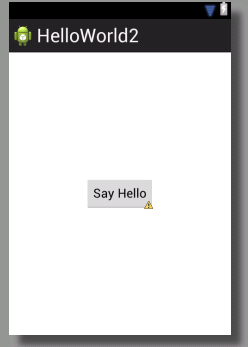
Normally, I write Android apps using PhoneGap / Cordova, but I wanted to start looking into native apps, to tap into features such as SQLLite etc.
So, Here’s a first go at “Say Hello World”, an app with a button that pops up a toast saying “Hello World”.
I used eclipse to create a new blank Android app, then dropped a button onto the form. Set it’s ID to btnSayHello
Then in MainActivity.java I added the following code:
Button button = (Button)findViewById(R.id.btnHello);
button.setOnClickListener(new View.OnClickListener(){
@Override
public void onClick(View v) {
// TODO Auto-generated method stub
Toast.makeText(getApplicationContext(), “Hello”, Toast.LENGTH_SHORT).show();
}
});
And, then following the prompts by eclipse, added some necessary imports
import android.os.Bundle;
import android.app.Activity;
import android.view.Menu;
import android.view.View;
import android.widget.Button;
import android.widget.Toast;
Bit of trial and error, but it’s starting to make sense…
PGWhitelist was not initialized properly, all urls will be disallowed.
When upgrading a project from PhoneGap 0.9.4 to PhoneGap 1.5.0, I got the error
PGWhitelist was not initialized properly, all urls will be disallowed.
This was because the PhoneGap.plist file was from the previous version of PhoneGap, and didn’t have all the required keys.
<?xml version=”1.0″ encoding=”UTF-8″?>
<!DOCTYPE plist PUBLIC “-//Apple//DTD PLIST 1.0//EN” “http://www.apple.com/DTDs/PropertyList-1.0.dtd“>
<plist version=”1.0”>
<dict>
<key>DetectPhoneNumber</key>
<true/>
<key>TopActivityIndicator</key>
<string>gray</string>
<key>EnableLocation</key>
<true/>
<key>ExternalHosts</key>
<array>
<string>*</string>
</array>
<key>EnableAcceleration</key>
<true/>
<key>Plugins</key>
<dict>
<key>Accelerometer</key>
<string>Accelerometer</string>
<key>Camera</key>
<string>Camera</string>
<key>Connection</key>
<string>Connection</string>
<key>Contacts</key>
<string>Contacts</string>
<key>DebugConsole</key>
<string>DebugConsole</string>
<key>Contacts</key>
<string>Contacts</string>
<key>File</key>
<string>File</string>
<key>FileTransfer</key>
<string>FileTransfer</string>
<key>Image</key>
<string>Image</string>
<key>Location</key>
<string>Location</string>
<key>Movie</key>
<string>Movie</string>
<key>Network</key>
<string>Network</string>
<key>Notification</key>
<string>Notification</string>
<key>Sound</key>
<string>Sound</string>
<key>Capture</key>
<string>Capture</string>
</dict>
</dict>
</plist>
HTML to PDF proxy

This is a discovery I made when looking for an online HTML to PDF converter that could be used automatically from code;
http://www.htmlpdf.com/iframeconvert?url=http://www.google.de&orientation=Portrait&pageSize=A4
Generates a PDF file from a url (here; http://www.google.de), Very simple, and very quick.
Domino sort in C#
 A domino sort is a term I coined to provide a way to order a list of objects that should be joined end-to-end, where the input array is out-of-order. For Example, if an input array was “A-B”,”C-D”,”B-C” then the output array would be “A-B”,”B-C”,”C-D”. Where common letters are joined together.
I’ve used generics so that this function can be used for any type of object. The only limit is that the “top” and “tail” must be in some way mutable into a string.
The function may throw an exception if the input array cannot be joined end-to-end. It does not do a best-match type connection, nor does it provide options if there are more than one way for the list to be ordered end-to-end.
/// <summary>
/// Recursively orders a list by linking a top and tail together
/// </summary>
/// <typeparam name=”T”>The type of the object</typeparam>
/// <param name=”orderedList”>The ordered list.</param>
/// <param name=”unOrderedList”>The unordered list.</param>
/// <param name=”top”>Function to create a string that represents the top of the object .</param>
/// <param name=”tail”>Function to create a string that represents the tail of the object</param>
private static void DominoJoin<T>(ref List<T> orderedList,
ref List<T> unOrderedList,
Func<T, string> top,
Func<T, string> tail)
{
var matched = new List<T>();
foreach (var unOrderedItem in unOrderedList)
{
var positionInList = 0; // Default to start
bool hasMatched = true; // Default to matched end-to-end
for (var i = 0; i < orderedList.Count; i++)
{
var strTop = top(orderedList[i]);
var strTail = tail(unOrderedItem);
if (strTop == strTail)
{
positionInList = i + 1;
break;
}
strTop = top(unOrderedItem);
strTail = tail(orderedList[i]);
if (strTop == strTail)
{
positionInList = i;
break;
}
if (i == orderedList.Count – 1)
{
hasMatched = false;
}
}
if (hasMatched)
{
orderedList.Insert(positionInList, unOrderedItem);
matched.Add(unOrderedItem);
}
}
// remove matches from unorderd list
foreach (var match in matched)
{
unOrderedList.Remove(match);
}
if (!unOrderedList.Any())
{
return; // All flights matched
}
if (!matched.Any())
{
// This exception is thrown when the list cannot be linked top to tail
throw new Exception(“Stack Overflow warning!”);
}
// Recurse until all flights matched
DominoJoin(ref orderedList, ref unOrderedList, top, tail);
}
I hope this helps someone! 🙂
Getting started with Parse
 Parse.com is a backend-service for mobile apps, or web apps. It allows you to create simple back ends for mobile apps, without requiring developing your own data-layer. I wanted to try it out, to see if I could get a simple “Hello World” app working, which stores a value in Parse, and then retrieves it via an ID later.
<html>
<head>
<script src=”http://www.parsecdn.com/js/parse-1.2.8.min.js”></script>
<script src=”http://code.jquery.com/jquery-1.10.1.min.js”></script>
<script language=”javascript”>
Parse.initialize(“…..”, “…..”);
var TestObject = Parse.Object.extend(“TestObject”);
$(init);
function init()
{
$(“#save”).bind(“click”,save_click);
$(“#load”).bind(“click”,load_click);
}
function save_click()
{
var testObject = new TestObject();
testObject.save({data: $(“#data”).val()}, {
success: function(object) {
alert(“stored as ” + object.id);
$(“#reference”).val(object.id);
}
});
}
function load_click()
{
$(“#data”).val(“”);
var reference = $(“#reference”).val();
var query = new Parse.Query(TestObject);
query.get(reference, {
success: function(obj) {
$(“#data”).val(obj.attributes.data);
},
error: function(object, error) {
// The object was not retrieved successfully.
// error is a Parse.Error with an error code and description.
alert(error);
}
});
}
</script>
</head>
<body>
<input type=”text” name=”data” id=”data” Value=”hello world”><br>
<input type=”button” value=”save” id=”save”><br>
<input type=”text” name=”reference” id=”reference” Value=””><br>
<input type=”button” value=”load” id=”load”><br>
</body>
</html>
Here, I initialise the Parse Library, then tie up events via JQuery, the Save and Load buttons to functions save_click and load_click. Save_click then stores a JSON object with property “data” and value as typed into the data text box, and sends this to Parse, all going well, an id is returned and displayed in the “reference” box. Load_click then requests this object again from Parse, using the ID previously provided, and displays the data property into the data text box.
The package version in your .bar manifest file for New Bundle must be greater than the previous version
When updating an App for BlackBerry 10 on the ISV portal, a new error appeared when trying to submit my updated BAR file,
The package version in your .bar manifest file for New Bundle must be greater than the previous version, but lower than any the next release version added to the vendor portal. . Your .bar manifest file package version must be greater than 4.0. Correct your .bar manifest file and try again to continue.
After a bit of research, I realised that the version number is composed of two values:
The version number in the Widget tag of the Config.xml;
<widget xmlns=”http://www.w3.org/ns/widgets” xmlns:rim=”http://www.blackberry.com/ns/widgets” version=”4.0.0.0″>
Combined with the buildId that is passed into the BBWP tool.
The combined version number must be unique, and as per this new requirement greater than the app version as published in the ISV portal.
ExecuteCore not called in ASP.NET MVC 4

If you want a function to be called before every page load in an MVC asp.net web application, then you could of course call that function from every action, or you can override the ExecuteCore method.
But no… It never gets called, what can you do?, well, I discovered on StackOverflow, that if you also override DisableAsyncSupport and return true, then the ExecuteCore method gets called
protected override void ExecuteCore()
{
// Modify current thread’s cultures
var strCulture = CurrentLocale();
Thread.CurrentThread.CurrentCulture = new System.Globalization.CultureInfo(strCulture);
Thread.CurrentThread.CurrentUICulture = Thread.CurrentThread.CurrentCulture;base.ExecuteCore();
}/// <summary>
/// Ensures that ExecuteCore() is called.
/// </summary>
protected override bool DisableAsyncSupport
{
get { return true; }
}
This is how, I’ve created two code-identical sites, www.freesms.cat and www.kostenfreiesms.com with different resource files to handle two different locales
English Dictionary API served with MongoDB

As an exercise with the no-SQL database platform MongoDB, I created a free account on mongolabs, created a database called webtropy, and within this, created a collection with the name “dictionary”. I then downloaded a English dictionary in text format from http://www.isc.ro/en/commands/lists.html (TWL06), Importing this into Mongo was mongoimport, specifying fields as “word”.
They offer a REST API via their HTTP interface, such as:
https://api.mongolab.com/api/1/databases/webtropy/collections/dictionary?apiKey=5FdV2ICC_dTrXGyumdVcIaBB2xYztY_n&q={‘word’:’HELLO‘}
Where “HELLO” is the word being checked. If the word is missing, i.e. “HELLOY” then the result is an empty JSON array “[]”
For the full English dictionary in JSON format, you can download this from Box.com at https://www.box.com/s/dvvuv4d6kqet4xbu7nvw

