Process stored proc data from within another in stored proc
Say you have one stored procedure, that returns a very wide table; i.e. lots of columns – or even worse, a variable number of columns and you want another stored procedure to process that data in some way before returning it.
you could create a temporary table, with all those columns, and insert the data into it. – an approach that won’t even work if you have a variable number of columns.
If you’re using SQL server 2012, then you can use dm_exec_describe_first_result_set_for_object to help with this, but say, you’re using SQL server 2008 …
This is where OPENROWSET comes in, where you can make SQL server call itself, as if it were a remote database.
EXEC sp_configure ‘Show Advanced Options’, 1
RECONFIGURE
EXEC sp_configure ‘Ad Hoc Distributed Queries’, 1
RECONFIGURE
declare @CityName varchar(200)
set @CityName = ‘Derry’
declare @SQL varchar(1000)
set @SQL = ‘SELECT distinct something FROM OPENROWSET(”SQLNCLI”, ”Server=(local);Trusted_Connection=yes;”,
”yourdb.dbo.sp_SearchResultsByCityName ””’ + @CityName + ”””’)
order by something’
print @SQL
exec(@SQL)
There’s about two levels of indirection in there, but it works … after an hour of trial and error!
ps: If you’re using temp tables in your stored procedure, you also have to use
SET FMTONLY OFF
SET NOCOUNT ON
Changing the language of a Phonegap App.
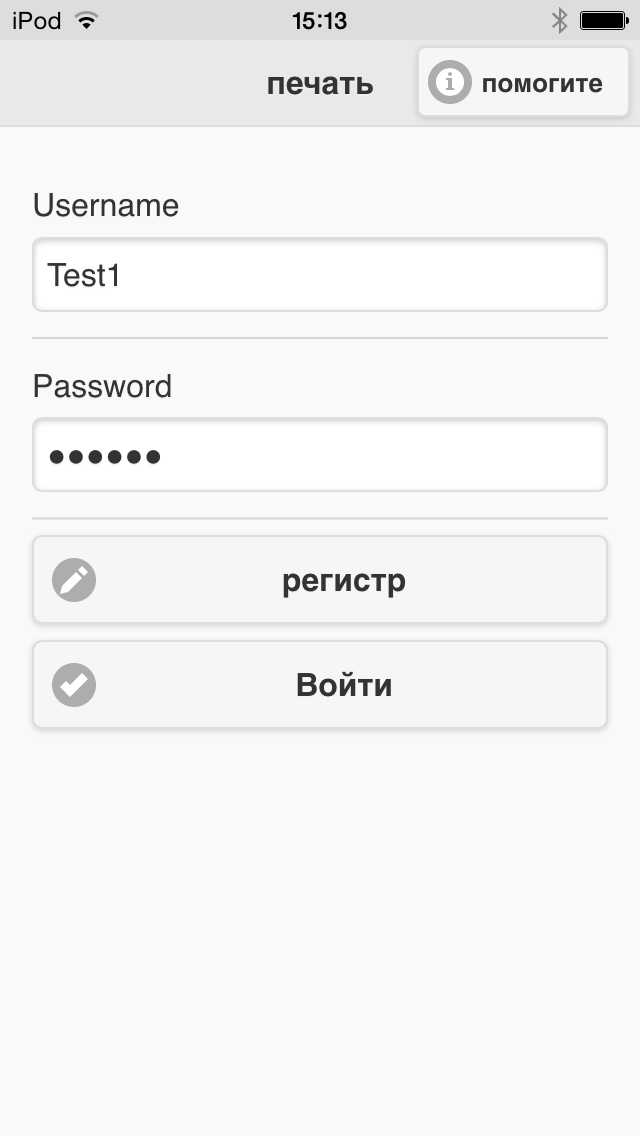
All my iOS apps have app store descriptions in multiple languages, the download increase from this simple step alone is enormous. However, I did notice that the increase in downloads doesn’t match the increase in actual app engagement, and it’s pretty obvious why, a Russian user might be tempted to download your app from your description in Russian, but then once downloaded, can’t use the app because he doesn’t speak english.
Earlier in this blog, I listed a way to determine the user’s language by using HTTP headers, however, I thought that it’s not a great solution, since I’m relying on a third party service, which could go offline tomorrow. So, I used a better solution as follows;
function checkLanguage()
{
navigator.globalization.getPreferredLanguage(
function (language)
{
console.log(‘language: ‘ + language.value + ‘\n’);
changelanguage(language.value);
},
function () {
console.log(‘Error getting language\n’);}
);
}
This only works in the context of PhoneGap, and not in the normal web. But that didn’t matter for me. The next trick, is to test this in a real device, not the simulator, since the emulator has a bug that prevents this from happening naturally (there’s a work around via edit-scheme > options > language). But with a real iPhone to hand, it works perfectly.
What I did is created a JSON object like this;
var translations = {
“en” : {
“#line1” : “In order to use this app, you will need to install the print spooler software available for purchase at”,
“#btnBuy” : “Download Software”,
“#line2” : “You can use this app to send photos from your photo gallery to print. To send other types of files, simply email them as an attachment to [username] @printfromipad.com, where [username] is your username that you have previously set up.”,
“#line3” : “If you have any problems using this printing system, please email us at support@openmerchantaccount.com, or phone us on (0044)2871226151”,
“#btnCreateAccount” : “Register”,
“#btnLogin” : “Login”,
“.ui-title” : “Print”,
“.ui-header .ui-btn” : “Help”
},
“fr” : {
“#line1” : “Pour utiliser cette application, vous aurez besoin d’installer le logiciel du gestionnaire d’impression disponible à l’achat au”,
“#btnBuy” : “Télécharger le logiciel”,
“#line2” : “Vous pouvez utiliser cette application pour envoyer des photos de votre galerie de photos à imprimer. Pour envoyer d’autres types de fichiers, il suffit de les envoyer par courriel en pièce jointe à [nom d’utilisateur] @ printfromipad.com, où [nom d’utilisateur] est votre nom d’utilisateur que vous avez précédemment créé.”,
“#line3” : “Si vous avez des problèmes avec ce système d’impression, se il vous plaît écrivez-nous à support@openmerchantaccount.com, ou appelez-nous au (0044) 2871226151”,
“#btnCreateAccount” : “Créer un compte”,
“#btnLogin” : “Connexion”,
“.ui-title” : “Imprimer”,
“.ui-header .ui-btn” : “Aide”
},
Where you can see a JQuery selector, and the localised text; and this is applied like this
function changelanguage(lang)
{
for(var i in translations[lang])
{
var translation = translations[lang][i];
console.log(i + “->” + translation);
$(i).html(translation);
}
}
Really happy with this. The only bug I found was that the element has to be present on-screen when changeLanguage is called, so in the next version, I’ll ensure that this is called on every page load.
Subscribe to mailchimp via API in PHP
This is a handy little PHP script using CURL that adds an email address onto a MailChimp list
taken from: https://apidocs.mailchimp.com/api/1.3/listsubscribe.func.php
<?php
$apiKey = ‘xxxxxx’; // your mailchimp API KEY here
$listId = ‘xxxxx’; // your mailchimp LIST ID here
$double_optin=false;
$send_welcome=false;
$email_type = ‘html’;
$email = $_POST[’email’];
//replace us2 with your actual datacenter
$submit_url = “http://us10.api.mailchimp.com/1.3/?method=listSubscribe”;
$data = array(
’email_address’=>$email,
‘apikey’=>$apiKey,
‘id’ => $listId,
‘double_optin’ => $double_optin,
‘send_welcome’ => $send_welcome,
’email_type’ => $email_type
);
$payload = json_encode($data);$ch = curl_init();
curl_setopt($ch, CURLOPT_URL, $submit_url);
curl_setopt($ch, CURLOPT_RETURNTRANSFER, true);
curl_setopt($ch, CURLOPT_POST, true);
curl_setopt($ch, CURLOPT_POSTFIELDS, urlencode($payload));$result = curl_exec($ch);
curl_close ($ch);
$data = json_decode($result);
if ($data->error){
echo $data->error;
} else {
echo ‘Got it, you\’ve been added to our email list.’;
}
?>
Premature end of script headers
I’m not really used to fixing problems on Linux / Apache – but after a server crash, and a forced migration to a new server, I’ve had to get my hands dirty and try and get a new Linux server back up and running.
So, my problem was. I needed to install Perl, Python and Ruby on the server, I had existing scripts but nothing appeared to work, I just got the generic Http 500 Internal server error message. – Which isn’t enough to work with.
The first step with troubleshooting is to get more information on the error, which means in my case anyway, looking at the file /var/log/httpd/error_log (I’m on centOS), and looking at the last error.
Then fixing the error listed
Permission denied: exec of ‘….HelloWorld.py’ failed
This means you need to grant execute permissions to the file, – i.e. in WinSCP, right click the file, select properties, then click all the X checkboxes in permissions
Premature end of script headers: HelloWorld.py
This means, in my case anyway, was the shebang line was pointing to the wrong file – so instead of
#!usr/local/bin/python it was in fact #!usr/bin/python
You can type which python into the command prompt to find the location of your python executable
: undefined method `require_relative’ for main:Object
This was a ruby specific error I got, which was because I had an old version of Ruby installed (1.8.1), just replaced require_relative to require, and that went away.
Localise a web page via Javascript
Here is a way to simply detect the user’s language,and switch the content for the local version. As a caveat, this system will show English before changing to the local language, and it’s not good for SEO. You can get rid of the change from english by removing visible text in the HTML, but this also serves as a failover for users who don’t speak any of the supported languages.
<span id=”btnBuy”>Download Software</span>
<script language=”javascript”>
var translations = {
“en” : {
“btnBuy” : “Download Software”
},
“fr” : {
“btnBuy” : “Télécharger le logiciel”,
}};function changelanguage(httpheaders)
{
var lang=httpheaders[“Accept-Language”];
lang = lang.split(“,”)[0].substring(0,2);
console.log(lang);
for(var i in translations[lang])
{
var translation = translations[lang][i];
console.log(i + “->” + translation);
document.getElementById(i).innerHTML = translation;
}
}
</script>
<script src=”http://ajaxhttpheaders2.appspot.com/?callback=changelanguage”></script>
Kudos to Dan Singerman for the appengine script.
Free UK VPN (L2TP – suitable for iPad)
vpn-td2.reliablehosting.com
Login:vpn527
Password:zGGZ8q8kE6
L2TP key:dARkaTt25rW4fqBC
Server:91.228.115.130
Not using this server for the rest of the month, so feel free to use it!
Automated access_token grant using Facebook and C=
Say you wanted to get an access token for facebook from a desktop app, but don’t want to display the normal facebook login screen. – and you somehow know the user’s facebook username and password – then this approach might help you get the access token you need;
first, you need to set up a facebook app, and get the client_id
public void GetAccessToken(Action<string,string> Callback)
{
this.Callback = Callback;
string strUrl = “https://www.facebook.com/dialog/oauth?”;
strUrl += “type=user_agent&”;
strUrl += “client_id=xxxx&”;
strUrl += “redirect_uri=xxxxx”;
this.webBrowser1.DocumentCompleted += WebBrowser1OnDocumentCompleted;
this.webBrowser1.Navigate(strUrl);
}
Here, I’m assuming you have a windows form, with a web browser control called webBrowser1 – redirect_uri has to be whatever was configured in the facebook app, but other than that, it doesn’t matter.
then we fill out the username / password and click the login burron on Document completed;
private void WebBrowser1OnDocumentCompleted(object sender, WebBrowserDocumentCompletedEventArgs webBrowserDocumentCompletedEventArgs)
{
if (webBrowser1.Url.Host == “<domain>”)
{
var variables = HttpUtility.ParseQueryString(webBrowser1.Url.Fragment);
var access_token = variables[“#access_token”];
var expires_in = variables[“expires_in”];
Callback(access_token, expires_in);
}
else
{
var strJs1 = @”document.getElementsByName(’email’)[0].value ='” + strUsername + “‘”;
var strJs2 = @”document.getElementsByName(‘pass’)[0].value = ‘” + strPassword + “‘”;
var strJs3 = @”document.getElementsByName(‘login’)[0].click()”;
SendJs(strJs1);
SendJs(strJs2);
SendJs(strJs3);
}
}
SendJS is defined as follows;
protected string SendJs(string jScript)
{
object[] args = { jScript };
var strReturn = webBrowser1.Document == null ? “” : webBrowser1.Document.InvokeScript(“eval”, args);
System.Diagnostics.Debug.WriteLine(jScript);
System.Diagnostics.Debug.WriteLine(strReturn);
return strReturn == null ? “” : strReturn.ToString();
}
You’ll also need the following global variables
public string strUsername = “<email>”;
public string strPassword = “<password>”;public Action<string, string> Callback;
Hope this helps someone out!
Changes to Linkedin API
|
||||||||||
|
|
||||||||||
|

Using Html5 geolocation to find someone via their email
Here’s a tool that you can use to track the location (lat/lon) of someone via their email account:
Offline Adverts.com – an advertising solution that works even when offline.

Offline Adverts.com is an advertising platform for apps that is designed to work specifically when the user’s device is offline, and not connected to the Internet. This is where most ad platforms just show an empty space, this backup solution allows you to fill that unused ad space with a paid ad.
As an advertiser, it lets you gain brand exposure, even for a fraction of the cost of the mainstream ad networks.
Want to find out more? visit – OfflineAdverts.com
 Network Programming in .NET