Archive
Unlimited webspace hosting
Here are another 35 websites I’ve rescued from the Geocities torrent. The next recovery looks huge … 65 GB of sites, which
    Friday, October 12, 2012 11:21 PM        <dir> 0
     Friday, October 12, 2012 11:22 PM        <dir> 1
     Friday, October 12, 2012 11:24 PM        <dir> 2
     Friday, October 12, 2012 11:24 PM        <dir> 3
     Friday, October 12, 2012 11:26 PM        <dir> 4
   Saturday, October 13, 2012  6:17 AM        <dir> _
   Saturday, October 13, 2012  7:18 AM        <dir> a
   Saturday, October 13, 2012  1:25 AM        <dir> b
   Saturday, October 13, 2012  7:21 AM        <dir> c
   Saturday, October 13, 2012  1:41 AM        <dir> d
   Saturday, October 13, 2012  7:36 AM        <dir> e
   Saturday, October 13, 2012  7:43 AM        <dir> f
   Saturday, October 13, 2012  2:38 AM        <dir> g
   Saturday, October 13, 2012  2:41 AM        <dir> h
   Saturday, October 13, 2012  8:05 AM        <dir> i
   Saturday, October 13, 2012  3:40 AM        <dir> j
   Saturday, October 13, 2012  3:41 AM        <dir> k
   Saturday, October 13, 2012  4:36 AM        <dir> l
   Saturday, October 13, 2012  4:43 AM        <dir> m
   Saturday, October 13, 2012  4:45 AM        <dir> n
   Saturday, October 13, 2012  6:05 AM        <dir> o
   Saturday, October 13, 2012  6:07 AM        <dir> t
   Saturday, October 13, 2012  6:07 AM        <dir> v
   Saturday, October 13, 2012  6:08 AM        <dir> x
   Saturday, October 13, 2012  6:09 AM        <dir> z
Iterating HTMLSelectElement options in C# And VB.NET
If you want to list all the values of options in a HTML drop down list, from a webbrowser control in VB.NET or C#, here’s how to do it:
Dim hoeDest As HTMLOptionElement
For iDest = 0 To hseDestinations.options.length – 1
hoeDest = hseDestinations.options.item(iDest)
tbOutput.Text += hoeDest.value
Next iDest
Or in C#
for (var iDest = 0; iDest <= destinationSelect.Children.Count – 1; iDest++)
{
var hoeDest = (HTMLOptionElement)destinationSelect.Children[iDest].DomElement;
tbOutput.Text += hoeDep.value;
}
Another 183 sites rescued from the demise of geocities
     Friday, October 12, 2012  2:27 PM        <dir> _
     Sunday, October 14, 2012  8:16 AM        <dir> a
     Monday, October 15, 2012  2:59 PM        <dir> b
    Tuesday, October 16, 2012  6:04 AM        <dir> c
   Saturday, October 13, 2012  6:09 AM        <dir> f
     Friday, October 12, 2012 11:13 PM        <dir> g
     Friday, October 12, 2012 10:47 PM        <dir> h
     Friday, October 12, 2012 10:22 PM        <dir> i
     Friday, October 12, 2012 10:07 PM        <dir> j
     Friday, October 12, 2012  9:51 PM        <dir> k
     Friday, October 12, 2012  9:39 PM        <dir> l
     Friday, October 12, 2012  9:24 PM        <dir> m
     Friday, October 12, 2012  9:12 PM        <dir> n
     Friday, October 12, 2012  8:42 PM        <dir> o
     Friday, October 12, 2012  8:21 PM        <dir> p
     Friday, October 12, 2012  7:56 PM        <dir> q
     Friday, October 12, 2012  7:20 PM        <dir> r
     Friday, October 12, 2012  7:01 PM        <dir> s
     Friday, October 12, 2012  6:54 PM        <dir> t
     Friday, October 12, 2012  6:24 PM        <dir> u
     Friday, October 12, 2012  5:41 PM        <dir> v
     Friday, October 12, 2012  4:55 PM        <dir> w
     Friday, October 12, 2012  4:19 PM        <dir> x
     Friday, October 12, 2012  3:32 PM        <dir> y
     Friday, October 12, 2012  2:46 PM        <dir> z
NVARCHAR(4000) & NTEXT vs NVARCHAR(MAX)
What is the difference between NVARCHAR(4000), NTEXT and NVARCHAR(MAX)?
First consider this SQL script:
declare @BigData ntext
set @BigData = N’0123456789012345678901234567890123456789012345678901234567890123456789012345678901234567890123456789
0123456789012345678901234567890123456789012345678901234567890123456789012345678901234567890123456789
0123456789012345678901234567890123456789012345678901234567890123456789012345678901234567890123456789
0123456789012345678901234567890123456789012345678901234567890123456789012345678901234567890123456789
0123456789012345678901234567890123456789012345678901234567890123456789012345678901234567890123456789
0123456789012345678901234567890123456789012345678901234567890123456789012345678901234567890123456789
0123456789012345678901234567890123456789012345678901234567890123456789012345678901234567890123456789
0123456789012345678901234567890123456789012345678901234567890123456789012345678901234567890123456789
0123456789012345678901234567890123456789012345678901234567890123456789012345678901234567890123456789
0123456789012345678901234567890123456789012345678901234567890123456789012345678901234567890123456789
-1K-
0123456789012345678901234567890123456789012345678901234567890123456789012345678901234567890123456789
0123456789012345678901234567890123456789012345678901234567890123456789012345678901234567890123456789
0123456789012345678901234567890123456789012345678901234567890123456789012345678901234567890123456789
0123456789012345678901234567890123456789012345678901234567890123456789012345678901234567890123456789
0123456789012345678901234567890123456789012345678901234567890123456789012345678901234567890123456789
0123456789012345678901234567890123456789012345678901234567890123456789012345678901234567890123456789
0123456789012345678901234567890123456789012345678901234567890123456789012345678901234567890123456789
0123456789012345678901234567890123456789012345678901234567890123456789012345678901234567890123456789
0123456789012345678901234567890123456789012345678901234567890123456789012345678901234567890123456789
0123456789012345678901234567890123456789012345678901234567890123456789012345678901234567890123456789
-2K-
0123456789012345678901234567890123456789012345678901234567890123456789012345678901234567890123456789
0123456789012345678901234567890123456789012345678901234567890123456789012345678901234567890123456789
0123456789012345678901234567890123456789012345678901234567890123456789012345678901234567890123456789
0123456789012345678901234567890123456789012345678901234567890123456789012345678901234567890123456789
0123456789012345678901234567890123456789012345678901234567890123456789012345678901234567890123456789
0123456789012345678901234567890123456789012345678901234567890123456789012345678901234567890123456789
0123456789012345678901234567890123456789012345678901234567890123456789012345678901234567890123456789
0123456789012345678901234567890123456789012345678901234567890123456789012345678901234567890123456789
0123456789012345678901234567890123456789012345678901234567890123456789012345678901234567890123456789
0123456789012345678901234567890123456789012345678901234567890123456789012345678901234567890123456789
-3K-
0123456789012345678901234567890123456789012345678901234567890123456789012345678901234567890123456789
0123456789012345678901234567890123456789012345678901234567890123456789012345678901234567890123456789
0123456789012345678901234567890123456789012345678901234567890123456789012345678901234567890123456789
0123456789012345678901234567890123456789012345678901234567890123456789012345678901234567890123456789
0123456789012345678901234567890123456789012345678901234567890123456789012345678901234567890123456789
0123456789012345678901234567890123456789012345678901234567890123456789012345678901234567890123456789
0123456789012345678901234567890123456789012345678901234567890123456789012345678901234567890123456789
0123456789012345678901234567890123456789012345678901234567890123456789012345678901234567890123456789
0123456789012345678901234567890123456789012345678901234567890123456789012345678901234567890123456789
0123456789012345678901234567890123456789012345678901234567890123456789012345678901234567890123456789
-4K-‘select @BigData
If @BigData is declared as NVARCHAR(4000), then the select statement will truncate at 4K bytes. You can’t declare as NVARCHAR(8000) as it will give the error:
Msg 2717, Level 16, State 2, Line 1
The size (8000) given to the parameter ‘@BigData’ exceeds the maximum allowed (4000).
@BigData cannot be declared as NTEXT, since it gives the error:
Msg 2739, Level 16, State 1, Line 1
The text, ntext, and image data types are invalid for local variables.
but, as NVARCHAR(MAX) then the data is not truncated!
How to loop for a specified time in C#
Say that you wanted to do something for one minute, as often as possible; then this bit of code is quite a nice way of doing it;
It would be called like:
foreach(var i in TimeLoop(TimeSpan.FromSeconds(30))
{ // Do something }
/// <summary>
/// A Loop that continues for a given time
/// </summary>
/// <param name=”duration”></param>
/// <returns></returns>
private static IEnumerable TimeLoop(TimeSpan duration)
{
var dtStart = DateTime.Now;
for (; ; )
{
yield return null;
System.Threading.Thread.Sleep(100);
var tsElapsed = DateTime.Now – dtStart;
if (tsElapsed > duration)
{
yield break;
}
}
}
Saving Geocities
I downloaded the Geocities torrent, but it only gets to 23.7% complete, so, stopping it there, I unzipped whatever zips I could, finding only “geocities.archiveteam.torrent\ARCHIVES\geocities-unmangled\www.geocities.com” to be the only directory with a few sites that could be salvaged.
After that, I processed all the html files, removing absolute links, then uploaded them to my server. It’s only 104 websites, or 340 Mb out of the 1 Tb download, so it’s less than a 3,000th of the size of geocities, but whenever a 100% seed for that torrent comes online, then I can finish the download.
 Saturday, October 13, 2012 12:17 PM        <dir> 0
   Saturday, October 13, 2012 12:25 PM        <dir> 1
   Saturday, October 13, 2012 12:25 PM        <dir> 2
   Saturday, October 13, 2012 12:25 PM        <dir> 3
   Saturday, October 13, 2012 12:26 PM        <dir> 4
   Saturday, October 13, 2012 12:28 PM        <dir> 5
   Saturday, October 13, 2012 12:28 PM        <dir> 7
   Saturday, October 13, 2012 12:28 PM        <dir> 8
   Saturday, October 13, 2012 12:28 PM        <dir> 9
     Sunday, October 14, 2012  8:29 AM        <dir> _
     Sunday, October 14, 2012  8:40 AM        <dir> a
     Sunday, October 14, 2012  8:52 AM        <dir> c
     Sunday, October 14, 2012  9:18 AM        <dir> d
   Saturday, October 13, 2012  2:55 PM        <dir> e
     Sunday, October 14, 2012  9:37 AM        <dir> f
     Sunday, October 14, 2012  9:40 AM        <dir> g
     Sunday, October 14, 2012  9:56 AM        <dir> h
     Sunday, October 14, 2012 10:22 AM        <dir> i
   Saturday, October 13, 2012  5:26 PM        <dir> j
   Saturday, October 13, 2012  6:02 PM        <dir> k
   Saturday, October 13, 2012  6:03 PM        <dir> L
   Saturday, October 13, 2012  8:16 PM        <dir> m
     Sunday, October 14, 2012  1:11 AM        <dir> n
     Sunday, October 14, 2012  1:18 AM        <dir> o
     Sunday, October 14, 2012  1:47 AM        <dir> p
     Sunday, October 14, 2012  2:12 AM        <dir> q
     Sunday, October 14, 2012  4:06 AM        <dir> r
     Sunday, October 14, 2012  5:22 AM        <dir> s
     Sunday, October 14, 2012  5:51 AM        <dir> t
     Sunday, October 14, 2012  6:37 AM        <dir> u
     Sunday, October 14, 2012  7:05 AM        <dir> v
     Sunday, October 14, 2012  7:05 AM        <dir> W
     Sunday, October 14, 2012  7:14 AM        <dir> x
     Sunday, October 14, 2012  7:37 AM        <dir> y
     Sunday, October 14, 2012  8:16 AM        <dir> z
Unable to telnet to port 25 remotely (Windows SMTP)
Setting up the SMTP & POP3 service on Windows 2003, I noticed that I could telnet localhost 25 on remote desktop, but not telnet port 25 remotely.
This turned out to be a setting in the Windows SMTP service. Just Open IIS, Right click properties on Default SMTP virtual server, then Access, connection and
select “All except list below”. Then I can telnet in, and the email started working 🙂

Start an IIS website synchronously with ADSI
Using ADSI, once you have a DirectoryEntry object for a given website using
var root = new DirectoryEntry(“IIS://localhost/W3SVC”);
foreach (DirectoryEntry e in root.Children)
{
if (e.SchemaClassName != “IIsWebServer”) continue;// e now represents a website in IIS
}
You can start and stop it using
Entry.Invoke(“start”);
Entry.Invoke(“stop”);
However, these commands run asynchronously, and you need to poll on the value
Entry.Invoke(“Get”, “ServerState”)
Where 4 is stopped and 2 is started. However, those using IISAdmin.net will find that this value never changes, meaning that it is impossible to tell when the website has actually changed state. Therefore, my fix was calling:
Entry.RefreshCache();
Prior to calling Invoke/Get
Hello World on Windows Phone 7
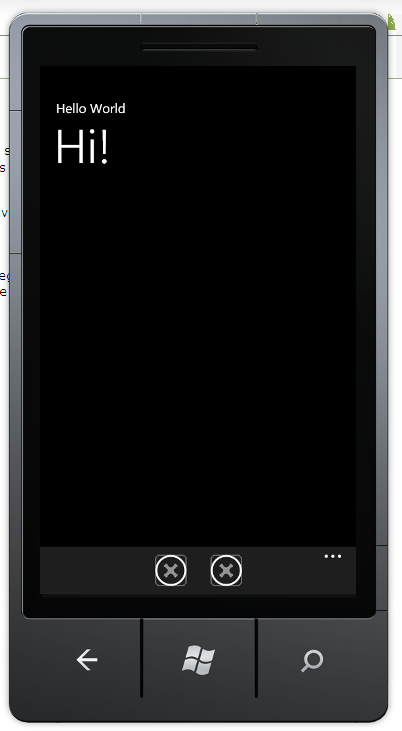 Just having a look at the Windows Phone SDK, and my first app, as always is “Hello World”
Here’s the Xaml below;
<phone:PhoneApplicationPage
x:Class=”WindowsPhoneApplication.MainPage”
xmlns=”http://schemas.microsoft.com/winfx/2006/xaml/presentation”
xmlns:x=”http://schemas.microsoft.com/winfx/2006/xaml”
xmlns:phone=”clr-namespace:Microsoft.Phone.Controls;assembly=Microsoft.Phone”
xmlns:shell=”clr-namespace:Microsoft.Phone.Shell;assembly=Microsoft.Phone”
xmlns:d=”http://schemas.microsoft.com/expression/blend/2008″
xmlns:mc=”http://schemas.openxmlformats.org/markup-compatibility/2006″
mc:Ignorable=”d” d:DesignWidth=”480″ d:DesignHeight=”696″
FontFamily=”{StaticResource PhoneFontFamilyNormal}”
FontSize=”{StaticResource PhoneFontSizeNormal}”
Foreground=”{StaticResource PhoneForegroundBrush}”
SupportedOrientations=”Portrait” Orientation=”Portrait”
shell:SystemTray.IsVisible=”True”><!–LayoutRoot is the root grid where all page content is placed–>
<Grid x:Name=”LayoutRoot” Background=”Transparent”>
<Grid.RowDefinitions>
<RowDefinition Height=”Auto”/>
<RowDefinition Height=”*”/>
</Grid.RowDefinitions><!–TitlePanel contains the name of the application and page title–>
<StackPanel x:Name=”TitlePanel” Grid.Row=”0″ Margin=”12,17,0,28″>
<TextBlock x:Name=”ApplicationTitle” Text=”Hello World” Style=”{StaticResource PhoneTextNormalStyle}”/>
<TextBlock x:Name=”PageTitle” Text=”Hi!” Margin=”9,-7,0,0″ Style=”{StaticResource PhoneTextTitle1Style}”/>
</StackPanel><!–ContentPanel – place additional content here–>
<Grid x:Name=”ContentPanel” Grid.Row=”1″ Margin=”12,0,12,0″></Grid>
</Grid><!–Sample code showing usage of ApplicationBar–>
<phone:PhoneApplicationPage.ApplicationBar>
<shell:ApplicationBar IsVisible=”True” IsMenuEnabled=”True”>
<shell:ApplicationBarIconButton IconUri=”/Images/appbar_button1.png” Text=”Button 1″/>
<shell:ApplicationBarIconButton IconUri=”/Images/appbar_button2.png” Text=”Button 2″/>
<shell:ApplicationBar.MenuItems>
<shell:ApplicationBarMenuItem Text=”MenuItem 1″/>
<shell:ApplicationBarMenuItem Text=”MenuItem 2″/>
</shell:ApplicationBar.MenuItems>
</shell:ApplicationBar>
</phone:PhoneApplicationPage.ApplicationBar></phone:PhoneApplicationPage>
Log file .\ib_logfile0 is of different size 0
When removing a site from Plesk, I got an error saying it could not connect to MySQL. I tried to start the service, which wouldn’t start, and got this in the event log:
Failed to connect to database: Can’t connect to MySQL server on ‘localhost’ (10061)
at Turn off domain xxx.com (state=1)(domainmng::turnDomain line 104)
Execute file name: C:\Program Files\SWsoft\Plesk\admin\bin\domainmng.exe
Trying to start MySQL from the command prompt gave this error:
C:\Program Files\SWsoft\Plesk\Databases\MySQL\bin>mysqld-nt.exe –console
InnoDB: Error: log file .\ib_logfile0 is of different size 0 10485760 bytes
InnoDB: than specified in the .cnf file 0 209715200 bytes!
101111 15:30:10 [ERROR] Can’t init databases
101111 15:30:10 [ERROR] Aborting
101111 15:30:10 [Note] mysqld-nt.exe: Shutdown complete
So, after looking in the –help options, and reading online I found this fix:
C:\Program Files\SWsoft\Plesk\Databases\MySQL\bin>mysqld-nt.exe –console –innodb_log_file_size=10M
101111 15:30:29 InnoDB: Started; log sequence number 0 135464
mysqld-nt.exe: ready for connections.
Version: ‘4.1.18-nt-log’ socket: ” port: 3306 MySQL Community Edition (GPL)
 Network Programming in .NET