Archive
Find all apps installed on Android
When installing an app using adb, you use the APK filename, but to uninstall it, you have to use the package or activity class name. I used PhoneGap build, which generated it’s own class name for my app, subtly replacing a hyphen for an underscore.
Long story short, I didn’t know the class name of the app I wanted to uninstall, so I looked for how to get a list of apps installed on the device (a Nook emulator)
C:\android>adb shell pm list packages
package:com.bn.policymanager.svc
package:com.android.launcher
package:com.android.defcontainer
package:com.bn.setupkicker
package:com.bn.touchcalibrator
package:com.android.quicksearchbox
package:sensor.test
package:com.android.inputmethod.latin
package:com.android.phone
package:com.openmerchantaccount.astronomy
package:com.android.htmlviewer
package:com.bn.encore.devicecleanup
package:com.android.browser
package:com.android.music
package:com.bn.benchmarks
package:com.android.providers.userdictionary
package:com.bn.filestresser
package:android.tts
package:com.adobe.air
package:com.bn.nook.dadmin
package:com.bn.fscheck
package:com.openmerchantaccount.athens
package:com.android.providers.media
package:com.bn.kube
package:com.android.certinstaller
package:com.bn.videomark
package:com.android.gallery
package:android
package:com.android.settings
package:com.android.providers.contacts
package:com.bn.deviceregistrator
package:com.android.protips
package:com.android.providers.applications
package:com.bn.cloud.svc
package:com.android.providers.drm
package:com.adobe.flashplayer
package:com.android.term
package:com.bn.authentication.svc
package:com.android.speechrecorder
package:com.mybeauty_world.app
package:com.android.packageinstaller
package:com.bn.app.crypto.server
package:com.android.development
package:com.android.providers.telephony
package:com.android.providers.subscribedfeeds
package:com.svox.pico
package:com.bn.bnappinstaller
package:com.android.spare_parts
package:com.android.providers.settings
package:org.hermit.android.battrack
package:com.bn.syschecksum
package:com.bn.devicemanager
package:com.android.providers.downloads
package:com.android.server.vpn
Et Voila!
[[UIApplication sharedApplication] openURL:url] not working on mailto
*Hack warning*: This is not an elegant or nice solution, so feel free to berate me for damage to your eyes 🙂
If you are using PhoneGap with iPhone, then you have noticed that external urls don’t open unless you modify
shouldStartLoadWithRequest, This works fine with http:// and https:// urls, but I’ve noticed that it didn’t work with tel: or mailto: links. Despite millions of posts on the internet saying it ‘should’ work. I found a horrible hack that avoids this problem, by creating a HTML page on my server, with the content:
<script language=”javascript”> function getParameterByName(name) { name = name.replace(/[\[]/, “\\\[“).replace(/[\]]/, “\\\]”); var regexS = “[\\?&]” + name + “=([^&#]*)”; var regex = new RegExp(regexS); var results = regex.exec(window.location.search); if(results == null) return “”; else return decodeURIComponent(results[1].replace(/\+/g, ” “)); } var url = getParameterByName(“url”); window.location.href=url; </script>
Which, very simply, means that you can send a user to http://yourserver.com/link.html?url=mailto:me@me.com – sending the user to safari, then the mail client immediately afterwards.
Feel free to throw up your lunch now.
Incorrect PFS free space information for page
This is just a personal experience, so if this destroys your house or eats your dog, then don’t blame me.
If you run a DBCC CheckDB on your SQL server database, and get an error such as
Incorrect PFS free space information for page (1:7394) in object ID 60, index ID 1, partition ID 281474980642816, alloc unit ID 71776119065149440 (type LOB data). Expected value 0_PCT_FULL, actual value 100_PCT_FULL.
Then, you can repair this error using
ALTER DATABASE xxxxx
SET single_user WITH ROLLBACK IMMEDIATE;
go
DBCC checkdb (‘xxxx’, repair_allow_data_loss);
go
What this command does, is delete any erroneous pages, which removes the error, but will also delete any data contained in the erroneous pages. If the affected data can be sacrificed, then you can use this to recover the rest of the database.
Selectively prevent vertical scrolling in Phonegap app.
A battle I’ve often fought is the vertical scroll in Phonegap. iOS sees the app as a browser window (UIWebView), and wants to treat it as such, and your clients and users see it as a static app, with fixed navigation elements ontop of scrollable content.
On pages where the content does not need to be scrolled at all then you just need to call preventDefault on touchmove event.
document.addEventListener(‘touchmove’, function (e)
{
if (!IsDraggablePage(e))
{
e.preventDefault();
}
}, true);
Note, that I have used a function call to “IsDraggablePage”, this method can be used to selectively decide if the page can be scrolled or not. Typically, a page where all the content fits without scrolling, then you can disable scrolling, if the content doesn’t, or may not always fit, then you should enable scrolling.
function IsDraggablePage(e)
{
if($(‘.ui-page-active’).attr(‘draggable’)==”true”)
{
return true;
}
return false;
}
This function, isDraggablePage, checks an attribute “draggable” of the page, and if it is set to true, then the page can be dragged.
All well and good, until you hit this problem, on a page that needs to be draggable, it appears that the navigation bars can be dragged out of place
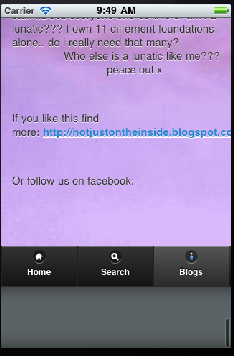 This is caused by the UIWebView Bounce feature of iOS, and in order to remove it, then you have to change some of the underlying Cocoa code, namely Classes > AppDelegate.m
Scroll to webViewDidFinishLoad, and enter the following line of code before the return statement:
[[theWebView.subviews objectAtIndex:0] setBounces:NO];
This means that, when you scroll beyond the bounds of the UIWebView, it will not bounce back to position, it will just stop suddenly, leaving your navigation in place.
Open link in external browser using Phonegap Webworks for Blackberry
If you are developing apps for BlackBerry using PhoneGap / Webworks for Blackberry, then you have probably noticed that if you add a url to an external website, such as <a href=”http://www.google.com”>Google</a>, then the destination website gets loaded within the frame of the app, giving a poor user experience, and no way to return to the app, apart from closing the app.
The solution is not obvious, since you have to use Webworks API (which is not cross-platform, it’s BlackBerry only).
use the following code when itializing JQuery
$(‘a[target=”_blank”]’).live( ‘click’, function()
{
if ( window.blackberry )
{
alert( ‘Loading website: ‘ + $(this).attr( ‘href’ ) );
var args = new blackberry.invoke.BrowserArguments( $(this).attr( ‘href’ ));
blackberry.invoke.invoke(blackberry.invoke.APP_BROWSER, args);
return false;
}
return true;
})
Then IMPORTANTLY add the following lines to the config.xml
<feature id=”blackberry.app” required=”true” version=”1.0.0.0″/>
<feature id=”blackberry.invoke”/>
<feature id=”blackberry.invoke.BrowserArguments” />
<access uri =”*”/>
I have heard that this invocation mechanism may change for BlackBerry 10 / Playbook, which I am going to test soon.
Sort DOM Elements using JQuery
If you want to save a round-trip to the server when changing the sort-order of a list of HTML Elements, you can use Javascript and JQuery quite simply with this handy bit of code:
<html>
<head>
<script src=”jquery-1.8.2.js”></script>
<script language=”javascript”>
$(init);
function init()
{
var listitems = $(“#sortContainer .sortable”).get();
listitems.sort(function(a, b) {
return $(a).attr(“value”) – $(b).attr(“value”);
});
$.each(listitems, function(index, item) { $(“#sortContainer”).append(item); });
}
</script>
</head>
<body>
<div id=”sortContainer”>
<div class=”sortable” value=”5″>5<br></div>
<div class=”sortable” value=”2″>2<br></div>
<div class=”sortable” value=”1″>1<br></div>
<div class=”sortable” value=”10″>10<br></div>
</div>
</body>
</html>
Using HTML markup to display dynamic information
I wanted to associate Longitude & Latitude values with HTML elements on a page, and then using this data, display the KM distance from the current location. Using JQuery, and omitting the HTML5 Geolocation code, this is what I came up with
<html>
<head>
<script src=”jquery-1.8.2.js”></script>
<script lanaguage=”javascript”>
$(init);
function init()
{
$(“.autoDistance”).each(function()
{
$(this).html(renderDistance($(this)));
}
);
}
function renderDistance(obj,position)
{
var a = {
Latitude:obj.attr(“latitude”),
Longitude:obj.attr(“longitude”)
};
var b = { latitude:55.1, longitude:-6.9}; // current location
var distance = Math.sqrt(Math.pow( 69.1 * (a.Latitude – b.latitude),2) +
Math.pow(53.0 * (a.Longitude – b.longitude),2)) * 1.609344;
return Math.round(distance) + ” KM”;
}
</script>
</head>
<body>
Waypoint 1: <div class=”autoDistance” latitude=”55″ longitude=”-7″></div>
<br>
Waypoint 2: <div class=”autoDistance” latitude=”10″ longitude=”-7″></div>
</body>
</html>
Hope this helps someone!
BlackBerry 10 Submissions open to developers
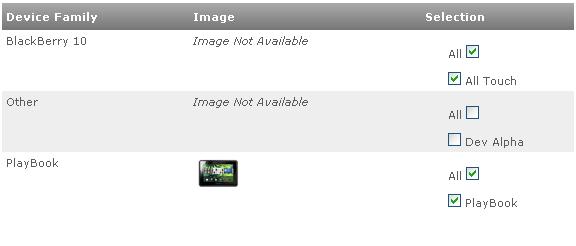
As of this afternoon, BlackBerry has opened up it’s ISV portal for BB10 submissions.
I’m going to try submitting an app using a Playbook signing key, and will update this post if it gets accepted!
Decode Google Recaptcha with C#

The Google Recaptcha system is one of the most popular Captcha systems in use. To beat it, you’ll need to subscribe to a Human Captcha API, What I used was FastTypers.org (Also known as HumanCoders or ExpertDecoders). To test this, I used the standard Recaptcha setup under ASP.NET CLR4 using the code downloaded from http://code.google.com/p/recaptcha/source/browse/trunk/recaptcha-plugins/
I set up a Windows forms application, with a button called btnReCaptcha, and ran the Recaptcha website under the virtual folder /Recaptcha.Test-CLR4/ – and here is the code – Note the code 6Lf9udYSAAAAAGF0LkIu3QsmMPfanZH3T8EXs9fA is the public key that will be contained in the HTML code of the website hosting the website.
private void btnReCaptcha_Click(object sender, EventArgs e)
{
var wc = new WebClient();
var strHtml = wc.DownloadString(“http://www.google.com/recaptcha/api/challenge?k=6Lf9udYSAAAAAGF0LkIu3QsmMPfanZH3T8EXs9fA&hl=&”);
const string strChallengeRegex = @”challenge.{4}(?<Challenge>[\w-_]+)”;
var strChallenge = Regex.Match(strHtml, strChallengeRegex).Groups[“Challenge”].Value;
var bImage = wc.DownloadData(“http://www.google.com/recaptcha/api/image?c=” + strChallenge);
var solver = new CaptchaSolver();
solver.SolveCaptcha(bImage);
var strImageText = solver.LastResponseText;
strHtml = wc.DownloadString(“http://localhost/Recaptcha.Test-CLR4/”);
var strViewstate = GetViewStateFromHtml(strHtml, true);
var strEventValidation = GetEventValidationFromHtml(strHtml);
var strPostData = “__EVENTTARGET=”;
strPostData += “&__EVENTARGUMENT=”;
strPostData += “&__VIEWSTATE=” + strViewstate;
strPostData += “&__EVENTVALIDATION=” + strEventValidation;
strPostData += “&recaptcha_challenge_field=” + strChallenge;
strPostData += “&recaptcha_response_field=” + strImageText;
strPostData += “&RecaptchaButton=Submit”;
wc.Headers[HttpRequestHeader.ContentType] = “application/x-www-form-urlencoded”;
string HtmlResult = wc.UploadString(“http://localhost/Recaptcha.Test-CLR4/”, strPostData);
}/// <summary>
/// Gets a ASP.NET Viewstate from an aspx page.
/// </summary>
/// <param name=”strHtml”>The HTML to extract the viewstate string from.</param>
/// <param name=”urlEncode”>Should the response be Url Encoded.</param>
/// <returns></returns>
public static string GetViewStateFromHtml(string strHtml, bool urlEncode)
{
const string strViewStateRegex = @”__VIEWSTATE.*value..(?<viewstate>[/\w\+=]+)”;
var strViewState = Regex.Match(strHtml, strViewStateRegex, RegexOptions.Compiled).Groups[“viewstate”].Value;
if (urlEncode) { strViewState = HttpUtility.UrlEncode(strViewState); }
return strViewState;
}/// <summary>
/// Gets a ASP.NET EventValidation from an aspx page, it will be already urlencoded.
/// </summary>
/// <param name=”strHtml”></param>
/// <returns></returns>
public static string GetEventValidationFromHtml(string strHtml)
{
var strEventValidationRegex = @”__EVENTVALIDATION.{32}(?<EventValidation>[/\w\+=]+)”;
var strEventValidation = Regex.Match(strHtml, strEventValidationRegex, RegexOptions.Compiled).Groups[“EventValidation”].Value;
if (strEventValidation.Length % 4 != 0)
{
// Invalid Capture, try another regex.
strEventValidationRegex = @”__EVENTVALIDATION..value..(?<EventValidation>[/\w\+=]+)”;
strEventValidation = Regex.Match(strHtml, strEventValidationRegex, RegexOptions.Compiled).Groups[“EventValidation”].Value;
}
strEventValidation = HttpUtility.UrlEncode(strEventValidation);
return strEventValidation;
}
Basically, it makes a request to Google for a Challenge key, uses the challenge key to get the image, passes the image to the Human OCR API, and then captures the Viewstate and Event Validation from the page, then posts the decoded text, challenge key, back to the webserver.
Use jQuery to include a include a Twitter feed
This snippet is designed for mobile apps, but with a suitable proxy, it would work on websites too.
<html>
<head>
<script src=”jquery.js”></script>
<script language=”javascript”>
$(init);
function init()
{
$.get(‘http://api.twitter.com/1/statuses/user_timeline.json?screen_name=petruccimusic’, function(data) {
var strHtml = “<ul>”;
for(var i in data)
{
var strText2 = replaceURLWithHTMLLinks(data[i].text);
strHtml += “<li>” + strText2 + “</li>”;
}
strHtml += “</ul>”;
$(“.result”).html(strHtml);
});
}
function replaceURLWithHTMLLinks(text) {
var exp = /(\b(https?|ftp|file):\/\/[-A-Z0-9+&@#\/%?=~_|!:,.;]*[-A-Z0-9+&@#\/%=~_|])/i;
return text.replace(exp,”<a href=’$1′>$1</a>”);
}
</script>
</head>
<body>
<div class=”result”></div>
</body>
</html>
 Network Programming in .NET