Archive
Online #PDB viewer for standard .NET references
If you select the option Tools>options>Debugging>Symbols, and select to download PDB (Symbol files) from Microsoft Symbol services, then, in the event of a crash, you can step deeper into the code, and understand perhaps the underlying reason, coming from a Microsoft provided DLL.
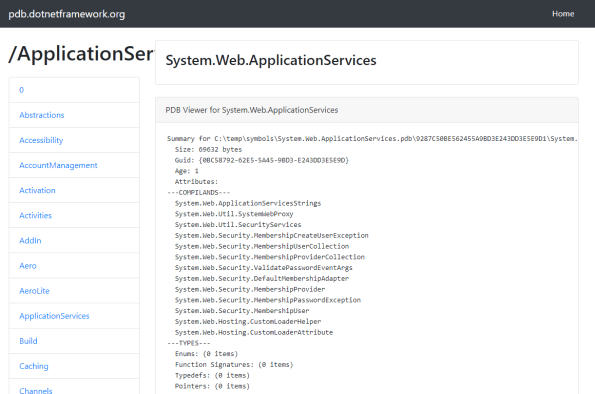
 This website http://pdb.dotnetframework.org/ provides a viewer that lets you see what’s contained within each of the PDBs online. The text was created using the command;
llvm-pdbutil.exe pretty –all
It’s open source on GITHUB here; https://github.com/infiniteloopltd/pdb
Specifically holding data on the following PDBs;
0
Abstractions
Accessibility
AccountManagement
Activation
Activities
AddIn
Aero
AeroLite
ApplicationServices
Build
Caching
Channels
Classic
Client
Compatibility
ComponentModel
Compression
Configuration
Context
Contract
Core
CSharp
Data
DataAnnotations
DataSetExtensions
DataVisualization
Deployment
Design
Device
Discovery
Drawing
DurableInstancing
DynamicData
Engine
EnterpriseServices
Entity
Extensions
Forms
Framework
Hosting
Http
IdentityModel
Infrastructure
Instrumentation
Internals
ISymWrapper
JScript
Linq
Log
Luna
Manipulations
Messaging
Mobile
mscorlib
Net
Numerics
OracleClient
pdblist
Presentation
PresentationBuildTasks
Printing
Protocols
ReachFramework
Registration
RegularExpressions
Remoting
Ribbon
Routing
Royale
Runtime
Selectors
Serialization
ServiceModel
Services
SMDiagnostics
Soap
Speech
SqlXml
STLCLR
sysglobl
system.activities
System
Transactions
UIAutomationClient
UIAutomationClientsideProviders
VisualC
Web
Windows
WorkflowServices
Xaml
XamlBuildTask
Xml
Connect to Microsoft #SQL server using #Java and Windows Authentication.

This post outlines how to connect to a local instance of SQL server using Windows Authentication from Java.
TLDR; Here’s the github repo for anyone who wants the source;
This download assumes you are running JRE8 and on a 64 bit machine, if you have a different configuration, then this may not work, but assuming you are, then just download those files from the Github repo.
The code is as follows;
import java.sql.Connection;
import java.sql.DriverManager;
import java.sql.ResultSet;
import java.sql.Statement;public class SQLJava {
public static void main(String[] args) {
String dsn = “jdbc:sqlserver://localhost;databaseName=Library;integratedsecurity=true”;
try {
Connection conn = DriverManager.getConnection(dsn);
Statement stmt = conn.createStatement();
ResultSet result = stmt.executeQuery(“select * from students”);
while (result.next()) {
String firstname = result.getString(“Firstname”);
String surname = result.getString(“Surname”);
System.out.println(firstname + ” ” + surname);
}
conn.close();
} catch (Exception e) {
e.printStackTrace();
}
}
}
and to run this, you need
javac SQLJava.java
java -cp “.;sqljdbc42.jar” SQLJava
Note the inclusion of the -cp (classpath) switch, to ensure that the JDBC driver is included. You should also have the DLL sqljdbc_auth.dll in the same folder, otherwise this will only work with SQL authentication.
U2F API.com – a hosted service for handling hardware two factor authentication #U2F #2FA #API
U2FAPI.com is a hosted service for handling hardware two factor authentication, to make it easy for you to implement a secure alternative to SMS as a 2FA option. It requires your users to have a hardware security key such as that from HyperFido – but by using this free API, it greatly simplifies the process by moving the crypto code off your server.
To use U2F Two Factor Authentication you will need a U2F compatible hardware key such as HyperFIDO. Your website must be served via HTTPS, and you will also need to include a script tag to U2F.js as follows;
Then to register, you would use code such as;
let registerRequest = {
	challenge: 'RegisterChallenge',
	version: 'U2F_V2'
}
u2f.register("https://" + window.location.host, [registerRequest], [],
(response) => {
        fetch('https://www.u2fapi.com/api.aspx', {
            method: 'post',
            body: JSON.stringify{
                action : "REGISTER",
                data : response.registrationData
            })
            }).then(function(response) {
                return response.json();
            }).then(function(data) {
                alert(data.WebSafeKeyHandle);
        });
	}
);
Which registers the U2F device, and returns a KeyHandle, which you need to store for future logins (signing).
Then, when the user logs in, you use the sign method as follows
let registeredKey = {
  keyHandle:  keyHandle,
  version: 'U2F_V2'
}
u2f.sign("https://" + window.location.host, 'SigningChallenge', [registeredKey],
  (response) => {
    	 fetch('https://www.u2fapi.com/api.aspx', {
            method: 'post',
            body: JSON.stringify({
                action : "SIGN",
                data : response.signatureData
            })
            }).then(function(response) {
                return response.json();
            }).then(function(data) {
                alert(data.userCounter);
        });
  }
);
There is also a web service available that allows you to handle the U2F responses on the server side; This web service is accessible via https://www.u2fapi.com/api.asmx, and the WSDL can be downloaded here; https://www.u2fapi.com/api.asmx?WSDL
It is designed to be consumed via a C# (.NET) client, however, other clients can use
simple HTTPS GET and POST to access this web-service.
The service works only on Chrome, and I welcome feedback on how to improve this API in terms of compatibiliy and security. I’ve been studying U2F for a week now, but I’m no expert. But, this was just a fitting project to complete my academic interest in the device.
Happy signing!
Parsing the #U2F Signature response in #Javascript

This is my third blog post in my series of U2F, and if you haven’t already seen it – check out the github repo for the source code here;
https://github.com/infiniteloopltd/U2FJS
It’s been refactored since the last post, so that the parser no longer pollutes the global namespace with it’s own variables, and keeps things cleaner.
So, it’s now wrapped up like this
class U2FParse {
parseRegistration (registrationData)
{ …
}parseSign (signData)
{ …
}…
}
So that you instatiate a new U2FParse class (which I’ve called “parser”), then parse either the registration response or the sign response.
Let’s look at how to get a signature response, assuming you already have the keyhandle from the registration;
function Sign()
{
let registeredKey = {
keyHandle: U2FRegistration.keyHandle,
version: ‘U2F_V2’
}
u2f.sign(‘https://localhost’, ‘SigningChallenge’, [registeredKey],
(response) => {
….
}
);
}
By running this code, the browser will prompt you to press the button on your U2F device, and the callback will be triggered, with the response object populated.
Now, we call the method;
U2FSign = parser.parseSign(response.signatureData);
Which does the following;
var bSignData = this._Base64ToArrayBuffer(signData);
return {
userPresence : bSignData[0],
userCounter : bSignData[4]
+ bSignData[3] * 256
+ bSignData[2] * 256 * 256
+ bSignData[1] * 256 * 256 * 256
};
The UserPresence is a number where 1 is present, and anything else is just plain wierd, but treat that as an error.
UserCounter is a 4 byte integer, that counts up how many times the user has logged in (signed a challenge).
My plan is to move this to server side code that can be accessed via Ajax, since I haven’t seen that done before, and I guess it may be useful to someone.
Parsing U2F Registration Data in #Javascript

Following on from yesterday’s post, today, I’m taking U2F one step further, by parsing the returned data in Javascript.
If you want to just skip to the code; here is the repo on GitHub: https://github.com/infiniteloopltd/U2FJS
A high level overview of what is happening here, is that the u2f.register function call returns an object, a property of which is registrationData, which is a Web-Safe Base64 string, that encodes the raw FIDO data, as a byte array.
First, a quick seque – a web-safe base64 string is just a base64 string with the forward-slashes (/) converted to underscores (_) and plusses (+) converted to dashes (-), and any trailing equals (=) removed. It’s important to note the difference, because the standard (atob and btoa functions will fail if you don’t account for this)
In Javascript, the first challenge is to convert a Web-Safe Base64 array into a Uint8Array array, which is much easier to handle, when you are doing byte-operations.
So here’s the code;
_Base64ToArrayBuffer : function (base64) {
base64 = base64.replace(/_/g, ‘/’).replace(/-/g, ‘+’); // web safe
var binary_string = window.atob(base64);
var len = binary_string.length;
var bytes = new Uint8Array(len);
for (var i = 0; i < len; i++) {
bytes[i] = binary_string.charCodeAt(i);
}
return bytes;
},
_ArrayBufferToBase64 : function (arrayBuffer) {
var dView = new Uint8Array(arrayBuffer);
var arr = Array.prototype.slice.call(dView);
var arr1 = arr.map(function(item){
return String.fromCharCode(item);
});
var b64 = window.btoa(arr1.join(”));
return b64.replace(/\+/g, ‘-‘).replace(/\//g, ‘_’).replace(/=+$/, ”);
}
Now, we need to look at FIDO’s documentation on the raw message format to see what the data contains, here are the docs;
The parts of the registrationData that we are interested in are;
- A reserved byte [1 byte], which for legacy reasons has the value 0x05.
- A user public key [65 bytes]. This is the (uncompressed) x,y-representation of a curve point on the P-256 NIST elliptic curve.
- A key handle length byte [1 byte], which specifies the length of the key handle (see below). The value is unsigned (range 0-255).
- A key handle [length specified in previous field]. This a handle that allows the U2F token to identify the generated key pair. U2F tokens may wrap the generated private key and the application id it was generated for, and output that as the key handle.
There is very little validation done in the javascript, but we are trusting the U2F API to return un-tampered data.
So, we parse it as follows
var bRegData = U2FRegistration._Base64ToArrayBuffer(registrationData);
if(bRegData[0]!=5)
{
throw “Reserved byte is incorrect”;
}
U2FRegistration.userPublicKey = U2FRegistration._ArrayBufferToBase64(bRegData.slice(1,66));
U2FRegistration.keyHandleLength = bRegData[66];
U2FRegistration.keyHandle = U2FRegistration._ArrayBufferToBase64(bRegData.slice(67,U2FRegistration.keyHandleLength+67));
The Attestation certificate and signature are not captured from the data, since we are trusting the data to be valid.
Going back to our U2F registration code, we callout to U2FRegistration.parse after registration;
let registerRequest = {
challenge: ‘RegisterChallenge’,
version: ‘U2F_V2’
}
u2f.register(‘https://localhost’, [registerRequest], [],
(response) => {
U2FRegistration.parse(response.registrationData);
console.log(U2FRegistration);
}
);
The next step will be signing, in which we will use the KeyHandle above. But that’s for another day.
#U2F Authentication using #Javascript (#opensource)
U2F is a new standard in hardware dongles that will become more prevalent as stronger 2FA Auth becomes more commonplace, due to PSD2 regulations etc.
I’m just learning, so this demo does nothing much at the moment, other than trigger the registration procedure on the U2F device, and, so far – it runs entirely in client side javascript.
It requires the U2F library from Google.
let registerRequest = {
challenge: ‘RegisterChallenge’,
version: ‘U2F_V2’
}
u2f.register(‘https://localhost’, [registerRequest], [],
(response) => {
debugger;
console.log(response);
}
);
I’ll be develping this over a few days, if I get time to experiment!
Read a QR code in C# using the ZXing.net library

QR codes are all around us, and with a few lines of code you can take an image of a QR code, and interpet it as text. The same code also works with barcodes, and all these formats; UPC-A, UPC-E, EAN-8, EAN-13, Code 39, Code 93, Code 128, ITF, Codabar, MSI, RSS-14 (all variants), QR Code, Data Matrix, Aztec and PDF-417.
The code is open source at https://github.com/infiniteloopltd/ReadQRCode , but there’s not much to it; just these few lines of code;
const string imageUrl = “https://httpsimage.com/v2/c890b3a2-098b-41ab-bb9a-cc727bfc1a95.png”;
// Install-Package ZXing.Net -Version 0.16.5
var client = new WebClient();
var stream = client.OpenRead(imageUrl);
if (stream == null) return;
var bitmap = new Bitmap(stream);
IBarcodeReader reader = new BarcodeReader();
var result = reader.Decode(bitmap);
Console.WriteLine(result.Text);
UK #VRM #API #OpenSource website

I thought I’d take a moment to talk honestly, and describe how I got to where I am in business. Lots of people look back with rose coloured glasses from whence they came, claiming it was all a plan, and every decision they made was planned to get to the point they are at now.
Perhaps thats the case for them, it wasn’t for me. I wake up every morning with five business ideas in my head. Luckily I have the technical ability try some of them out, and I swear, 99% fail miserably. I don’t invest much in each idea. Perhaps a day or two, and a few hundred pounds at most, so I can afford it, in both time and money, but I keep going.
One idea, RegCheck.org.uk worked for me, and you can perhaps see it in the domain name, that I had little faith at the time. I bought a cheap domain name, and I didn’t even create a new database for it, I lumped it in with other projects. I put it on the same server as everthing else.
It made no money for a year, perhaps one customer, maybe two. Then I discovered that the API only worked on the DVLNI (Northern Ireland), and it was overpriced. I spend a little time on it, making it work against the DVLA (UK), and dropped the price by half. Then it started getting picked up by users from all over the UK.
Once the momentum started, I decided to invest more time and money in it, and I quickly expanded the site accross europe, and the USA. Once it hit the USA, then the serious money started. A few major customers, and I was on a roll.
From there, I focused on quality, making sure the API was fast, accurate and reliable, and that made the difference. I added a few more countries along the way, and improved my sales pitch.
Revisiting where I started, I’m almost ashamed of my UK domain name, it sucks. I got a better domain, but I’m not sure if I wanted to rebrand. So I just put a free website up there, at https://www.vrmapi.co.uk – it’s open source on Github, feel free to clone or fork it.
Perhaps I’m nearing the end of this run, but from humble beginnings, I’m happy with where it has taken me.
Access #Azure #CLI from SQL server

If you want to automate Azure tasks directly from a scheduled job in SQL server, such as transferring a database backup to Azure blob storage once a backup is complete, then you may run into this issue;
You run a simple command like
xp_cmdshell ‘az storage account list’
And you get an error message
ERROR: Please run ‘az login’ to setup account.
but that doesnt work, since it’ll try to open a web browser.
So, the trick is, assuming you’ve logged in under your user account correctly, copy the “.azure” folder (it’s hidden), and move it to the windows user profile used by SQL server.
Want to know what that is?, just run;
xp_cmdshell ‘echo %userprofile%’
Once you’ve copied the .azure folder, then the commands will run as normal
#Opensource #javascript library to help localize your multi-lingual website
When developing a multi-lingual website, there are common elements that can be costly to translate if you are paying per-word, and it’s too risky to resort to automatic translation. How embarassing would it be to have Turkey (the country) translated as Tacchina (a bird)?
However, the folks at Unicode Inc, have a freely downloadable zip file, that contains common translations in every conceiveable language, known as the CLDR, and this is a javascript file that leverages the CLDR, so you don’t have to translate a list of countries (or languages, time zones, etc.)
So, to get to the point, You can clone the repo from github here; https://github.com/infiniteloopltd/LocalizeJS
It’s open source, so feel free to fork, and develop upon this library, as long as you keep the copyright notices in place
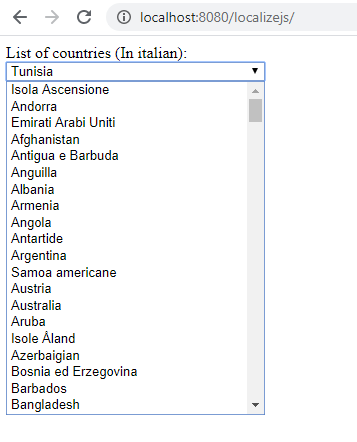
The simple example here, is to load the italian localisation file (it.xml), and then use it to display a drop down of countries as follows;
Localize.Load(“it.xml”).then( language => initializeWith(language));
function initializeWith(language)
{
var territories = language.localeDisplayNames.territories.territory;
var countries = territories.filter(country => country.type.length==2
&& country.alt == null);var CountriesSelect = document.getElementById(“countries”);
for(var i in countries)
{
var country= countries[i];
var el = document.createElement(“option”);
el.text = country[“#text”];
el.value = country.type;
CountriesSelect.add(el);
}
CountriesSelect.value=”US”;
}
Of course, if you are interested in creating a multi-lingual website, you should also check out http://www.resxtranslate.com – especially if you have a .NET based website.
 Network Programming in .NET
