Archive
Optimizing #MySQL performance on Windows

The MySQL community edition, when installed using default settings is limited to 128MB of memory, which makes it unobtrusive, and won’t hog resources if misused, which is fine. But sometimes you need a blast of performance, to help run queries fast, even if it gets greedy with memory.
Everybody knows that memory is faster than disk, so if you find that MySQL is using 100% (or maxing out), disk usage, and only using 128MB of memory, then you will benefit from giving MySQL more access to available memory. Lets say your desktop machine is 16GB, you can easily give it 10GB (10G) of memory without affecting system stability. Ypu can see all of this in task manager.
So, assuming you’re using Windows, you need to open notepad (or another text editor) as Adminsistrator and then open the file C:\ProgramData\MySQL\MySQL Server 8.0\my.ini
Find the part that says
innodb_buffer_pool_size=….
and change it to
innodb_buffer_pool_size=10G
Then stop and start the MySQL service (Using Services.msc).
As you start running heavy queries, you should see the memory usage of MySQLd go up, and the disk usage go down.
gnutls_handshake() failed: Handshake failed – #GIT #error #Ubuntu #BitBucket

When trying to connect via GIT to BitBucket from an older server, I got this error;
fatal: unable to access xxx : gnutls_handshake() failed: Handshake failed
After updating GIT, CA root certifiates, rebooting the server, nothing seemed to work.
Then I did;
Get the SSH public key as follows;
cat /home/ubuntu/.ssh/id_rsa.pub
Then log into bitbucket, and press the settings cog in the top right, then “Personal Bitbucket settings”, then SSH Keys,
then paste in the public key from the result above.
Once added, you can do;
git clone git@bitbucket.org:XXX/XXX
Hope this helps someone!
How to transfer an #S3 bucket from one account to another
Transferring S3 bucket from one AWS account to another is a pretty common action, and the AWS documentation on this seems to be quite lacking.
At a high level, you need to give destination account READ access to the source account’s bucket, and give the source account WRITE access to the destination account’s bucket. In this way the destination does the reading, and the source does the writing. This means the whole operation can be performed by AWS S3 internally, without the data flowing to an intermediary service.
The approach below is not exactly “least privilige”, so I’m assuming you trust the source and destination accounts.
So, here I’m going to go from SOURCE-BUCKET to DESTINATION-BUCKET and the AWS Account ID of the source is 1111111 and the AWS account ID on the destination is 2222222 – You will obviously need to replace these placeholders with your own values.
So, under the source bucket – click permissions, then Edit under bucket policy then paste this JSON;
{
    "Version": "2012-10-17",
    "Id": "CrossAccountRead",
    "Statement": [
        {
            "Sid": "AllowCrossAccountRead",
            "Effect": "Allow",
            "Principal": {
                "AWS": "arn:aws:iam::2222222:root"
            },
            "Action": "s3:*",
            "Resource": "arn:aws:s3:::SOURCE-BUCKET/*"
        }
    ]
}
Then on the destination bucket, do the same in reverse;
{
    "Version": "2012-10-17",
    "Id": "CrossAccountWrite",
    "Statement": [
        {
            "Sid": "AllowCrossAccountWrite",
            "Effect": "Allow",
            "Principal": {
                "AWS": "arn:aws:iam::1111111:root"
            },
            "Action": "s3:*",
            "Resource": [
                "arn:aws:s3:::DESTINATION-BUCKET/*",
                "arn:aws:s3:::DESTINATION-BUCKET"
            ]
        }
    ]
}
Then, back on the source account again, run the following command in the AWS CLI;
aws s3 sync s3://SOURCE-BUCKET s3://DESTINATION-BUCKETChange to #Azure #Devops #API, vso.loadtest scope no longer valid

I use Azure Devops to host some of my code, and then to automate deployments, I use the Azure Devops API, which up to now has worked great. Today, suddenly I got the error;
?error=InvalidScope
Returned, appended to the callback URL after authorization. I hadn’t changed anything, so automatically presumed something must have changed on the Azure side.
I logged in, everything seemed fine, I made a minor (non-breaking) change to the app definition, and pressed “Save changes”, then I saw the above error “Scope is not vald, Cannot mix uri based and modern scopes ‘vso.loadtest’“
Granted, I didn’t actually need the scope vso.loadtest, but I had over-enabled the scopes just to get the thing working, and you can’t edit the scopes once the app is created.
So, I had to create a new app, with the appropriate scopes, but everything else identical, copied the new App id, app secret and client secret to to the web.config on my client, and still broken.
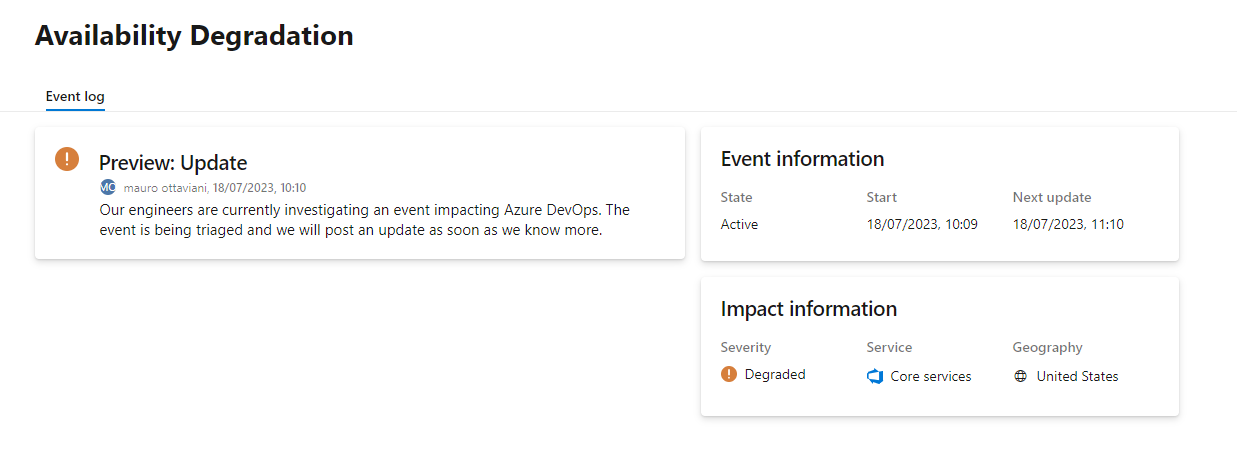
However, this turned out to be a temporary outage on the Azure side, and it worked again shortly afterwards. I wonder if the two events are related?
Visual Studio debugger not hitting breakpoints

This happened on a Xamarin based project, connected to a real android device on VS 2022. Where no breakpoints were being hit on the projecct, even though the application deployed and ran on the device.
Here, thanks to this post: https://github.com/xamarin/xamarin-android/pull/6660 I enabled “Use Fast Deployment” – see screenshot above, and the breakpoints started to get hit again, and it deployed faster to the device.
Find all webpages hosted on a domain via an API

If you want to find all webpages that are hosted on a given domain, then you can use the Site: prefix in Google or Bing
However, let’s imagine you want a more extensive list, and perhaps, you want the result back in JSON format, such that you can use it in your own applications, here is where the WayBackMachine (Internet Archive) can be useful.
So, imagine that you want to see what pages are (or were) hosted on the domain webtropy.com; you’d use the url
This returns a JSON array, of webpages on that domain divided by year. Of course, you can’t be sure that all of those pages are live, but you can know that they were live on the year specified, so you can focus on the latest year. There will also be plenty of duplicates, so you’ll need to eliminate these too.
This appears to be an unofficial API, so it is subject to change without warning. However, I hope it is useful!
#ChatGPT #API is not blocked in Italy, loophole by design?
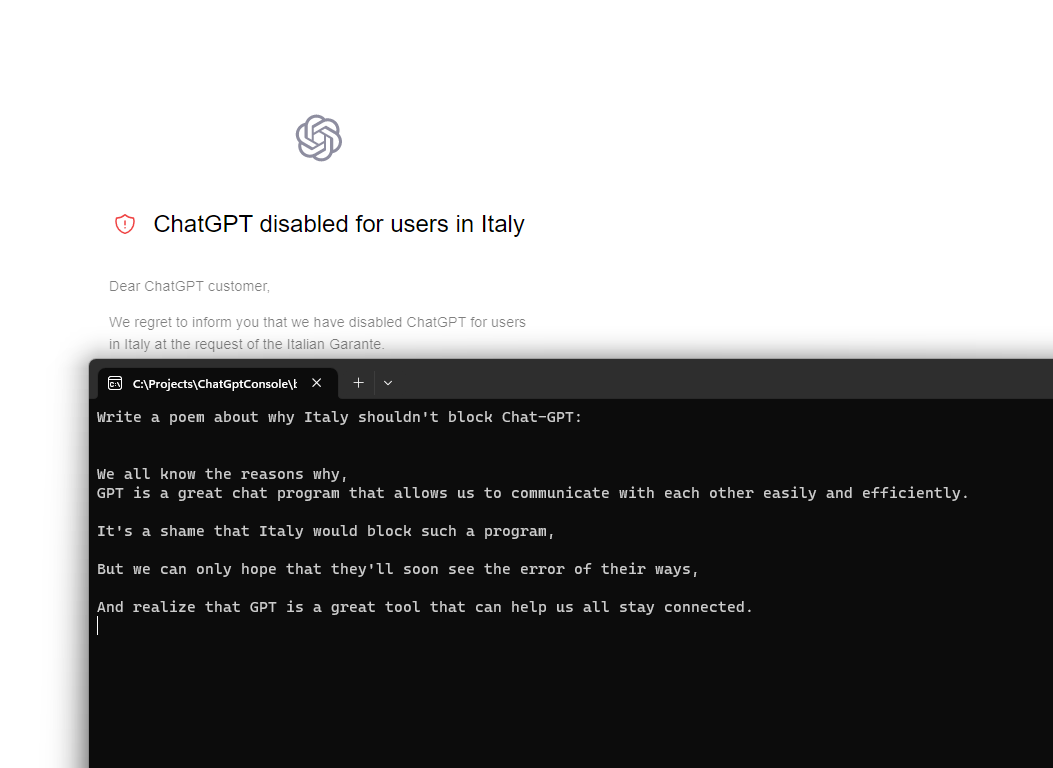
It was big news that Italy would be the first country in the EU to block Chat-GPT, and you can see what happens if you use a VPN and set it to an Italian IP, then try to access the service, it gives a warning “ChatGPT disabled for users in Italy”.
But, I was thinking, is the API also blocked, and the answer is no, it’s not. Which means that tools built on ChatGPT can still continue to operate. Quite a glaring loop-hole (One I’m happy about, but shows that somebody accidentally, or purposefully slipped up).
Above is a screenshot showing a response from the ChatGPT API, and the same “blocked screen”, while on an Italian VPN.
Below is the code I used, using the GPT3 Nuget package from Betalgo.
 // Install-Package Betalgo.OpenAI.GPT3
var gpt3 = new OpenAIService(new OpenAiOptions
{
	ApiKey = strSecretKey
});
var question = Console.ReadLine();
var completionResult = await gpt3.Completions.CreateCompletion(new CompletionCreateRequest()
{
	Prompt = question,
	Model = Models.TextDavinciV2,
	Temperature = 0.5F,
	MaxTokens = 100
});
if (completionResult.Successful)
{
	foreach (var choice in completionResult.Choices)
	{
		Console.WriteLine(choice.Text);
	}
}
else
{
	if (completionResult.Error == null)
	{
		throw new Exception("Unknown Error");
	}
	Console.WriteLine($"{completionResult.Error.Code}: {completionResult.Error.Message}");
}
Send #SMS to the #USA or #Canada for 1 Cent via an #API

There are a million different APIs that allow you to send SMS messages, but here is a really simple one, that although is limited to the US or Canada, is really cost effective, at 1 US cent per SMS, with no monthly or setup charges.
There is also a free plan that starts at 5 SMS per day, at no cost.
It’s really easy to use, you subscribe to the API here: https://rapidapi.com/dananos/api/1-cent-sms/pricing
to get your API Key, which you include as a HTTP header called “X-RapidAPI-Key”, then you post a body such as the following
{
    "text" : "Your Authentication code is 74456",
    "phone" : "+17047037094"
}
To the URL – https://1-cent-sms.p.rapidapi.com/default/SMSLambda
(Yes, it’s a AWS lambda function on the back-end)
Performance testing AvatarAPI.com – Speed and Coverage.

AvatarAPI.com is a service that can obtain a name and profile picture from an email address, it offers an API, such that you can include this functionality into your own systems, be it your CRM system, or marketing platform.
One of the key features of the API, is that you can select which providers to use, when searching for sources. Some sources are more expensive than others, in terms of credits, and the more sources you add, the slower the search will be. Therefore, if you are looking for a very responsive API, you will have to make a trade-off between coverage and speed. Associating a profile picture with an email may be a nice-to-have, but shouldn’t interupt the flow of work, either for your users or staff.
| Provider | Avg Time (ms) | In Default Set | % found |
| 2404.0475 | 2404.0475 | 80 | |
| Skype | 1351.5663 | 1351.5663 | 14 |
| Flickr: | 2823.8726 | 2823.8726 | 1 |
| Adobe: | 730.7049 | 730.7049 | 1 |
| LinkedIn: | 1271.6846 | 1 | |
| Gravatar: | 1246.6041 | 1246.6041 | 2 |
| Microsoft: | 1665.0182 | 1665.0182 | 1 |
| Academic: | 2577.0996 | 0 | |
| GitHub: | 472.6273 | 0 | |
| Paypal: | 1636.4517 | 0 | |
| Total: | 16179.6768 | 10221.8136 |
Illustrated above is the list of providers available to AvatarAPI, and the average time in millisecods (1000 ms = 1 second), per request. If all providers are used, and nothing was found by any of them, the complete search would take of 16 seconds, which is probably unaccepable in an interactive environment, but maybe reasonable for batch-processing. However, given that manu of the providers have a low <1% chance of hitting a match, they can be removed, in order to optimize the processing speed.
In the above example, using only Google and Skype, one could achieve 94% of the matches of all providers combined, in 3.7 seconds rather than 16 seconds.
The default set, is the set of providers used when none are specified, and this is calibrated to roughly 10 seconds, although this may be subject to review.
 Network Programming in .NET