Archive
Convert #3gp to #wav in c# using #ffmpeg

I recently found today that Android’s native audio recording format is 3GP ( 3rd Generation Partnership Project ), which may need to be decoded to a decompressed raw format like WAV before you do certain processing on it. My first google searches led me to Alvas, which seemed good, but their trial version has a nag screen that would break IIS, and I didn’t want to pay.
So, I turned to FFMPEG, a free tool, that’s typically used for Video conversion, but also works on audio. The command from the CLI is
ffmpeg -i bible.3gp bible.wav
Which generates the following dump of data;
ffmpeg version N-93863-g58d167bcd5 Copyright (c) 2000-2019 the FFmpeg developers
built with gcc 8.3.1 (GCC) 20190414
configuration: –enable-gpl –enable-version3 –enable-sdl2 –enable-fontconfig –enable-gnutls –enable-iconv –enable-libass –enable-libdav1d –enable-libbluray –enable-libfreetype –enable-libmp3lame –enable-libopencore-amrnb –enable-libopencore-amrwb –enable-libopenjpeg –enable-libopus –enable-libshine –enable-libsnappy –enable-libsoxr –enable-libtheora –enable-libtwolame –enable-libvpx –enable-libwavpack –enable-libwebp –enable-libx264 –enable-libx265 –enable-libxml2 –enable-libzimg –enable-lzma –enable-zlib –enable-gmp –enable-libvidstab –enable-libvorbis –enable-libvo-amrwbenc –enable-libmysofa –enable-libspeex –enable-libxvid –enable-libaom –enable-libmfx –enable-amf –enable-ffnvcodec –enable-cuvid –enable-d3d11va –enable-nvenc –enable-nvdec –enable-dxva2 –enable-avisynth –enable-libopenmpt
libavutil 56. 27.100 / 56. 27.100
libavcodec 58. 52.101 / 58. 52.101
libavformat 58. 27.103 / 58. 27.103
libavdevice 58. 7.100 / 58. 7.100
libavfilter 7. 53.100 / 7. 53.100
libswscale 5. 4.101 / 5. 4.101
libswresample 3. 4.100 / 3. 4.100
libpostproc 55. 4.100 / 55. 4.100
Input #0, mov,mp4,m4a,3gp,3g2,mj2, from ‘bible.3gp’:
Metadata:
major_brand : 3gp6
minor_version : 256
compatible_brands: isom3gp6
creation_time : 2015-07-24T19:40:33.000000Z
Duration: 00:04:03.30, start: 0.000000, bitrate: 229 kb/s
Stream #0:0(und): Video: mpeg4 (Simple Profile) (mp4v / 0x7634706D), yuv420p, 320×180 [SAR 1:1 DAR 16:9], 193 kb/s, 29.97 fps, 29.97 tbr, 30k tbn, 30k tbc (default)
Metadata:
creation_time : 2015-07-24T19:40:33.000000Z
handler_name : IsoMedia File Produced by Google, 5-11-2011
Stream #0:1(eng): Audio: aac (LC) (mp4a / 0x6134706D), 22050 Hz, mono, fltp, 32 kb/s (default)
Metadata:
creation_time : 2015-07-24T19:40:33.000000Z
handler_name : IsoMedia File Produced by Google, 5-11-2011
Stream mapping:
Stream #0:1 -> #0:0 (aac (native) -> pcm_s16le (native))
Press [q] to stop, [?] for help
Output #0, wav, to ‘bible.wav’:
Metadata:
major_brand : 3gp6
minor_version : 256
compatible_brands: isom3gp6
ISFT : Lavf58.27.103
Stream #0:0(eng): Audio: pcm_s16le ([1][0][0][0] / 0x0001), 22050 Hz, mono, s16, 352 kb/s (default)
Metadata:
creation_time : 2015-07-24T19:40:33.000000Z
handler_name : IsoMedia File Produced by Google, 5-11-2011
encoder : Lavc58.52.101 pcm_s16le
size= 10478kB time=00:04:03.29 bitrate= 352.8kbits/s speed=22.7x
video:0kB audio:10478kB subtitle:0kB other streams:0kB global headers:0kB muxing overhead: 0.000727%
To, write the same code in C# it’s
Process p = new Process
{
StartInfo =
{
FileName = @”D:\Research\ffmpeg.exe”,
Arguments = @”-i d:\research\bible.3gp d:\research\bible.wav”,
WindowStyle = ProcessWindowStyle.Hidden,
RedirectStandardOutput = true,
UseShellExecute = false
}
};
p.Start();
p.WaitForExit();
.. And yes, I’m using a file called bible.3gp, not that I’m in any way religious, it was just the first 3gp file I could find online.
This code also works in a ASP.NET page, hosted by IIS, without elevated privileges.
FYI, this code is going to be used in an upcomming Android app for www.cloudansweringmachine.com
Simple #logging in C#

If you have some software in C# that runs unattended, or doesn’t have a graphical interface, then hunting down problems with it, can be a pain, and a simple text logger comes to the rescue. – So at least you can check a log file to see what went wrong.
Writing a text logger isn’t complicated, in fact, it’s probably only a handful of lines of code, but it’s not something that a client or your boss is going to pay you for, it’s just a diagnostic tool, that adds nothing to the end user experience. So, it needs to be super-simple to add and use.
My favourite, so far is SimpleLogger, which you can install via nuget here;
Install-Package SimpleLogger
Then to use it, you firstly configure it as follows;
Logger.LoggerHandlerManager
.AddHandler(new ConsoleLoggerHandler())
.AddHandler(new FileLoggerHandler())
.AddHandler(new DebugConsoleLoggerHandler());
Then write out your progress as follows;
Logger.Log(strProgress);
And it outputs to the console, and to a file, which is date stamped, so you can look back over it.
The only downside is, that I guess there is no limit to the log file sizes, I’m not sure how to do cleanup, in case you write too much to the file. – And I did notice, that if you call this in a multi-threaded environment, if you get a collision (two logs at once), the logger will crash.
Anyway, top marks for simplicity!
Access #EventBrite API to display event information
If you’re creating a What’s On guide, or need to supplement one with existing events, then the EventBrite API is free, and is easy to use. Here is an example below using NodeJS and the Request NPM package.
First, off, you need to authenticate with a Bearer Token, this is easy to do, but you’ll need to get one from the Developer portal on Eventbrite. Here’s some NODE code that makes an authenticated request against the Eventbrite API
function EventbriteRequest(strUrl, callback)
{request(
{
uri: strUrl,
headers:
{
‘Content-Type’: ‘application/json’
},
auth: {
bearer: ‘xxxxxxxx’
}
}, function (error, response, body) {
console.log(‘error:’, error);
console.log(body);
if (error == null)
{
var jBody = JSON.parse(body);
callback(jBody,null);
}
else
{
callback(null,error);
}
});
}
This simply takes an eventbrite URL, and a callback, which will contain the response in the first parameter, or null, and an error in the second parameter.
And to make a “Whats On” type search, you simply call the following
var strUrl = “https://www.eventbriteapi.com/v3/events/search?”;
strUrl += “q=” + search;
strUrl += “&location.address=northern+ireland”;
console.log(strUrl);
EventbriteRequest(strUrl, function(response, error)
{….
This is taken from an Alexa app, but retired as a feature for other reasons.
Access #UK government #database of food establishments

If you’re developing an app or software that lists places to eat in the UK, it’s great to have a definitive database of every official food vending establishment in the UK, and Food.gov.uk provides this. The API is free, and doesn’t even require authentication. Here’s a sample
https://ratings.food.gov.uk/search-address/belfast/rating/1/100/json
Here’s the official docs
Click to access api-guidance.pdf
And here’s some NodeJS code that I wrote to parse this; (It’s taken from an Alexa app)
module.exports.List = function(city, callback) {
var response = “”;
var strUrl = “https://ratings.food.gov.uk/search-address/” + city + “/rating/1/100/json”;
request(strUrl, function (error, response, body) {
console.log(‘error:’, error); // Print the error if one occurred
console.log(body);
if (error == null)
{
var jBody = JSON.parse(body);
if (typeof jBody.FHRSEstablishment.EstablishmentCollection == “undefined”)
{
response = text.dyn().RESTAURANT_NONE
.replace(“{city}”, city );
callback(response);
return;
}
// Filter
var restaurants = jBody.FHRSEstablishment.EstablishmentCollection.EstablishmentDetail.filter(function(el){
return ( (el.PostCode || “”).indexOf(“BT”) == 0
&& el.BusinessTypeID == 1
&& el.AddressLine3.toLowerCase() == city.toLowerCase()
);
});
if (restaurants.length == 0)
{
response = text.dyn().RESTAURANT_NONE
.replace(“{city}”, city );
callback(response);
return;
}
var restaurantList = [];
restaurants.forEach(function(element){
restaurantList.push(element.BusinessName);
});
var strRestaurantList = customJoin(restaurantList, ” , “, ” ” + text.dyn().AND + ” ” );response = text.dyn().RESTAURANT_LIST
.replace(“{city}”, city )
.replace(“{restaurantList}”, strRestaurantList );
callback(response);
}
});
};function customJoin(arr,s1,s2){
return(arr.slice(0,-1).join(s1).concat(arr.length > 1 ? s2 : ”, arr.slice(-1)));
}
Hope this is useful to somebody!
Find #Twitter #Influencers in your area, using #linqtotwitter
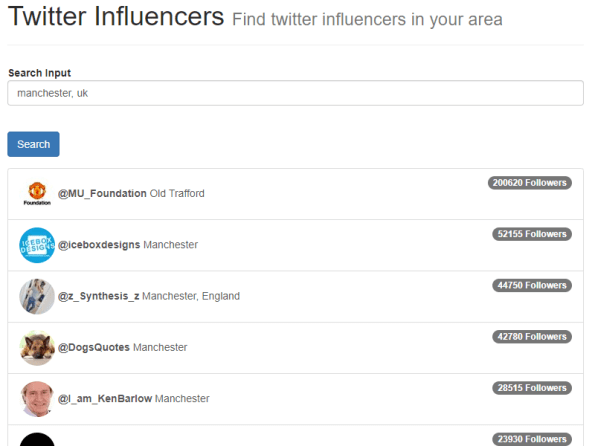
If you are promoting a product or service that is relevant only to a certain geographic area, i.e. a cafe or restaurant, then you might want to reach out to local twitter influencers – that is, people that carry alot of followers, and some might be amenable to tweet about your restaurant in return for a free meal.
Check out the demo at http://twitter.derrycreativescollective.com/
Or, if you’re a c# developer, and don’t need the use-case spelled out to you, then read on…
Here, I’ve used Linq2Twitter, which is FAR more stable than Tweetsharp, even though I do find the linq syntax a bit back-to-front.
It’s installed via Nuget as follows
Install-Package linqtotwitter
Now, What I’ve done, is created a web form page that returns JSON, which will be consumed by an ajax call. The call takes a strGeo parameter, which effectively is LAT,LON,RADIUS where radius, I’ve hard-coded to 10mi (10 miles)
You’ll need a Twitter developer account, and an App set up to get your authentication details, and you can’t use mine .. so they are excluded from the example below;
var auth = new SingleUserAuthorizer
{
CredentialStore = new SingleUserInMemoryCredentialStore
{
ConsumerKey = “…”,
ConsumerSecret = “…”,
OAuthToken = “….”,
OAuthTokenSecret = “…”
},
};
var twitterCtx = new TwitterContext(auth);
Search(twitterCtx, strGeo);
And the search method is as follows
void Search(TwitterContext twitterCtx, string geo)
{
var searchResponse =
(from search in twitterCtx.Search
where search.Type == SearchType.Search &&
search.Query == “a” &&
search.GeoCode == geo &&
search.Count == 100select search)
.FirstOrDefault();if (searchResponse.Statuses.Count == 0)
{
return;
}if (searchResponse != null && searchResponse.Statuses != null)
{
var users = searchResponse.Statuses.Select(s =>
s.User).GroupBy(u =>
u.ScreenNameResponse).Select(g =>
g.FirstOrDefault()).OrderByDescending(u =>
u.FollowersCount).ToArray();
var jsSerializer = new JavaScriptSerializer();
var strJson = jsSerializer.Serialize(users);
Response.AppendHeader(“Access-Control-Allow-Origin”, “*”);
Response.Headers.Add(“Content-type”, “text/json”);
Response.Write(strJson);
}
}
This, searches a given geographic area for tweets, and grabs 100 of them. It then takes all the users that posted the tweets, removes duplicates, and orders by follower count. It then spits the lot out as JSON, with a CORS header added.
On the web side, I use Google to reverse geocode the city typed by the user, to get a lat / lon, using the following code
var address = $(“#tbLocation”).val();
geocoder.geocode({ ‘address’: address }, function (results, status) {
if (status === ‘OK’) {
var geoResult = results[0].geometry.location;
var strGeo = geoResult.lat() + “,” + geoResult.lng() + “,10mi”;
callAPI(strGeo);
} else {
alert(‘Geocode was not successful for the following reason: ‘ + status);
}
});
And, then I have defined callAPI as follows;
function callAPI(geo) {
console.log(“searching: ” + geo);
$.getJSON(“/PopularAjax.aspx?geo=” + geo,
function (data) {
$(“#btnSearch”).removeClass(“disabled”);
var tpl = $(“#tplItem”).html();
var strHtml = Mustache.render(tpl, data);
$(“#divResults”).html(strHtml);
});
}
Where I take the raw JSON returned by the AJAX and render it against a Mustache template, which is then injected into a Bootrap-based page.
Quite simple, but hopefully, it is useful to someone.
#Database of over 15,000 Medical practices

If you ever wanted to add a feature into a health-based app in the UK to help users find a nearby medical center, here is a database of over 15,000 NHS practices in England, Scotland, Wales and Northern Ireland. Including name, address, phone number, and geo-position
#Photoshop fix, colours messed up when pasting onto existing PNG


Normally I don’t post Photoshop tips on this blog, but this really got me.
With version 5.0.1 of Cordova iOS, it comes with an iconset of images with optimised colour palettes. This is fine to keep the image sizes low, but it causes a problem, if you want to use your own icons by copy-pasting-resizing an existing icon onto the new icon, suddenly, the colours are all messed up. See the coloured football on the top right?, that becomes the weird grey football on the bottom right!
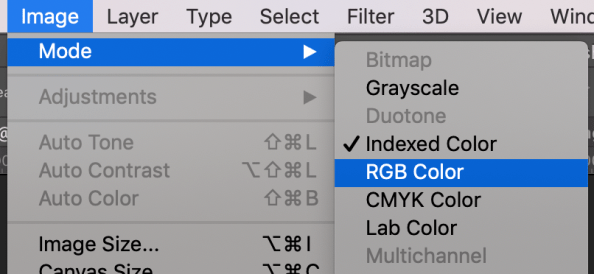
The fix?, to Change the Image Mode from Indexed Color to RGB Color, like shown below.
Support #HTTP2 in your C# Client code

If you use code such as WebClient to make HTTP requests from C#, then you’re probably using HTTP 1.1. if you want to use HTTP/2 then you need to write some extra code.
First, let’s prove that you’re using HTTP 1.1
WebClient wc = new WebClient();
var check1 = wc.DownloadString(“https://http2.pro/api/v1”);
and the response is
{“http2″:0,”protocol”:”HTTP\/1.1″,”push”:0,”user_agent”:””}
Now, to use HTTP 2, you need to override a setting here;
public class Http2CustomHandler : WinHttpHandler
{
protected override Task<HttpResponseMessage> SendAsync(HttpRequestMessage request, System.Threading.CancellationToken cancellationToken)
{
request.Version = new Version(“2.0”);
return base.SendAsync(request, cancellationToken);
}
}
And we can make a GET request like so;
public static string GetHtmlFromUrl(string Url)
{
var httpClient = new HttpClient(new Http2CustomHandler { AutomaticDecompression = DecompressionMethods.GZip | DecompressionMethods.Deflate });
var resTask = httpClient.GetAsync(new Uri(Url));
var response = resTask.Result;
var strTask = response.Content.ReadAsStringAsync();
var strResponse = strTask.Result;
return strResponse;
}
And check again;
var check2 = GetHtmlFromUrl(“https://http2.pro/api/v1”);
Which yields
{“http2″:1,”protocol”:”HTTP\/2.0″,”push”:0,”user_agent”:””}
Hope this helps!
SMTPJS.com now supports #BCC in #Javascript #Email

SMTPJs.com is a Javascript library for sending email from client-side Javascript (not node), it offers plenty of features for sending email, but one was missing until this morning, the ability to send BCC emails. (Blind Carbon-Copy)
It’s used just like the “To” field as follows
Email.send({SecureToken : “…..”,To : [“salesguy@gmail.com“, “boss@gmail.com“] ,Bcc : [“private_admin@hotmail.com“, “Auditors@private.es“],…
Temporary failure in name resolution #Fix #Linux #PHP

If you get this error message in PHP,
php_network_getaddresses: getaddrinfo failed: Temporary failure in name resolution
Then you are either calling a domain name that doesn’t exist, or your DNS resolution has failed on your server. Assuming you haven’t mistyped the API url, then you can check for a DNS issue by SSH’ing into your server and trying to ping http://www.google.com and see if you get a response. – If that fails, then you need to fix your resolving DNS servers, and perhaps contact your host company too.
Google offer their own DNS resolving servers for free, and you can use them as follows;
sudo echo nameserver 8.8.8.8 > /etc/resolv.conf
sudo /etc/init.d/httpd restart
Which changes the DNS resolver on your server to Google’s server with IP 8.8.8.8, and then restarts your web server. You may use apache2 here instead of httpd – depending on your flavour of linux.
 Network Programming in .NET