Archive
com.facebook.http.protocol.ApiException: Key hash does not match any stored key hashes.
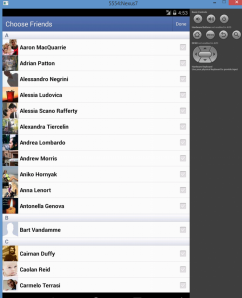 I’m not alone in the type of developer who things he understands how something works without reading instructions, and this is certainly a lesson in reading instructions before banging you head off a wall trying to fix a problem that was solved by reading the next paragraph.
But, the diagnostic technique may help someone else.
I was trying to get the Android Facebook SDK to get up and running, with a view to then move onto the Phonegap Facebook Plugin. But quite naturally, I knew that I would have to get the base level Facebook SDK examples to work before moving on to the Phonegap plugin.
So, I installed the Facebook Android SDK, imported the projects into my workspace, and tried to run the first one, Friend Picker, and lo and behold. Nothing. Nada. No worky. Just a prompt asking me permission, then nothing else.
I tried then connecting a real android device. Same result. #
I checked in LogCat, and scrolled up to the first mention of a Facebook related error and got this:
04-08 04:50:01.757: W/fb4a(:<default>):BlueServiceQueue(1711): com.facebook.http.protocol.ApiException: Key hash bBZxOcCkWDdGSW8zex5GXuvuwpY does not match any stored key hashes.
04-08 04:50:01.757: W/fb4a(:<default>):BlueServiceQueue(1711): at com.facebook.http.protocol.ApiResponseChecker.b(ApiResponseChecker.java:83)
04-08 04:50:01.757: W/fb4a(:<default>):BlueServiceQueue(1711): at com.facebook.http.protocol.ApiResponseChecker.a(ApiResponseChecker.java:162)
04-08 04:50:01.757: W/fb4a(:<default>):BlueServiceQueue(1711): at com.facebook.http.protocol.ApiResponse.g(ApiResponse.java:151)
04-08 04:50:01.757: W/fb4a(:<default>):BlueServiceQueue(1711): at com.facebook.platform.auth.server.AuthorizeAppMethod.a(AuthorizeAppMethod.java:275)
04-08 04:50:01.757: W/fb4a(:<default>):BlueServiceQueue(1711): at com.facebook.platform.auth.server.AuthorizeAppMethod.a(AuthorizeAppMethod.java:31)
04-08 04:50:01.757: W/fb4a(:<default>):BlueServiceQueue(1711): at com.facebook.http.protocol.ApiResponseHandler.a(ApiResponseHandler.java:55)
04-08 04:50:01.757: W/fb4a(:<default>):BlueServiceQueue(1711): at com.facebook.http.protocol.ApiResponseHandler.handleResponse(ApiResponseHandler.java:28)
04-08 04:50:01.757: W/fb4a(:<default>):BlueServiceQueue(1711): at com.facebook.http.common.FbHttpRequestProcessor.a(FbHttpRequestProcessor.java:314)
04-08 04:50:01.757: W/fb4a(:<default>):BlueServiceQueue(1711): at com.facebook.http.common.FbHttpRequestProcessor.a(FbHttpRequestProcessor.java:144)
04-08 04:50:01.757: W/fb4a(:<default>):BlueServiceQueue(1711): at com.facebook.http.common.FbHttpRequestProcessor.b(FbHttpRequestProcessor.java:100)
04-08 04:50:01.757: W/fb4a(:<default>):BlueServiceQueue(1711): at com.facebook.http.common.FbHttpRequestProcessor.a(FbHttpRequestProcessor.java:230)
04-08 04:50:01.757: W/fb4a(:<default>):BlueServiceQueue(1711): at com.facebook.http.protocol.SingleMethodRunnerImpl.a(SingleMethodRunnerImpl.java:402)
04-08 04:50:01.757: W/fb4a(:<default>):BlueServiceQueue(1711): at com.facebook.http.protocol.SingleMethodRunnerImpl.a(SingleMethodRunnerImpl.java:164)
04-08 04:50:01.757: W/fb4a(:<default>):BlueServiceQueue(1711): at com.facebook.http.protocol.AbstractSingleMethodRunner.a(AbstractSingleMethodRunner.java:18)
04-08 04:50:01.757: W/fb4a(:<default>):BlueServiceQueue(1711): at com.facebook.platform.common.server.SimplePlatformOperation.a(SimplePlatformOperation.java:40)
04-08 04:50:01.757: W/fb4a(:<default>):BlueServiceQueue(1711): at com.facebook.platform.common.server.PlatformOperationHandler.a(PlatformOperationHandler.java:60)
04-08 04:50:01.757: W/fb4a(:<default>):BlueServiceQueue(1711): at com.facebook.fbservice.service.BlueServiceQueue.e(BlueServiceQueue.java:329)
04-08 04:50:01.757: W/fb4a(:<default>):BlueServiceQueue(1711): at com.facebook.fbservice.service.BlueServiceQueue.d(BlueServiceQueue.java:55)
04-08 04:50:01.757: W/fb4a(:<default>):BlueServiceQueue(1711): at com.facebook.fbservice.service.BlueServiceQueue$3.run(BlueServiceQueue.java:258)
04-08 04:50:01.757: W/fb4a(:<default>):BlueServiceQueue(1711): at java.util.concurrent.Executors$RunnableAdapter.call(Executors.java:422)
04-08 04:50:01.757: W/fb4a(:<default>):BlueServiceQueue(1711): at java.util.concurrent.FutureTask.run(FutureTask.java:237)
04-08 04:50:01.757: W/fb4a(:<default>):BlueServiceQueue(1711): at com.facebook.common.executors.ListenableScheduledFutureImpl.run(ListenableScheduledFutureImpl.java:59)
04-08 04:50:01.757: W/fb4a(:<default>):BlueServiceQueue(1711): at android.os.Handler.handleCallback(Handler.java:733)
04-08 04:50:01.757: W/fb4a(:<default>):BlueServiceQueue(1711): at android.os.Handler.dispatchMessage(Handler.java:95)
04-08 04:50:01.757: W/fb4a(:<default>):BlueServiceQueue(1711): at android.os.Looper.loop(Looper.java:136)
04-08 04:50:01.757: W/fb4a(:<default>):BlueServiceQueue(1711): at android.os.HandlerThread.run(HandlerThread.java:61)
04-08 04:50:01.797: D/dalvikvm(2292): GC_FOR_ALLOC freed 467K, 15% free 3196K/3736K, paused 360ms, total 366ms
04-08 04:50:01.997: W/CursorWrapperInner(2292): Cursor finalized without prior close()
04-08 04:50:02.107: I/Choreographer(382): Skipped 31 frames! The application may be doing too much work on its main thread.
04-08 04:50:02.137: W/fb4a(:<default>):GDPDialog(1711): Failed to send
04-08 04:50:02.137: W/fb4a(:<default>):GDPDialog(1711): com.facebook.fbservice.service.ServiceException: API_ERROR: API_ERROR
04-08 04:50:02.137: W/fb4a(:<default>):GDPDialog(1711): at com.facebook.fbservice.ops.BlueServiceOperation.c(BlueServiceOperation.java:639)
04-08 04:50:02.137: W/fb4a(:<default>):GDPDialog(1711): at com.facebook.fbservice.ops.BlueServiceOperation.c(BlueServiceOperation.java:47)
04-08 04:50:02.137: W/fb4a(:<default>):GDPDialog(1711): at com.facebook.fbservice.ops.BlueServiceOperation$2.run(BlueServiceOperation.java:604)
04-08 04:50:02.137: W/fb4a(:<default>):GDPDialog(1711): at android.os.Handler.handleCallback(Handler.java:733)
04-08 04:50:02.137: W/fb4a(:<default>):GDPDialog(1711): at android.os.Handler.dispatchMessage(Handler.java:95)
04-08 04:50:02.137: W/fb4a(:<default>):GDPDialog(1711): at android.os.Looper.loop(Looper.java:136)
04-08 04:50:02.137: W/fb4a(:<default>):GDPDialog(1711): at android.app.ActivityThread.main(ActivityThread.java:5017)
04-08 04:50:02.137: W/fb4a(:<default>):GDPDialog(1711): at java.lang.reflect.Method.invokeNative(Native Method)
04-08 04:50:02.137: W/fb4a(:<default>):GDPDialog(1711): at java.lang.reflect.Method.invoke(Method.java:515)
04-08 04:50:02.137: W/fb4a(:<default>):GDPDialog(1711): at com.android.internal.os.ZygoteInit$MethodAndArgsCaller.run(ZygoteInit.java:779)
04-08 04:50:02.137: W/fb4a(:<default>):GDPDialog(1711): at com.android.internal.os.ZygoteInit.main(ZygoteInit.java:595)
04-08 04:50:02.137: W/fb4a(:<default>):GDPDialog(1711): at dalvik.system.NativeStart.main(Native Method)
Finding the first reference (highlighted in bold) was
com.facebook.http.protocol.ApiException: Key hash does not match any stored key hashes.
So, I searched for that online, and realised I hadn’t read all the instructions, you have to enter in the hash provided (base64 padded) to https://developers.facebook.com/settings/developer/sample-app/
– Which is generated from DOS, like this:
C:\OpenSSL-Win32\bin>keytool -exportcert -alias androiddebugkey -keystore %HOMEP
ATH%\.android\debug.keystore | openssl sha1 -binary | openssl base64
Enter keystore password: android
bBZxOcCkWDdGSW8zex5GXuvuwpY=
Obviously, this means that I’ll have to re-do this step whenever I’m using my signing key. Hopefully that’s not going to be a problem…
Confirm18.com – Credit card verification, without taking payment
- A user visits your website – say, http://www.yourwebsite.com/welcome.html
- The user clicks on a link saying “I am over 18” on your website, and it takes the user to the page http://www.confirm18.com/verify.aspx?merchant=xxx
- If the user passes our credit-card check, then they will be returned to your website, say http://www.yourwebsite.com/page1.html
To set this up, you must have at least three webpages on your website.
- A welcome page, where you ask the user to click a link saying “I am 18”
- A success page, where the user will be taken if they pass our credit-card check
- A failure page, where the user will be taken if they fail our credit-card check
When you register on this website, you will set up your success and failure urls, and you will be given a merchant id. This is then used in the link from your welcome page to our website, in the form http://www.confirm18.com/verify.aspx?merchant=xxx where xxx is your merchant id.
More advanced uses: Passing a consumer idIf you need to make sure that the user that you send to our verification process is the same user that comes back in to your success page, then you should use the consumerid parameter to ensure that you do not loose track of a user’s session, shopping cart, or preferences.
To pass a consumerid, simply add it as a parameter to the link to our verification page, i.e. http://www.confirm18.com/verify.aspx?merchant=xx&consumer=yy where xx is your merchant id, and yy can be any value that identifies the user on your website.
The consumer id will be passed back in the querystring to either the success or failure page. i.e. http://www.yourwebsite.com/success.html?consumer=yy
Additionally, if the user fails the credit check, then the reason will be passed back in the querystring to the failure page on your website. You can choose whether to display the reason for failure to the user or not.
i.e. http://www.yourwebsite.com/fail.html?consumer=yy&reason=Bank_Invalid
Reasons can be as followsCard_type_invalid = The card issuing network does not match that suppled by the user Bank_Invalid = The bank entered by the user did not match that of the card issuing bank IP_Invalid = The card is issued by a bank in another country than the user’s current location
You can optionally opt to allow certain failures, for example, IP_Invalid could happen under legitimate circumstances, if the user is abroad on holiday.
Premium Only: Branding the verification pageBy default, our verification page will show our adverts, and our branding. If you wish to remove these, you can upgrade to a premium account.
Once you have upgraded to a premium account, then you can embed the verification page as an iFrame in your website, so the user will not be aware that they are using Confirm18.com
To use this verification iframe, use code such as the following
Where “xxx” is your merchant id.
Your success and failure urls may need to use iFrame killer script to ensure the correct user experience, i.e.
<script type=”text/javascript”> if (top != self) top.location.replace(location); </script>
Premium Only: API useageIf you want to have full control over the branding of the Confirm18.com experience, then premium users can avail of our API. This API is designed for developers, and requires programming experience. It is based on industry standard XML SOAP.
You can find the API at the following URL: http://www.confirm18.com/api.asmx, where you will find two methods:
Method 1:
VerifyCreditCard(int merchantid, string consumerId, string firstSixDigits, string clientIP, string cardType, string bankName)
– Performs the same check as Verify.aspx, returns a class containing pass/fail , and a reason, and the data returned from both the BIN lookup and IP lookup
* The merchant must have a premium account
Method 2:
VerifyPastCheck(string consumerid, int merchantid)
– Used to get information on a past verification check, either to double check that the user has arrived on the success url via legitimate means, or to get extra information about your customers.
* The merchant must have a premium account
 Network Programming in .NET