Archive
Get your latitude and longitude in Javascript
Here’s an AJAX request that gets your longitude and latitude in javascript. It’s using XML, not JSON, since there was some problems using eval() for non-US addresses.
var strUrl = “http://maps.googleapis.com/maps/api/geocode/xml?”;
strUrl += “address=bt489ph “;
strUrl += “&sensor=false”;
ajaxRequest = new XMLHttpRequest();
ajaxRequest.onreadystatechange = function() {
if (ajaxRequest.readyState != 4)
{
return;
};
var xmlDoc = ajaxRequest.responseXML;
var latitude = xmlDoc.getElementsByTagName(‘lat’)[0].firstChild.nodeValue;
var longditude = xmlDoc.getElementsByTagName(‘lng’)[0].firstChild.nodeValue;
alert(latitude);
alert(longditude);
};
ajaxRequest.open(“GET”,strUrl,true);
ajaxRequest.send(null);
Viewing a webcam on a Palm or Nokia Phone
Here’s a project I’m trying to get off the ground; a mobile app for viewing webcam images streamed from your PC.
Scrollable image in WP7/XAML
Probably really obvious for anybody who’s worked with XAML before, but I was happy with a little discovery, where you can show an image and have it scroll too…
<ScrollViewer
            HorizontalScrollBarVisibility="Auto"
            VerticalScrollBarVisibility="Auto">
        <Image
               HorizontalAlignment="Stretch"
               Margin="0" Name="image1"
               Stretch="None"
               VerticalAlignment="Stretch"

               Source="/ScrollViewer2;component/Images/dubai.png" />
        </ScrollViewer>
error 907 icon data is too large
When compiling (ant build) a BlackBerry Webworks project, I got this error: error 907 icon data is too large.
The icon was about 42K. I discovered that, I had created the Icon with Fireworks 8, which had somehow jam packed the PNG full of layers, metadata, and larger images, that I had used to create the icon. I discovered, that if you export as image only, or select batch process, select export, then custom, the png 32, then it drops it down to a few Kb, and the build goes ok.
PhoneGap for Windows Phone 7
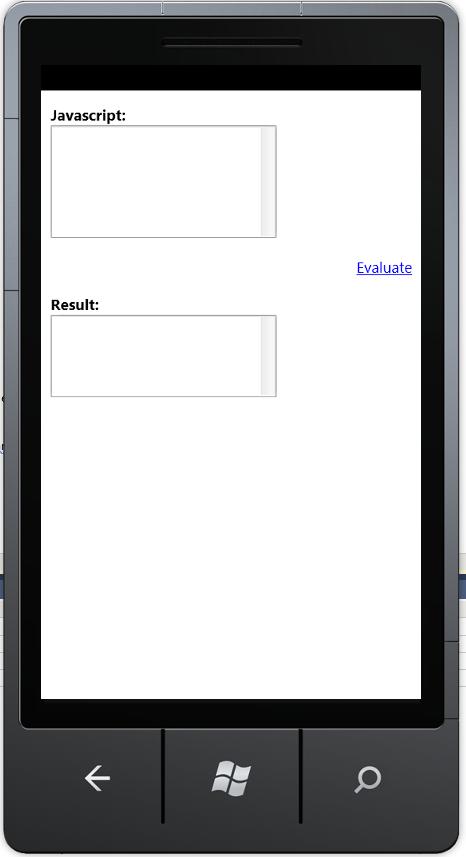 Not exactly phonegap… but an easy way to create WP7 (Windows Phone 7) apps without any .NET / XAML / Silverlight knowledge.
Basically, I created a XAML front end as follows:
<phone:PhoneApplicationPage x:Class=”WebBrowserControl.MainPage” xmlns=”http://schemas.microsoft.com/winfx/2006/xaml/presentation” xmlns:x=”http://schemas.microsoft.com/winfx/2006/xaml” xmlns:phone=”clr-namespace:Microsoft.Phone.Controls;assembly=Microsoft.Phone” xmlns:shell=”clr-namespace:Microsoft.Phone.Shell;assembly=Microsoft.Phone” xmlns:d=”http://schemas.microsoft.com/expression/blend/2008″ xmlns:mc=”http://schemas.openxmlformats.org/markup-compatibility/2006″ mc:Ignorable=”d” d:DesignWidth=”480″ d:DesignHeight=”768″ FontFamily=”{StaticResource PhoneFontFamilyNormal}” FontSize=”{StaticResource PhoneFontSizeNormal}” Foreground=”{StaticResource PhoneForegroundBrush}” SupportedOrientations=”Portrait” Orientation=”Portrait” shell:SystemTray.IsVisible=”True”> <phone:WebBrowser x:Name=”Browser1″ IsScriptEnabled=”True” Loaded=”Browser1_Loaded” > </phone:WebBrowser> </phone:PhoneApplicationPage>
Then, the MainPage.Xaml.cs file contains:
using System;using System.Collections.Generic;using System.IO;using System.Linq;using System.Net;using System.Reflection;using System.Windows;using System.Windows.Controls;using System.Windows.Documents;using System.Windows.Input;using System.Windows.Media;using System.Windows.Media.Animation;using System.Windows.Shapes;using Microsoft.Phone.Controls;
namespace WebBrowserControl{ public partial class MainPage : PhoneApplicationPage { // Constructor public MainPage() { InitializeComponent(); }
private void Browser1_Loaded(object sender, RoutedEventArgs e) { var _assembly = Assembly.GetExecutingAssembly(); var _textStreamReader = new StreamReader(_assembly.GetManifestResourceStream(“WebBrowserControl.Index.html”)); var strHtml = _textStreamReader.ReadToEnd(); Browser1.NavigateToString(strHtml); }
}}
Then Index.Html contains the following:
<!DOCTYPE html PUBLIC “-//W3C//DTD XHTML 1.0 Transitional//EN””http://www.w3.org/TR/xhtml1/DTD/xhtml1-transitional.dtd”><html xmlns=”http://www.w3.org/1999/xhtml”> <head> <title>Javascript Evalulator</title> <meta http-equiv=”Content-Type” content=”text/html; charset=UTF-8″ /> <meta name=”viewport” content=”width=400; user-scalable=no”; </head> <body sytle=”font-family: Arial, Helvetica, sans-serif;”> <b>Javascript:</b><br> <textarea id=”taJS” rows=”7″ cols=”27″></textarea> <p align=”right”> <a href=”javascript:evaluate();”>Evaluate</a> </p> <b>Result:</b><br> <textarea id=”taResult” rows=”5″ cols=”27″></textarea> <script language=”javascript”> function evaluate() { var JS = document.getElementById(“taJS”); var Result = document.getElementById(“taResult”); Result.value = eval(JS.value); } </script> </body></html>
In order to get a 2/way communication between the WebBrowserControl / Javascript and C#, then The ScriptNotify Event could be used, along with InvokeScript.
Pity the emulator was too slow to see this working properly…
Convert between actual Hard drive sizes and logical sizes
 Hard drive manufacturers quote every 1,000 bytes as 1 Kb, whereas a computer will
call 1,024 bytes as 1 Kb. On big hard drives, this does add up, giving the impression that you
buy 1 Tb hard drive, and it appears as 921 GB.
There is FAT32 overhead also, but this is the main reason for the discrepancy.
To calculate the physical (manufacturer’s) size from the the logical (Computers) size,
multiply it by 1.073741824 – and add a bit to round it up.
 Network Programming in .NET